

Best Thermostat for Heat Pump: Eight Smart Picks That Actually Understand Your System
Heat pumps are not furnaces with a different name. They need a thermostat that speaks their language, manages auxiliary heat sensibly, and keeps your bills from creeping up. Here is how to choose well.
Short version: if you want the most complete heat pump experience, the ecobee Smart Thermostat Premium is hard to beat. If you want a clean learning thermostat with excellent heat pump logic, the Google Nest Learning Thermostat (4th Gen) is the one. If you want dependable and affordable, look at the Emerson Sensi ST55 or the Honeywell Home T9. The rest of this guide explains why, and how to match each model to your own system.
Why a Heat Pump Needs a Different Thermostat
Most people shop for a thermostat the way they shop for a toaster: look at the screen, check the app rating, pick one. That approach works fine for a gas furnace and a basic air conditioner. It can quietly cost you money with a heat pump.
A heat pump does not burn fuel to make heat. It moves heat from one place to another using a refrigerant loop, a compressor, and a component called a reversing valve. In summer it pulls heat out of your home and dumps it outside, just like an air conditioner. In winter, the valve flips and the whole process runs backward, pulling warmth from outdoor air and delivering it indoors. That reversal is the single biggest reason heat pump thermostats are different. A thermostat has to tell the system which direction to run, and it has to do so using a wire that behaves differently from anything in a furnace system.
The second reason is backup heat. Most air-source heat pumps pair with electric resistance strips, a gas furnace, or another auxiliary source that kicks in when the outdoor temperature drops or the house falls too far behind the setpoint. Resistance heat is expensive to run. A thermostat that calls for it too eagerly can turn a modest utility bill into a shocking one. A thermostat that is too shy about it can leave you cold on the coldest mornings. The best models give you control over exactly when auxiliary heat is allowed to engage.
The third reason is patience. Heat pumps are happiest when they run longer, gentler cycles. A traditional thermostat that swings the setpoint by several degrees all at once, especially in the morning when a schedule says to jump from a sleeping temperature to a daytime temperature, can trigger backup heat to catch up quickly. Smart thermostats designed for heat pumps use gradual recovery, staged control, and sometimes outdoor-temperature awareness to avoid that trap.
If you are brand new to the topic, it helps to understand the basic job of the device first. Our primer on how thermostats work and the explainer on what a thermostat actually is cover the foundations, and the guide on how heating and cooling thermostats differ adds useful context. Once those basics click, the heat pump differences make a lot more sense.
The cost of choosing wrong
Choosing a thermostat that is not truly heat pump compatible rarely causes a dramatic failure. More often it produces slow, annoying problems: the system runs in cooling mode when you wanted heat, the auxiliary strips fire all the time, the house never quite reaches the setpoint, or the thermostat refuses to power on without a wiring change you did not expect. Spending a little time on compatibility now saves a lot of frustration later.
Quick Picks at a Glance
Before we go deep, here is the short list. Each of these eight thermostats supports heat pump systems in typical setups, but every home is different, so always run the manufacturer’s compatibility checker against your own wiring before you buy. Think of this table as a map, and the sections that follow as the detailed directions.
| Thermostat | Best For | Standout Feature | Watch Out For |
|---|---|---|---|
| ecobee Smart Thermostat Premium | Best overall | Built-in voice assistant, air quality monitoring, sensor support | Highest price among the ecobee models |
| ecobee Smart Thermostat Enhanced | Best value ecobee | Same core comfort and heat pump logic for less | Fewer premium extras |
| Google Nest Learning Thermostat (4th Gen) | Best learning thermostat | Heat pump balance and automatic scheduling | Premium price tag |
| Google Nest Thermostat | Best simple Nest | Clean design and easy setup | Fewer advanced controls |
| Honeywell Home T9 WiFi Smart Thermostat | Best for room sensors | Smart room sensors and strong zoning feel | Setup is more involved |
| Honeywell Home RTH9585WF | Best traditional touchscreen | Familiar color display and straightforward schedule | Older style, fewer smart extras |
| Emerson Sensi Smart Thermostat ST55 | Best budget-friendly pick | Easy install and dependable app | Basic feature set |
| Meross Smart Thermostat (Matter) | Best for smart home ecosystems | Matter support across platforms | Newer brand, check system specifics |
What to Look For Before You Buy
A long spec sheet can make every thermostat look the same. For a heat pump, a short list of features does most of the work. Here is what to check, in rough order of importance.
1. Explicit heat pump support
The product page or manual should clearly say it supports heat pumps and mention the O/B terminal, the connection that controls the reversing valve. If a listing only talks about “conventional” systems or does not mention heat pumps at all, move on.
2. Stage support
Heat pumps come in single-stage, two-stage, and variable-speed versions, and many include one or more stages of auxiliary heat. Your thermostat needs enough terminals and enough software logic to control all the stages your system has. A model that supports only one heating stage may work, but it will not be able to use a two-stage compressor the way it was designed to run.
3. Auxiliary and emergency heat control
Look for settings that let you set an outdoor-temperature threshold for backup heat, or a delay timer before auxiliary heat is allowed. Also look for a clearly labeled emergency heat mode, which should only be used when the compressor itself has failed. Understanding these controls pays off, and we cover them in detail further down.
4. C-wire or power strategy
Most smart thermostats need continuous low-voltage power from a common wire, usually called the C-wire. Heat pump systems often have an extra wire pair or conductor already in the bundle, but not always. Some thermostats ship with a power extender kit or adapter. Others can borrow power from other wires, which can create trouble with certain systems. Our comparison of Nest versus Sensi power stealing and battery backup explains the tradeoffs well, and what a battery-powered smart thermostat is covers the alternative.
5. Remote sensors
Heat pumps deliver gentler, more even heat. A thermostat that can average temperatures from several rooms makes that evenness easier to measure and use. Read more about how remote sensors work and how ecobee and Honeywell remote sensors compare.
6. Ecosystem and connectivity
Think about whether you live in an Apple, Google, or Amazon household, or a mix. Matter support, HomeKit support, and voice assistant compatibility vary a lot. Our guide to how smart thermostat connectivity works is a good reference, and the list of best Apple HomeKit thermostats helps if you are firmly in that camp.
7. Energy reporting and utility programs
Good reporting helps you see how often your auxiliary heat runs. Many utilities also offer rebates for qualifying smart thermostats, so check the current smart thermostat rebates guide before you check out. For a broader view of what to compare, see our rundown of key features to compare when buying a smart thermostat.
Match the thermostat to your type of heat pump
“Heat pump” covers several different kinds of equipment, and the right thermostat depends on which one you own. Knowing your type narrows the field quickly.
Single-stage heat pumps run the compressor at one speed. They are the simplest to control, and nearly every thermostat on our list handles them well. The main thing to watch is how auxiliary heat is staged, since a single-stage unit often leans on backup heat sooner on cold days.
Two-stage heat pumps can run at a lower capacity most of the time and step up when demand rises. They need a thermostat with two compressor outputs (Y1 and Y2) and software that knows how to use them. A model that only understands one stage may leave efficiency on the table, because the second stage would never be called intelligently.
Variable-speed or inverter heat pumps adjust output continuously. Some of these systems use proprietary communicating controls from the manufacturer, which means a standard smart thermostat may only be able to send simple on and off calls. Others accept ordinary low-voltage thermostats just fine. If you own a premium variable-speed unit, check the installation manual before assuming any third-party thermostat will unlock its full capability.
Dual-fuel systems pair a heat pump with a gas or propane furnace. In these homes the thermostat decides, based on outdoor temperature or cost, whether to use the heat pump or the furnace. That decision logic is valuable, and it is one reason more configurable thermostats tend to be popular with dual-fuel owners.
Ductless mini-splits are a special case. Most come with their own remote or wall controller and are not wired to a conventional low-voltage thermostat at all. If that describes your home, a standard thermostat from this list is not the answer, and you should look at accessories made specifically for your mini-split brand instead.
Heat Pump Wiring Explained
Wiring is where most buyer confusion lives, but it is more approachable than it looks. A thermostat is really just a smart switch. It connects a power wire to different function wires to ask the equipment for heating, cooling, or fan. Heat pumps just add a few terminals with specific jobs.
| Terminal | Typical Wire Job | What It Means for a Heat Pump |
|---|---|---|
R / Rc / Rh | 24V power from the transformer | The power feed the thermostat uses to send signals |
C | Common wire | Continuous power return that keeps Wi-Fi thermostats running |
Y1 / Y2 | Compressor stage 1 and 2 | Calls the heat pump compressor for heating or cooling |
O/B | Reversing valve | Tells the system whether to heat or cool |
G | Fan | Controls the indoor blower |
W / W1 / Aux | Auxiliary heat | Calls backup heat strips or a furnace |
E | Emergency heat | Runs backup heat only, bypassing the compressor |
O versus B: a detail that matters
The reversing valve wire is labeled either O or B depending on the manufacturer. Most brands energize the valve in cooling mode (an O wire), while some energize it in heating mode (a B wire). Good smart thermostats let you choose the correct setting during setup. Getting it backward means your heat pump heats when you ask for cooling, a mistake that is easy to spot but frustrating to fix if you did not expect it. When you remove your old thermostat, take a clear photo of the wiring and note which letter appears on the terminal.
Why the C-wire gets so much attention
A smart thermostat has a screen, a radio, and sensors, all of which need steady power. Old mechanical thermostats needed none. The C-wire supplies the missing return path to the transformer. If your wall has an unused wire tucked behind the plate, you may be able to connect it as the C-wire at both ends, the thermostat and the air handler control board. If not, many brands include an adapter that creates a common connection using existing wires. Our thermostat wiring guide walks through all of this, and the article on C-wire adapter differences between the Amazon thermostat and ecobee Premium is a good case study.
Low voltage only
Everything on this list is a low-voltage thermostat. If your wires are thick and your home has electric baseboard heaters or similar, you may have a line-voltage system instead, which needs a different type of thermostat entirely. A simple check is described in our line voltage versus low voltage wiring test. Also review whether your thermostat is compatible with your furnace if you run a dual-fuel setup.
ecobee Premium and Enhanced: The Heat Pump Favorites
ecobee has built a reputation for heat pump friendliness, and it earns that reputation through settings. During setup, the thermostat asks detailed questions about your equipment, then gives you fine control over compressor minimums, auxiliary heat thresholds, and how the system behaves at different outdoor temperatures. If you like to tune things, this is your playground. If you prefer to leave it alone, the defaults are reasonable.

ecobee Smart Thermostat Premium
The Premium is the flagship, and it earns the title. It combines the platform’s strongest heat pump controls with a built-in voice assistant, air quality monitoring, and support for remote room sensors. For homes where comfort varies from room to room, being able to average or prioritize sensors is a real advantage, because heat pumps deliver gentler air that benefits from accurate, whole-house measurement.
Pros
- Deep heat pump and auxiliary heat settings
- Works with sensors for even comfort
- Built-in voice and air quality features
- Broad smart home compatibility
Cons
- Higher price than the Enhanced
- Many settings can overwhelm beginners
- Some homes need the included power adapter

ecobee Smart Thermostat Enhanced
The Enhanced keeps the part of the ecobee experience that matters most for a heat pump: the equipment logic, the scheduling, and the app. It skips some of the premium extras. If you do not need a built-in voice assistant or the air quality sensing, the Enhanced is the smarter spend, and the money you save can go toward extra sensors for the rooms that matter.
Pros
- Same trusted heat pump platform
- Lower cost of entry
- Excellent app and energy reports
- Sensor compatible
Cons
- Fewer built-in extras
- Same learning curve as the Premium
- Screen and speaker are less feature-rich
Which ecobee should you pick?
If you want one thermostat to cover comfort, voice control, and air quality, pick the Premium. If your priority is heat pump efficiency and good scheduling at a fair price, the Enhanced is the better value. Our ecobee Premium versus Enhanced comparison breaks down the differences line by line, and the full ecobee Smart Thermostat Premium review adds long-term impressions. If sensor technology interests you, read about the ecobee Premium radar sensor too.
One more thing worth knowing: ecobee’s energy reports show you how many hours your compressor and auxiliary heat ran. For a heat pump owner, that is gold. If you see auxiliary heat running for long stretches on moderately cold days, you can adjust the thresholds and watch the effect over the following weeks.
Google Nest Learning Thermostat and Nest Thermostat
Nest takes a different philosophy. Instead of handing you hundreds of settings, it tries to learn your routine and make smart decisions for you. For heat pump owners, the standout idea is a feature that balances comfort against cost when deciding how aggressively to use backup heat. That means less fiddling and often a good result, especially if you prefer to set it and forget it.

Google Nest Learning Thermostat (4th Gen)
The fourth generation brings a refined display, improved sensors, and the ability to add optional room sensors. It builds an automatic schedule from how you adjust the dial, then fine-tunes. With a heat pump, its balance-focused approach to auxiliary heat is the major draw: you can lean toward savings or comfort, and the thermostat adjusts how readily it brings in backup heat.
Pros
- Automatic scheduling that gets smarter over time
- Heat pump balance style controls
- Beautiful display and easy interface
- Optional temperature sensors
Cons
- Premium price
- Fewer manual tuning options than ecobee
- Learning takes a couple of weeks

Google Nest Thermostat
This is the streamlined Nest. It trades the learning dial and large display for a minimalist design and a friendlier price. It still supports heat pumps in many systems, still offers schedules and remote control through the app, and still looks good on the wall. If you want the Nest ecosystem without the premium cost, this is the starting point.
Pros
- Lower price
- Clean, simple interface
- Easy installation for many homes
- Good app experience
Cons
- Fewer advanced controls
- Does not learn like the Learning model
- Less suited to complex multi-stage systems
Nest versus ecobee for heat pumps
If you enjoy control, ecobee gives you more dials. If you enjoy simplicity, Nest gives you fewer decisions to make and a strong default behavior. Both are excellent. Read our Nest Learning Thermostat review and the dedicated fourth generation review, and compare scheduling approaches in Nest auto-schedule versus ecobee smart sensors. If you are weighing Nest against a traditional brand, see Nest versus Honeywell. For the idea behind automated schedules, our explainer on adaptive learning in thermostats is a helpful read.
Honeywell Home T9 and RTH9585WF
Honeywell is the classic name in thermostats, and its modern Wi-Fi models carry that heritage. They tend to feel familiar, work with a wide range of equipment, and appeal to people who like the idea of a thermostat that behaves predictably. For heat pumps, the T9 is the more capable option, while the RTH9585WF is the more traditional one.

Honeywell Home T9 WiFi Smart Thermostat
The T9 shines when comfort varies between rooms. It works with smart room sensors that let you choose which rooms matter at which times of day, and its touchscreen is crisp and easy to read. It supports a wide range of heating and cooling configurations, including heat pumps with auxiliary heat, though verifying your specific stage count is always smart.
Pros
- Smart room sensor support with priority options
- Clear, responsive touchscreen
- Familiar Honeywell reliability
- Works across many system types
Cons
- Setup can take longer
- Sensors are an additional purchase in many bundles
- App is functional rather than flashy

Honeywell Home RTH9585WF Wi-Fi Smart Color Thermostat
This is the thermostat for people who want an upgrade without a learning curve. A color touchscreen, Wi-Fi control, and a straightforward schedule make it easy for everyone in the house to use. It is less modern than the T9 in terms of sensors and ecosystem features, but for a heat pump that just needs a dependable controller, it gets the job done.
Pros
- Simple, intuitive interface
- Color display with clear icons
- Remote access through the app
- Comfortable for non-technical users
Cons
- Older design
- Fewer smart home integrations
- No advanced sensor features
Related Honeywell reading
If the T9 is on your shortlist, our Honeywell Home T9 review covers everyday use, and the T9 versus T10 Pro comparison helps you decide whether the upgrade is worth it. The detailed T9 versus T10 Pro wiring and indoor air quality breakdown is useful for complicated installs. Brand loyalty questions often come up, so see Honeywell versus Emerson and check how long Honeywell thermostats last for expected lifespan.
Emerson Sensi Smart Thermostat ST55: The Dependable Value Pick
Not everyone wants a thermostat with an air quality monitor and a voice assistant. Plenty of people want a thermostat that installs cleanly, connects to Wi-Fi without drama, and lets them control the temperature from their phone. That is exactly where the Sensi shines.

Emerson Sensi Smart Thermostat ST55
The ST55 is a simple, well-regarded thermostat with a clean app and a reputation for straightforward installation. It supports heat pumps and offers scheduling, geofencing, and compatibility with major voice assistants. In many homes it is the most approachable way to upgrade a heat pump to a smart thermostat without paying for features you may not use.
Pros
- Easy installation and setup
- Reliable app and Wi-Fi connection
- Affordable for a smart thermostat
- Works with common voice assistants
Cons
- Fewer advanced heat pump controls
- No sensor ecosystem like ecobee
- Basic reporting
Who should choose the Sensi?
Choose it if your heat pump system is fairly standard, your budget matters, and you value an easy install over detailed tuning. Landlords, first-time smart thermostat buyers, and anyone who just wants reliable remote control will likely be happy. For a deeper look, read our Emerson Sensi Touch review, compare it directly in Sensi versus ecobee, and keep our guide on how to reset your Sensi thermostat handy in case you need a fresh start. If something ever seems off, why your Sensi thermostat is not working covers the common causes.
If your budget is tighter still, our best budget thermostats under fifty dollars list might help, though keep in mind that very low-cost models often lack the heat pump logic discussed in this guide.
Meross Smart Thermostat (Matter): The Ecosystem Flexer
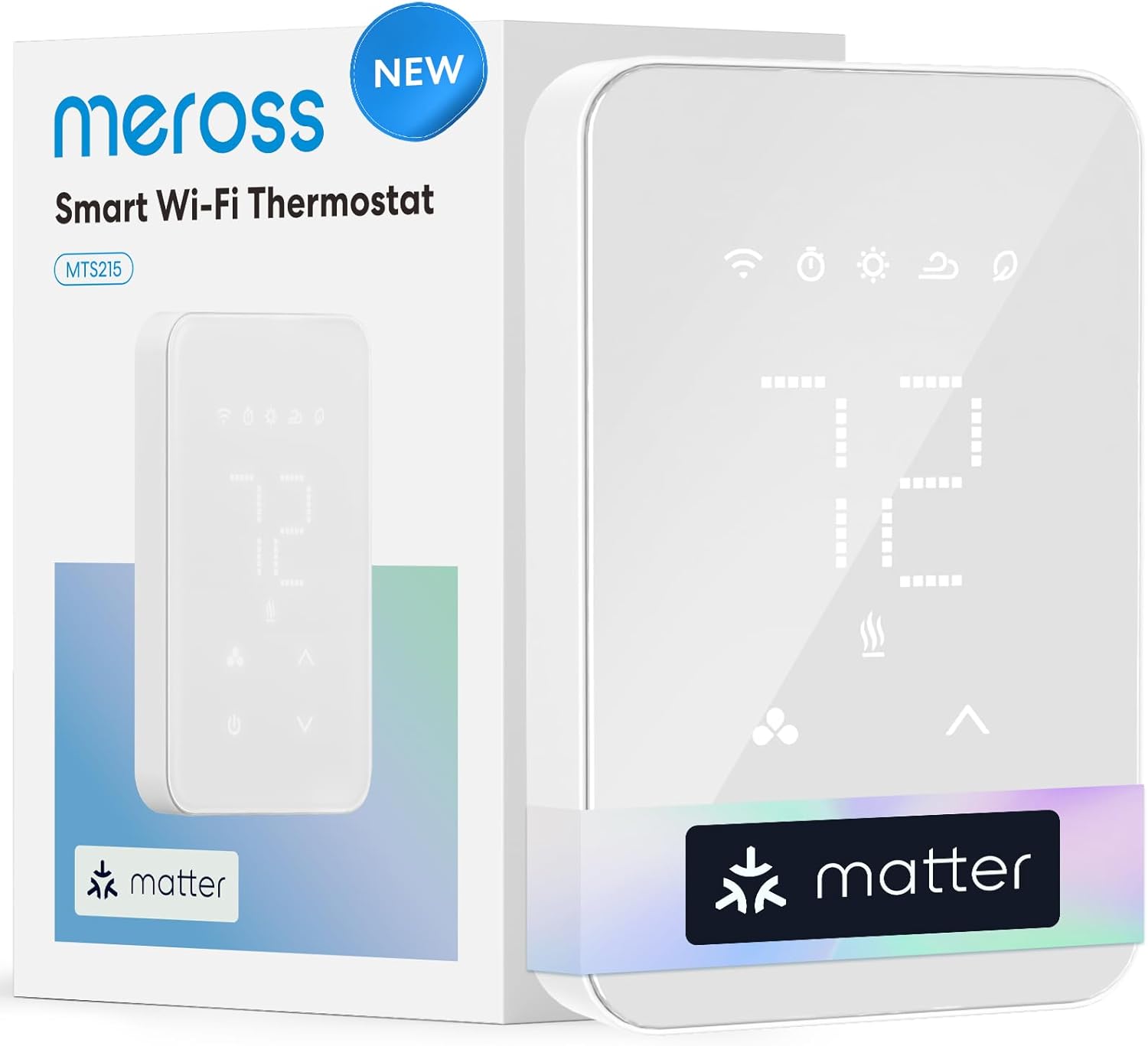
Matter is a smart home standard designed to make devices from different brands work together. A Matter thermostat can appear in multiple smart home platforms at once, which is attractive for households that mix Apple, Google, and Amazon devices. Meross has leaned into this approach with a thermostat that targets people who care about ecosystem flexibility.
Meross Smart Thermostat (Matter)
The Meross thermostat offers broad compatibility with major smart home platforms and a clean interface. It supports a range of low-voltage heating and cooling systems, including heat pumps in many configurations. Because it is from a newer thermostat brand, it is especially important to verify wiring and stage support against the listing before purchase.
Pros
- Matter support for multi-platform homes
- Competitive pricing
- Modern, uncluttered design
- Good for automation fans
Cons
- Less long-term track record
- Fewer advanced heat pump settings
- Confirm multi-stage support first
Is Matter worth caring about?
If you already have a Matter hub and a handful of smart devices, absolutely. Matter lets your thermostat take part in automations, such as lowering the setpoint when everyone leaves, without being locked into one brand’s app. If your home is not very automated, Matter is a nice-to-have rather than a deciding factor. Our best Apple HomeKit thermostats guide and the article on adding a Nest thermostat to Apple Home are useful reading for ecosystem planning, and whether Wi-Fi thermostats are worth it offers a balanced view.
Head-to-Head: Which One Fits Your Home?
Every home and every heat pump is a little different, so the “best” thermostat depends on your situation. Use the following tables and scenarios to narrow your pick.
| Feature | ecobee Premium | ecobee Enhanced | Nest Learning 4th Gen | Nest Thermostat |
|---|---|---|---|---|
| Learning schedule | Manual plus smart features | Manual plus smart features | Yes, automatic | Basic scheduling |
| Remote sensors | Yes | Yes | Yes, optional | Limited |
| Heat pump tuning depth | Very high | Very high | Medium to high | Medium |
| Voice assistant built in | Yes | No | No | No |
| Ease of use | Moderate | Moderate | Very easy | Very easy |
| Feature | Honeywell T9 | Honeywell RTH9585WF | Sensi ST55 | Meross Matter |
|---|---|---|---|---|
| Learning schedule | Programmable plus smart response | Programmable | Programmable | Programmable |
| Remote sensors | Yes | No | No | Varies |
| Heat pump tuning depth | High | Medium | Medium | Basic to medium |
| Matter or HomeKit | Check listing | No | Check listing | Yes (Matter) |
| Ease of use | Moderate | Easy | Easy | Easy |
Scenario guide
- Large or multi-story home with hot and cold rooms: go with an ecobee model or the Honeywell T9, both built around remote sensors. See also multi-zone sensor comparisons.
- Set-it-and-forget-it households: the Nest Learning Thermostat is hard to beat, because it builds the schedule itself.
- Rental properties: pick the Sensi or Nest Thermostat for simplicity, then read our best smart thermostats for rental properties.
- Tech enthusiasts with many smart devices: consider the ecobee Premium or the Meross Matter.
- Budget-first buyers: start with the Sensi ST55, then see whether extras are worth paying for.
- Prefers a familiar touchscreen: the Honeywell RTH9585WF is the comfortable option.
Brand-versus-brand reading
If you are still torn, these comparisons go deeper: Wyze versus ecobee, Google Nest versus Amazon Smart Thermostat, and our top picks for energy savings. For a more basic question, smart versus programmable thermostats explains when you can skip the smart features altogether.
Think about living with it every day
Spec tables tell you what a thermostat can do. They do not tell you how it feels to use at six in the morning when you are half asleep. A few everyday considerations are worth weighing before you decide.
Display and controls. The Nest Learning Thermostat has a bright, simple dial that guests understand instantly. The Honeywell RTH9585WF has a conventional touchscreen that anyone can operate without instruction. The ecobee models pack more information onto the screen, which power users love and casual users sometimes find busy. Consider who else in your household will touch the thermostat.
App quality. Most of your interaction will happen in the phone app, so the quality of that app matters. ecobee and Nest both have polished apps with clear schedules and history, Sensi keeps things refreshingly simple, and Honeywell’s app is dependable if less stylish. If you travel often or manage a second property, remote access and reliable notifications matter more than screen design.
Support and updates. A thermostat is a long-term device. Established brands tend to provide longer software support, clearer documentation, and easier customer service. Newer entrants can be great value and often have strong hardware, but it is sensible to look at how long the company has supported its products and how it handles firmware updates.
Privacy and data. Smart thermostats collect usage and sometimes presence data. Read the privacy settings, decide what you are comfortable sharing, and review which accounts are linked. A thermostat that works well with your existing smart home setup, and respects your privacy preferences, will be easier to live with for years. If safety matters to you, our article on how a smart thermostat improves home safety shows the other side of the coin.
Auxiliary Heat, Lockouts and Smart Settings
Buying the right thermostat is only half the story. How you configure it decides whether your heat pump runs efficiently. A handful of settings deserve attention.
Auxiliary heat versus emergency heat
These two terms are often confused. Auxiliary heat is backup heat that runs alongside your compressor when the system needs help catching up, usually on very cold days or after a big temperature jump. Emergency heat is a manual mode that turns off the compressor entirely and runs only backup heat. You should use emergency heat only if the outdoor unit has a problem, such as ice that will not clear or a failed compressor. Leaving a system in emergency heat all winter is one of the most expensive mistakes a heat pump owner can make.
Compressor and auxiliary lockouts
Many thermostats let you set an outdoor temperature below which the compressor will not run, and a temperature above which auxiliary heat will not run. The first protects the compressor in extreme cold, especially on older equipment. The second prevents costly resistance heat from firing on mild days. The right numbers depend on your equipment and climate, so check your heat pump’s documentation or ask an installer before changing defaults.
The balance point idea
Every heat pump has an outdoor temperature at which it can no longer meet the house’s heating demand on its own. That is the balance point. Below it, you need backup heat. Above it, the heat pump can handle things solo. Good thermostats let you reflect that reality in their settings, so backup heat is used when truly needed rather than as a convenience. Modern inverter technology in HVAC pushes that balance point lower, meaning variable-speed systems can keep working efficiently in colder weather.
Setback strategy
With a gas furnace, large overnight setbacks often save money. With a heat pump, large setbacks can backfire because the morning recovery may trigger auxiliary heat. A modest setback, or a gradual ramp that begins early, usually works better. Many smart thermostats offer smart recovery to start warming early so the house hits your setpoint on time without leaning on strips. For ideas, read our recommended thermostat settings for winter, the ideal room temperature for sleeping, and what temperature to set when you are on vacation in winter.
Smart features that help heat pumps
- Geofencing: automatically adjusts when you leave and return. See what a geofencing thermostat is.
- Home and away modes: simple presence-based savings, explained in the home and away feature guide.
- Remote sensors: measure comfort where you actually live.
- Energy reports: reveal auxiliary heat runtime so you can adjust.
Curious how much a smart thermostat can really save? Read do smart thermostats really save money and how a smart thermostat saves money for realistic expectations. For other ways to trim your bill, our collection of HVAC energy efficiency tips adds practical ideas.
How climate changes the settings you should choose
A thermostat that is perfect in a mild coastal town can be wrong in a snowy mountain community. In mild climates, where winter lows rarely drop far below freezing, a heat pump can carry nearly the entire load. In that case you want auxiliary heat locked out for most of the season so it only appears when something unusual happens, such as a defrost cycle that leaves the house a few degrees behind. In colder regions, the heat pump will run hard for long stretches and will need backup help more often, so a more permissive auxiliary setting is reasonable, as long as it does not fire on mild afternoons.
Defrost cycles deserve a mention. In cold, damp weather, frost builds on the outdoor coil, and the system periodically reverses to melt it. During those few minutes the indoor air can feel cooler, and many systems briefly turn on auxiliary heat to compensate. This is normal. A well-designed thermostat will tolerate it without overreacting, and you should not read it as a fault unless it happens constantly or the outdoor unit stays buried in ice.
Humidity matters too. Heat pumps in cooling mode remove moisture, but in heating mode they can leave a home feeling dry or, in some climates, clammy. If comfort never quite feels right despite a perfect temperature reading, consider reading about the whole-house dehumidifier and the best whole-house humidifiers. Some thermostats, including models with built-in humidity sensing, can help coordinate those accessories.
Installation, Setup and Common Mistakes
Most smart thermostat installs take under an hour, and many homeowners handle them without trouble. A little preparation makes it go smoothly.
Before you begin
- Turn off the breaker for your HVAC system and confirm the old thermostat’s screen goes blank.
- Photograph the wiring before disconnecting anything, and label each wire with the terminal letter it was attached to.
- Check for a C-wire. Look for an extra wire tucked behind the plate or confirm it at the air handler control board.
- Run the manufacturer’s compatibility checker using your wire labels and system type.
During setup
Mount the new base plate level, connect the labeled wires, and snap on the display. Then follow the setup prompts carefully. When it asks about your equipment, choose heat pump, select O or B based on your system, and enter the number of compressor and auxiliary stages. If you are unsure of your system type, our explainers on a split HVAC system and a packaged HVAC unit show how each is built, which helps you identify yours.
Mistakes to avoid
- Choosing the wrong O/B setting. The system will heat when it should cool, or the reverse.
- Ignoring auxiliary heat settings. Defaults are not always ideal for your climate.
- Using emergency heat as a regular mode. It bypasses your efficient compressor.
- Making large temperature jumps. They can trigger backup heat.
- Skipping firmware updates. Updates often refine heat pump behavior.
- Forgetting the filter. A clogged filter forces any system to work harder.
When something seems wrong
If the house will not warm up, start with a few basic checks. Our guides on a thermostat not reaching the set temperature, a thermostat that says heat is on but there is no heat, and why your house feels cold even with the heating on walk through the likely causes. If your thermostat flips unexpectedly, see why a thermostat keeps switching from heat to cool. If you suspect the device itself, read how to tell if your thermostat is bad, and learn how to reset a thermostat when a fresh start is needed.
Finally, if you are considering bigger changes, such as replacing the whole system, our HVAC system replacement cost guide and the review of whether the Bosch heat pump is good are worth a look. Owners of that brand can also see our best thermostats for Bosch heat pumps.
Keep the whole system healthy
A thermostat can only control what the equipment is able to deliver. A few habits keep a heat pump delivering for years. Replace or clean the air filter on the schedule your manufacturer recommends, because restricted airflow lowers efficiency and can cause the system to run longer than needed. Keep the outdoor unit clear of leaves, snow drifts, and debris, leaving a generous gap around it for airflow. Have a professional inspect the system once a year, ideally before the heating season, to check refrigerant levels, electrical connections, and the defrost controls.
It is also worth watching how your system behaves after a new thermostat goes in. For the first couple of weeks, check the energy report or runtime history every few days. If auxiliary heat hours look high compared with compressor hours, tighten the auxiliary threshold or soften the schedule. If the house struggles to stay warm, loosen it. Treat the first month as tuning time rather than assuming the factory defaults are final.
Think about cost, rebates and long-term value
A thermostat is one of the least expensive upgrades you can make to an HVAC system, yet it influences every hour of operation. Prices vary a lot across our eight picks, from budget-friendly models to premium learning thermostats, and the more expensive options do not automatically save more. A mid-priced thermostat that you actually configure well often beats an expensive one left on default settings. Before buying, check whether your electric utility offers a rebate or enrollment bonus for smart thermostats, since some programs also reward you for allowing small adjustments during peak demand events. Our smart thermostat rebates guide and savings calculator is a good place to start.
Also consider the bigger picture. If your heat pump is old, struggles to keep up, or has been repaired repeatedly, a new thermostat will not fix the root problem. In that situation it makes sense to look at the cost of replacement in the context of efficiency gains and available incentives, and to discuss options with a qualified contractor.
Frequently Asked Questions
What is the best thermostat for a heat pump overall?
For most homes, the ecobee Smart Thermostat Premium offers the most complete combination of heat pump control, sensors, and smart features. The Google Nest Learning Thermostat (4th Gen) is a close second for people who want automatic scheduling, and the Emerson Sensi ST55 is a strong choice when budget and simplicity matter most.
Can I use any smart thermostat with a heat pump?
No. The thermostat must support heat pumps and include the logic and terminals to control the reversing valve and any auxiliary heat stages your system has. Always check the manufacturer’s compatibility tool using your actual wiring before buying.
What does the O/B terminal do on a heat pump thermostat?
It controls the reversing valve, which switches the system between heating and cooling. Some brands energize it for cooling (O) and others for heating (B). Your thermostat will ask which one you have during setup, and choosing correctly is essential.
Do I need a C-wire for a smart thermostat on a heat pump?
Usually yes, or at least a reliable alternative. A C-wire provides steady power for the screen and Wi-Fi radio. If you do not have one, many brands include an adapter or power extender, and some thermostats can run on batteries, though a true C-wire is generally the most dependable option.
What is the difference between auxiliary heat and emergency heat?
Auxiliary heat is backup heat that runs alongside the heat pump when extra help is needed. Emergency heat is a manual mode that shuts off the compressor and uses only the backup source. Emergency heat is meant for equipment problems and is much more expensive to run for long periods.
Why does my heat pump keep running auxiliary heat?
Common reasons include big setpoint changes, very cold outdoor temperatures, a dirty filter, low refrigerant, or thermostat settings that allow backup heat too early. Review your auxiliary heat threshold and energy report, and consider using gentler schedule changes to reduce unnecessary strip heat.
Will a smart thermostat save money with a heat pump?
It can, mainly by improving scheduling, reducing unnecessary backup heat, and giving you better visibility into runtime. Savings depend on your climate, equipment, habits, and settings, so treat any advertised percentage as a rough estimate rather than a guarantee.
Should I use big temperature setbacks with a heat pump?
Usually not. Large setbacks can force the system to recover quickly in the morning, which may trigger auxiliary heat. Smaller setbacks or gradual recovery tend to be more efficient. Many smart thermostats offer a smart recovery feature that starts warming earlier to avoid this.
Are remote sensors worth it with a heat pump?
Often yes. Heat pumps deliver steady, gentle air, and sensors help you measure comfort in the rooms you use most, rather than relying on a single hallway reading. They are especially useful in multi-story homes and homes with uneven temperatures.
Is Matter support important in a thermostat?
It matters if you use several smart home platforms or plan to build automations across brands. Matter makes a device easier to share between ecosystems. If you use just one platform, a thermostat with strong native support there may be all you need.
Can I install a smart thermostat on a heat pump myself?
Many homeowners can, provided they turn off power, photograph the wiring, and follow the manufacturer’s guidance. If your system is complex, such as dual-fuel, multi-stage, or has unusual wiring, a professional installation is a smart investment.
How long do smart thermostats last?
Many last a decade or more, though Wi-Fi hardware and software support can change sooner than the physical device. Keep firmware updated, and choose a brand with a track record of supporting older models. Use our guides on thermostat lifespan and symptoms of failure to know when it is time to replace one.
Final Verdict: Choosing the Best Thermostat for Your Heat Pump
A heat pump is a wonderfully efficient way to heat and cool a home, but it deserves a thermostat that understands how it works. The best thermostat is the one that matches your equipment, your comfort preferences, and your tolerance for tinkering.
If you want the most capable, well-rounded option, the ecobee Smart Thermostat Premium is our top choice. If you like the idea of a thermostat that learns your routine and handles the details, the Google Nest Learning Thermostat (4th Gen) is wonderful. For value, the ecobee Enhanced, Emerson Sensi ST55, and Google Nest Thermostat each deliver a lot of comfort for the price. The Honeywell Home T9 is a great pick if room sensors are a priority, the Honeywell RTH9585WF suits people who like a classic interface, and the Meross Matter is a smart choice for multi-ecosystem homes.
Whichever you choose, take ten minutes to verify compatibility, label your wires, and review the auxiliary heat settings after installation. Those small steps make the difference between a thermostat that merely connects to Wi-Fi and one that genuinely helps your heat pump perform at its best.



 Home
 Info
 Compare
 Reviews
 Shop
Pingback: Best Temperature to Set Thermostat in Summer