
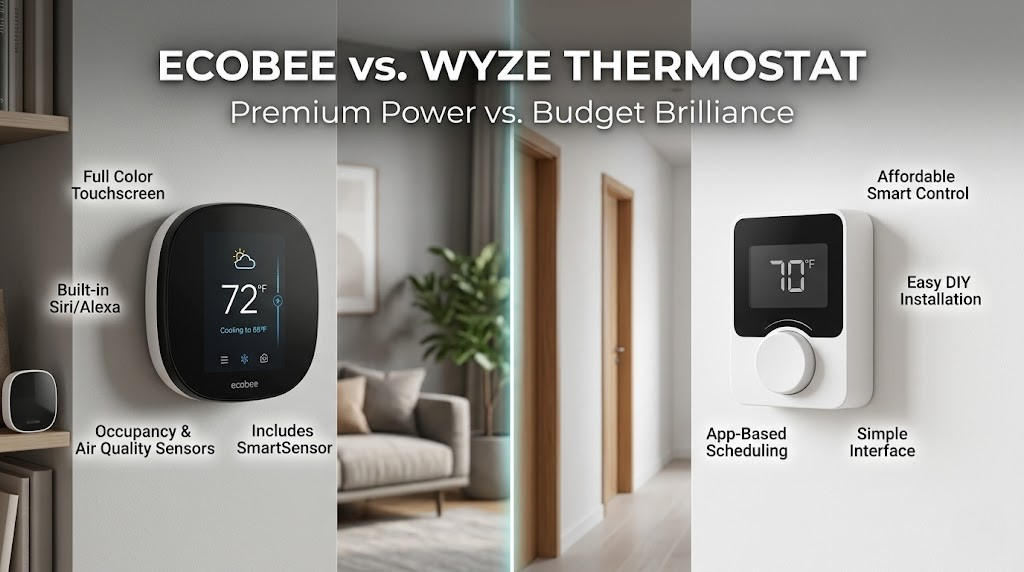
Ecobee vs. Wyze Thermostat: Premium Power vs. Budget Brilliance
In the world of smart thermostats, the conversation has often been dominated by high-end devices with premium price tags. But a new question is emerging for U.S. homeowners: do you really need to spend over $200 for smart climate control? This is the central theme of the Ecobee vs. Wyze matchup. It’s not just a comparison of two products; it’s a clash of philosophies.
On one side, you have Ecobee, the established leader known for its powerful, feature-rich thermostats that act as a command center for whole-home comfort. On the other, Wyze, the disruptive tech brand that has made a name for itself by delivering shockingly capable smart home devices at impossibly low prices. Is this a classic case of “you get what you pay for,” or is the Wyze Thermostat the smartest value in home climate today? Let’s find out.
Quick Verdict:
Choose the Ecobee Smart Thermostat if: Your home has uneven temperatures (hot/cold spots), you need Apple HomeKit support, or you’re a data-driven user who wants the absolute best features and control.
Choose the Wyze Thermostat if: You’re on a budget, you want the core benefits of a smart thermostat (app control, scheduling, voice commands), and your home’s temperature is relatively consistent.
Reviewed by Alex Riley, Smart Home Expert
Having tested and installed everything from ultra-premium smart home systems to the most accessible budget gadgets, I have a deep appreciation for both ends of the market. This review is based on hands-on, long-term testing of both the Ecobee Smart Thermostat Premium and the Wyze Thermostat in a real American home, focusing on real-world performance versus on-paper specs.
What This Guide Covers:
- At a Glance: Feature Breakdown
- HVAC System Compatibility: Heat Pumps, Multi-Stage & Dual Fuel
- Deep Dive: Ecobee
- Installation & Setup: How Hard Is DIY?
- Deep Dive: Wyze
- Connectivity, Reliability & Common Complaints
- Head-to-Head Battle
- Utility Rebates & Demand Response Programs
- Air Quality, Humidity & Comfort Sensing
- Data Privacy & Security
- Battery Backup & Power Outage Handling
- Warranty, Support & Long-Term Reliability
- Cost Savings Calculator: What’s the Real ROI?
- Sizing Guide: Which Homes Fit Which Thermostat
- Renter’s Guide: Smart Thermostats in Rental Properties
- Alternatives Worth a Look: Nest, Honeywell & Sensi
- Who Should Buy Which Thermostat?
- Frequently Asked Questions
- The Final Verdict
At a Glance: Ecobee vs. Wyze Feature Breakdown
This table highlights the stark differences in features and price point between the premium Ecobee and the value-focused Wyze.
| Feature | Ecobee Smart Thermostat Premium | Wyze Thermostat |
|---|---|---|
| Price Point | Premium (~$249) | Budget (~$79) VALUE WINNER |
| Remote Room Sensors | Yes (One SmartSensor included) | No |
| User Interface | Large color touchscreen | Simple dial with small LED display |
| Apple HomeKit Support | Yes | No |
| Built-in Voice Assistant | Yes (Alexa and Siri) | No |
| C-Wire Requirement | Required (PEK adapter included) | Required (C-wire adapter included) |
| Advanced Features | eco+, humidity sensor, detailed energy reports, Time of Use | Basic energy usage tracking, geofencing |
| Design and Build | Glass face, premium modern look | Minimalist plastic design |
HVAC System Compatibility: Heat Pumps, Multi-Stage & Dual Fuel
Before you buy either thermostat, the single most important question isn’t about touchscreens or app design — it’s whether the device can actually talk to your furnace, air conditioner, or heat pump. This is the part of the Ecobee vs. Wyze debate that gets skipped in most reviews, and it’s where buyers run into trouble after the box is already open.
Does the Ecobee Work With Heat Pumps?
Yes, and this is one of Ecobee’s genuine strengths. The Ecobee Smart Thermostat Premium supports single-stage, two-stage, and even three-stage heat pumps, including systems with auxiliary or emergency electric heat strips. During setup, the app walks you through identifying your heat pump wiring (O/B reversing valve orientation, auxiliary heat wiring, and so on) and configures compressor lockout temperatures automatically. Ecobee also supports dual fuel systems, where a heat pump is paired with a gas furnace for backup heat in very cold climates. The thermostat is smart enough to calculate the “balance point” — the outdoor temperature at which it’s more efficient to switch from the heat pump to the furnace — and can do this automatically based on live weather data pulled from its onboard connection, rather than a fixed temperature you have to guess at.
For multi-stage conventional systems (two-stage furnaces, two-stage air conditioners), Ecobee handles staging intelligently, running the lower, more efficient stage first and only calling for the second stage when the first can’t keep up. This reduces the short-cycling that wastes energy and wears out equipment.
Does the Wyze Thermostat Work With Heat Pumps?
Wyze does support heat pumps, but with meaningfully less sophistication. It handles single-stage heat pumps with auxiliary heat, and the setup wizard will ask about your O/B wire configuration just like Ecobee. However, Wyze does not support dual fuel (heat pump plus separate furnace) configurations, and it lacks the automatic balance-point calculation that makes Ecobee’s dual fuel handling so effective. If you have a heat pump paired with a gas furnace, Wyze is not compatible with that setup, and you should not attempt to force it — you’ll either damage your equipment or end up with a thermostat that can’t control half your system.
Wyze also tops out at two-stage heating and two-stage cooling for conventional systems. If you have a higher-end variable-speed or communicating HVAC system (common in newer premium installs from brands like Carrier Infinity or Trane ComfortLink), neither Wyze nor a standard Ecobee will unlock the full variable-speed capability — those systems typically require their own proprietary thermostat to access modulating features, though both Ecobee and Wyze will still operate them in basic on/off mode.
Boilers, Radiant Heat, and Line Voltage Systems
This is a gap most comparison articles never mention: neither the Ecobee Smart Thermostat nor the Wyze Thermostat is designed to control 120V or 240V line-voltage baseboard heaters, nor are they built for millivolt boiler systems without additional relays. Ecobee does support many low-voltage boiler systems (24V systems with a standard R, W, C wiring configuration), which covers the majority of gas- and oil-fired boilers in the Northeast and Midwest. Wyze’s boiler compatibility is more limited and less documented, so if you have a boiler system, we recommend checking Wyze’s compatibility checker tool carefully before purchasing, or leaning toward Ecobee, which has a longer track record with these systems.
| System Type | Ecobee Smart Thermostat Premium | Wyze Thermostat |
|---|---|---|
| Single-Stage Heat/Cool | Yes | Yes |
| Multi-Stage (2-3 Stage) | Yes, up to 3 stages | Yes, up to 2 stages |
| Heat Pump w/ Aux Heat | Yes | Yes |
| Dual Fuel (Heat Pump + Furnace) | Yes, with auto balance point | No |
| Low-Voltage Boiler (24V) | Yes, most systems | Limited, verify first |
| Line-Voltage Baseboard | No (needs relay) | No |
| Variable-Speed/Communicating Systems | Basic on/off only | Basic on/off only |
Deep Dive: Ecobee – The Premium Command Center
Ecobee has earned its reputation by focusing on a problem that other smart thermostats initially ignored: the fact that your thermostat only reads the temperature in one spot. Its entire platform is built around solving this for superior, whole-home comfort.

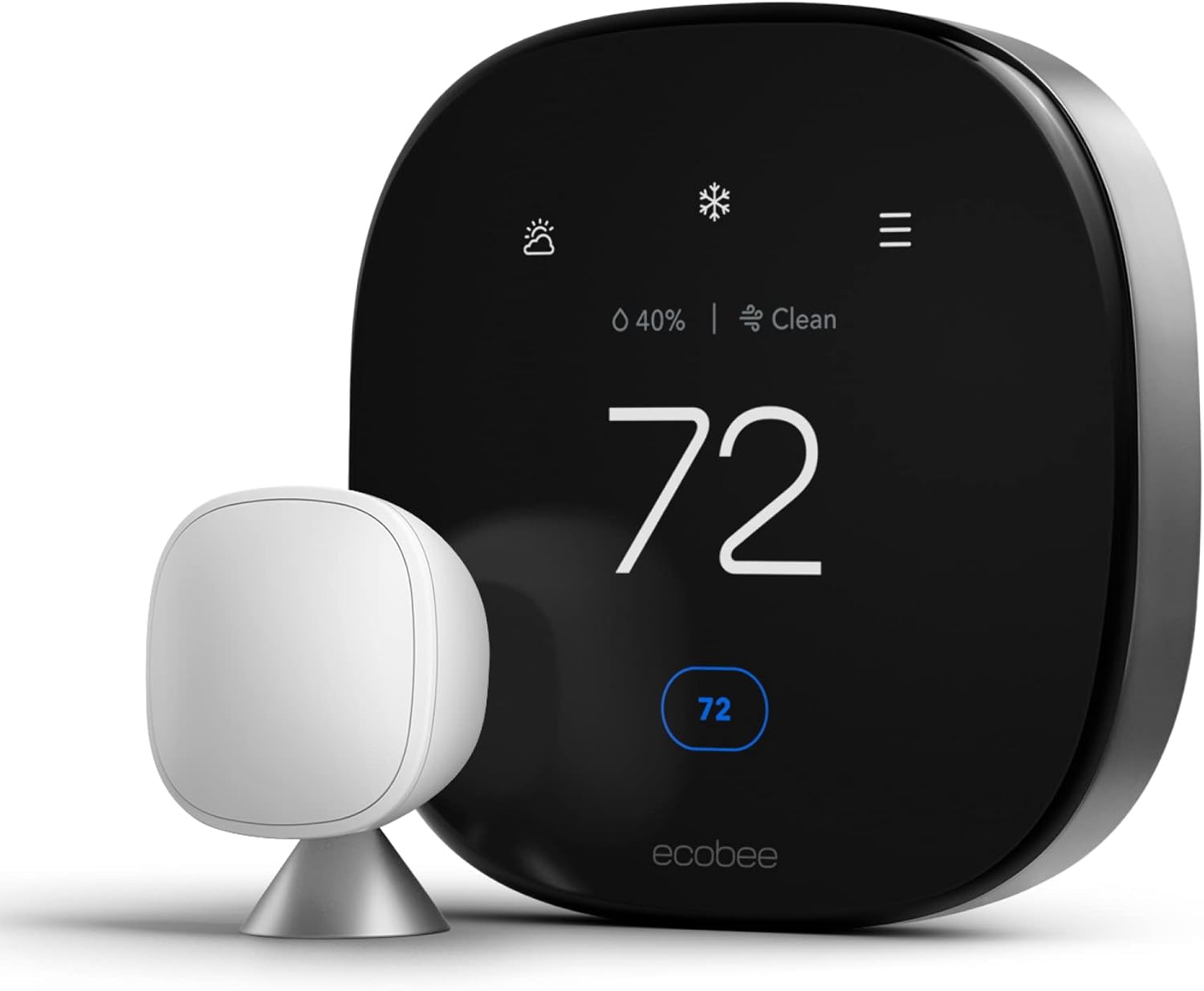
Ecobee Smart Thermostat Premium
The gold standard for power users, offering unparalleled control with remote sensors, broad smart home compatibility, and a rich feature set designed for maximum comfort and efficiency.
Check Price on AmazonKey Differentiator: SmartSensors
This is, without a doubt, the number one reason to pay the premium for an Ecobee. Nearly every home has that one room that’s always too hot or too cold. An Ecobee thermostat comes with a wireless SmartSensor you can place in that problem room. This sensor measures both temperature and occupancy.
This allows for game-changing features. You can configure the thermostat to average the temperatures of multiple rooms, or even more powerfully, to only pay attention to the rooms that are currently occupied. At night, it can focus solely on keeping your bedroom at the perfect temperature, ignoring the rest of the house. As we noted in our comprehensive Nest vs. Ecobee comparison, this single feature provides a level of comfort that single-point thermostats like Wyze simply cannot achieve.
Software Intelligence: eco+
Beyond sensors, Ecobee’s software is significantly more advanced. The eco+ suite is a set of optional, free features that fine-tune your energy savings. It considers humidity in its “Feels Like” calculations for more accurate comfort, can pre-heat or cool your home right before your scheduled arrival to save energy, and can integrate with your local utility’s peak pricing (“Time of Use”) to run your HVAC when electricity is cheapest. This proactive, data-driven approach can lead to greater savings over time compared to Wyze’s simpler system.
Unmatched Ecosystem Compatibility
Ecobee is the universal translator of smart thermostats. It works seamlessly with Amazon Alexa, Google Assistant, Samsung SmartThings, IFTTT, and most importantly for many, it has native Apple HomeKit support. This makes it an automatic choice for anyone invested in the Apple ecosystem. The premium model even has Alexa and Siri built directly into the thermostat, allowing it to function as a smart speaker, a feature Wyze lacks.
Pros of Ecobee
- SmartSensors provide true whole-home comfort
- Native support for all smart assistants, including HomeKit
- Built-in Alexa and Siri voice assistants
- Detailed energy reports and advanced eco+ software
- Premium design with a large, responsive touchscreen
Cons of Ecobee
- Significantly more expensive than Wyze
- Can be overly complex for users wanting a simple device
- Requires a C-wire (though adapter is included)
Installation & Setup: How Hard Is DIY?
Both thermostats are marketed as DIY-friendly, and for the average homeowner with a standard forced-air system, both live up to that promise. But the experience of actually mounting either device on your wall differs in ways worth knowing before you start unscrewing your old thermostat.
Installing the Ecobee
Ecobee’s installation process starts with the app, which is genuinely one of the best-designed setup flows in the smart home category. You take a photo of your existing thermostat’s wiring terminals, and the app identifies your system type and tells you exactly which wire goes where using labeled wire tags included in the box. The included PEK (Power Extender Kit) is the star of the installation for homes without a dedicated C-wire — it installs at your furnace or air handler control board rather than requiring you to fish a new wire through your walls, and it takes most users 10-15 extra minutes. Total installation time for most homeowners runs 30-45 minutes, including mounting the included SmartSensor. Ecobee also offers a paid professional installation option (typically $100-$200 depending on region) if you’d rather not touch your HVAC wiring at all, and many HVAC contractors are familiar with the brand from years of installs.
Installing the Wyze Thermostat
Wyze’s installation process is similarly guided through its app, with color-coded wire labeling and a comparable step-by-step wizard. The included C-wire adapter works the same way as Ecobee’s PEK, connecting at the furnace control board. Because the Wyze hardware is simpler (no room sensors to configure, fewer settings to walk through), some users report the initial setup feels slightly faster — often 20-30 minutes start to finish. However, Wyze’s installation documentation is less thorough than Ecobee’s for edge cases like heat pumps and dual-transformer systems, and its customer support for installation troubleshooting is more limited (primarily email/chat, without the phone support Ecobee offers).
When You Should Hire a Professional
Regardless of which brand you choose, we recommend hiring a licensed HVAC technician if any of the following apply to your home: you have a system with more than 5 wires and no labeling on the old thermostat, you have a boiler or radiant heat system, your home has knob-and-tube or otherwise dated electrical wiring near the HVAC control board, or you’re not comfortable shutting off power to your furnace at the breaker before starting. A botched DIY install can trip your HVAC system’s safety limits or, in rare cases, damage the control board — a $150 professional install is cheap insurance compared to a $600+ furnace board replacement.
Deep Dive: Wyze – The Undeniable Value Champion
Wyze entered the market with a simple mission: make smart home technology accessible to everyone. The Wyze Thermostat is a perfect embodiment of this, delivering the essential features that most users want from a smart thermostat at a fraction of the cost of its premium competitors.

Wyze Thermostat
An incredible value, offering core smart features like app control, scheduling, and voice integration with Alexa and Google Assistant for an unbeatable price.
Check Price on AmazonCore Smart Features, No Frills
What do most people want from a smart thermostat? The ability to control it from their phone, set schedules, and maybe adjust it with their voice. Wyze delivers perfectly on these fundamentals. The Wyze app is clean and easy to use, allowing you to set complex schedules for every day of the week. It offers geofencing to automatically switch to “Away” mode when you leave and “Home” when you’re returning. It works reliably with Google Assistant and Amazon Alexa for voice commands.
While it lacks the sophisticated “learning” of a Nest or the advanced algorithms of Ecobee’s eco+, it does have a feature that analyzes your usage and temperature preferences to suggest more efficient schedules, which is a nice touch for a budget device.
Simple, Functional Design
The Wyze Thermostat has a minimalist, black, rectangular design. It’s not going to win any design awards like a Nest, but it’s unobtrusive and clean. Control on the device itself is handled by a simple, clickable dial to raise or lower the temperature. A built-in passive infrared (PIR) motion sensor detects when you’re near and wakes up the small but clear display to show the current temperature and status. It’s practical and straightforward.
Energy Insights for Everyone
While it doesn’t offer the granular, multi-page reports of Ecobee’s HomeIQ, the Wyze app provides useful insights into your energy consumption. It tracks how many hours your HVAC system runs each day for heating and cooling and compares it to historical usage. It even estimates your savings compared to not having a schedule. For most users, this is more than enough data to help them identify patterns and make adjustments to save money. This focus on essential data is something we also see when comparing it to other budget brands, as detailed in our Wyze vs. Govee analysis.
Pros of Wyze
- Extremely low price offers incredible value
- Covers all the essential smart features (app, schedule, voice)
- Simple, user-friendly app and hardware
- Good integration with Alexa and Google Assistant
- Provides useful, easy-to-understand energy tracking
Cons of Wyze
- No support for remote room sensors
- No Apple HomeKit support
- Basic design and plastic build
- Fewer advanced energy-saving algorithms
- Requires a C-wire (adapter included)
Connectivity, Reliability & Common Complaints
No comparison is complete without addressing the real-world reliability issues that show up in owner reviews and forum discussions after the honeymoon period ends. This is where budget and premium hardware tend to diverge the most.
Wyze Wi-Fi Stability: What Owners Actually Report
The most consistently repeated complaint about the Wyze Thermostat in user forums and deal-tracking communities involves intermittent Wi-Fi dropouts, particularly on households with a large number of other smart home devices competing for 2.4GHz bandwidth. Some long-term owners report the thermostat reconnecting reliably after firmware updates, while others continue to see occasional disconnects that briefly interrupt schedule syncing (the thermostat itself keeps running its last known schedule locally, so a dropout doesn’t shut off your HVAC, but it can delay remote commands and app-based reporting). Placing your router closer to the thermostat, using a dedicated 2.4GHz network name separate from your 5GHz band, and keeping firmware updated are the most commonly recommended fixes.
Ecobee Reliability Track Record
Ecobee has been building connected thermostats since 2011, and its longer market presence shows in more mature Wi-Fi firmware and a more robust local fallback mode. If your internet connection drops, an Ecobee continues running its programmed schedule from the touchscreen without any loss of core functionality, and reconnects to Wi-Fi automatically once your network is back. Complaints about Ecobee hardware tend to center less on connectivity and more on occasional SmartSensor battery life (the included CR2032 batteries typically last 1-2 years) and, for some users, the complexity of the eco+ settings menu.
App Stability and Update Frequency
Both companies push regular firmware and app updates. Ecobee’s update cadence has historically been more consistent given its larger, dedicated HVAC engineering team, while Wyze — a company that manufactures dozens of different product categories from cameras to vacuums — sometimes prioritizes updates unevenly across its device lineup. Neither issue is a dealbreaker for most households, but if rock-solid connectivity is a top priority for you (for example, if you’re managing a rental property remotely), Ecobee’s track record gives it a slight edge.
Head-to-Head Battle: Is the Ecobee Premium Worth It?
This is the ultimate question. To answer it, we need to compare them on the features that truly impact your daily life and wallet.
The Single Biggest Difference: Comfort via Room Sensors
Let’s be clear: this is not a small difference. It’s a fundamental gap in capability. The Wyze Thermostat does an excellent job of maintaining the temperature *at its location*. If your thermostat is in a central hallway that’s always comfortable, and your home heats and cools evenly, Wyze will work wonderfully for you.
The Ecobee Smart Thermostat is designed for the reality of most U.S. homes, which are not perfectly balanced. The ability to place a sensor in your upstairs master bedroom and tell the Ecobee, “From 10 PM to 7 AM, only this room’s temperature matters,” is transformative for sleep quality. If your home office gets blasted by the afternoon sun, a sensor there can ensure you’re comfortable while you work. Wyze cannot do this. It has no way of knowing the temperature anywhere else in your home.
Winner: Ecobee. If you have any issues with uneven temperatures, the extra cost for Ecobee’s sensors is not a luxury; it’s a direct investment in your personal comfort.
Smart Home Integration and Future-Proofing
Wyze integrates well with the two most popular ecosystems: Amazon Alexa and Google Assistant. For a huge portion of the U.S. market, this is all that’s needed. It also works within its own excellent ecosystem of affordable Wyze products.
Ecobee, however, plays in a different league. Its universal compatibility, especially its native Apple HomeKit support, makes it the only choice for millions of iPhone users who want to use Siri and the Apple Home app. The addition of a built-in Alexa/Siri speaker adds tangible value, reducing clutter by combining two devices into one. This broad compatibility makes it a more flexible and future-proof choice if you ever decide to switch smart home platforms. The smart home space is dominated by these big tech players, a trend we also explore in the Google Nest vs. Amazon Smart Thermostat comparison.
Winner: Ecobee. Its “works with everything” approach is the gold standard and provides far more flexibility for the user.
User Interface and On-Device Experience
Using the thermostat on the wall is a key part of the experience.
The Wyze Thermostat’s dial is simple and effective for quick temperature changes. However, any complex scheduling or settings must be done in the app. The display is small and purely functional.
The Ecobee’s large, vibrant touchscreen is a huge step up. You can view a 5-day weather forecast, access detailed settings, see the status of all your sensors, and manage your schedule right from the wall. It feels like a dedicated control panel, not just a thermostat.
Winner: Ecobee. The rich touchscreen interface provides a far superior on-device experience.
The Bottom Line: Price and Value
You can often buy three, sometimes even four, Wyze Thermostats for the price of a single Ecobee Smart Thermostat Premium. This cannot be overstated.
Wyze’s value proposition is off the charts. For under $80, you get remote app control, geofencing, voice commands, and energy tracking. It delivers 80% of the functionality that most people use day-to-day for about 30% of the price of an Ecobee.
Ecobee’s value is in its premium features. The price is justified if, and only if, you need to solve the problem of uneven heating/cooling with its sensors, or if you are locked into the Apple HomeKit ecosystem. Its value comes from solving specific, tangible problems that budget devices can’t. In the premium space, it holds its own against other giants like Nest and Honeywell, which you can read about in our Honeywell vs. Nest review.
Winner: Wyze. For pure, undeniable value for the money, the Wyze Thermostat is in a class of its own.
Utility Rebates & Demand Response Programs
One of the most overlooked ways to offset the price difference between these two thermostats is through your local utility company. Many electric utilities across the U.S. offer instant rebates, mail-in rebates, or even free thermostats in exchange for enrolling in a demand response program.
Ecobee has partnerships with a large number of utility companies nationwide, and its Time of Use and eco+ features are specifically built to integrate with these programs. In many territories, Ecobee thermostats qualify for rebates ranging from $50 to $150, and some utilities (as referenced by the community discussion around Denver-area programs) offer demand response enrollment where the utility can make small, brief adjustments to your thermostat during peak grid stress in exchange for bill credits or a discounted device. Ecobee’s app makes it easy to see exactly which adjustments were made and to opt out of specific events if you prefer.
Wyze has fewer direct utility partnerships, meaning fewer instant rebate opportunities are tied specifically to the Wyze Thermostat by name. That said, some ENERGY STAR-based utility rebate programs are hardware-agnostic and only require that your thermostat carry the ENERGY STAR certification, which the Wyze Thermostat does hold. Before buying either device, it’s worth checking your utility’s rebate page — a $50 rebate on a $79 Wyze Thermostat effectively cuts the price to $29, and a $100 rebate on a $249 Ecobee closes much of the price gap with Wyze.
Winner: Ecobee, for the breadth of utility partnerships and demand response sophistication, though both models can qualify for basic ENERGY STAR rebates in many regions.
Air Quality, Humidity & Comfort Sensing
Temperature is only part of how comfortable a room actually feels. Humidity, in particular, has a huge effect on perceived comfort — a 72°F room at 65% humidity feels muggy and warm, while the same temperature at 40% humidity feels crisp and pleasant.
The Ecobee Smart Thermostat Premium includes a built-in humidity sensor and factors it directly into its “Feels Like” temperature display and its eco+ automation logic. If your HVAC system includes a whole-home humidifier or dehumidifier, Ecobee can control that equipment directly, coordinating it with your heating and cooling calls. The Premium model also includes an air quality sensor that monitors VOCs (volatile organic compounds) and CO2 proxies, alerting you when it might be time to run your system’s fan to clear the air or when outdoor air quality (via local index data) makes it a good idea to keep windows closed.
The Wyze Thermostat includes a basic humidity reading in its app, but it does not control external humidification or dehumidification equipment, and it has no dedicated air quality or VOC monitoring hardware. For most budget-conscious buyers this isn’t a dealbreaker, but for households with allergy sufferers, asthma, or a whole-home humidifier already installed, this is a meaningful gap.
Winner: Ecobee. Its sensor suite genuinely extends beyond temperature control into overall indoor comfort and air quality management.
Data Privacy & Security
Any Wi-Fi-connected device in your home collects some data, and thermostats are no exception — they know your occupancy patterns, your daily schedule, and (with room sensors) which parts of your house are used and when. Both Ecobee and Wyze publish privacy policies outlining what’s collected and how it’s used, primarily for improving energy-saving algorithms and, if you opt in, for utility demand response programs.
Ecobee, as a company solely focused on home comfort hardware with enterprise and utility partnerships, has generally maintained a clean security record for its thermostat line specifically. Wyze, notably, experienced a widely reported camera security incident in 2019 involving exposed user data, which understandably makes some privacy-conscious shoppers cautious about the brand more broadly, even though that incident involved its camera product line rather than its thermostat. Wyze has since implemented additional security measures across its product ecosystem, including two-factor authentication options. If data privacy is a top-tier concern for you, it’s worth reading each company’s current privacy policy directly, since these documents are updated periodically.
Battery Backup & Power Outage Handling
Neither thermostat includes an internal battery designed to keep the device fully operational during an extended power outage — both rely on continuous low-voltage power from your HVAC system (via the C-wire or its included adapter). If your power goes out, your furnace or AC won’t run regardless of which thermostat you own, so this is less about the thermostat and more about your home’s electrical situation generally.
Where the two diverge is in how they behave when power is restored. The Ecobee retains its full schedule, sensor pairings, and settings through a power interruption thanks to onboard non-volatile memory, and reconnects to Wi-Fi automatically. The Wyze Thermostat similarly retains its schedule through short outages, though some users have reported needing to manually reconnect to Wi-Fi after longer outages exceeding several hours. Neither issue is common enough to be a primary purchase factor, but if you live in an area with frequent brief power blips, Ecobee’s slightly more resilient reconnection behavior is a small plus.
Warranty, Support & Long-Term Reliability
Ecobee backs its Smart Thermostat Premium with a 3-year limited warranty when you register the product and connect it to Wi-Fi (2 years if unregistered), and offers phone, email, and live chat support with generally solid response times reported by owners. Its longer track record in the HVAC industry also means most licensed contractors are familiar with troubleshooting the device.
Wyze backs the Wyze Thermostat with a 1-year limited warranty, in line with most of its budget product lineup, and support is primarily handled through email and in-app chat rather than phone. Given the lower price point, some buyers view the shorter warranty as an acceptable trade-off; if a $79 device fails after two years, replacing it outright is still cheaper than many single-year extended warranty plans on premium hardware.
Winner: Ecobee, for warranty length and support channel breadth, though Wyze’s low replacement cost softens the impact of its shorter coverage window.
Troubleshooting Common Issues on Both Thermostats
Even well-designed hardware runs into hiccups. Here’s what to check before assuming you have a defective unit or an incompatible HVAC system.
Ecobee: Common Issues and Fixes
- “Heat/Cool Pump Anomaly” or E-codes on screen: Usually a wiring detection mismatch. Double-check your O/B wire orientation for heat pump systems, since this is the single most common miswiring on heat pump installs.
- SmartSensor not showing readings: Confirm the sensor is within Zigbee range of the main thermostat (typically 45 feet through walls) and that the coin-cell battery is seated correctly with the pull-tab removed.
- Short-cycling on multi-stage systems: This is often a settings issue rather than a hardware problem — check the minimum on/off cycle time settings in the Installation Settings menu, which are sometimes left at aggressive defaults after a DIY install.
- Won’t connect to Wi-Fi during setup: Ecobee thermostats only support 2.4GHz networks, not 5GHz. If your router broadcasts a combined SSID, you may need to temporarily create a separate 2.4GHz-only network name for setup.
Wyze: Common Issues and Fixes
- Frequent Wi-Fi disconnects: As covered above, this is the most reported issue. A firmware update, router placement adjustment, and switching to a dedicated 2.4GHz SSID resolve the majority of cases.
- Display stays off / motion sensor not waking screen: The PIR motion sensor has a limited detection cone directly in front of the unit; if your thermostat is mounted at an angle or in a high-traffic hallway with fast-moving foot traffic, sensitivity may need adjusting in the app.
- System won’t turn on after install: Almost always a wiring issue — the most common culprit is the Rc/Rh jumper wire not being reconnected if your old thermostat used a single R wire for both heating and cooling transformers.
- Geofencing triggers late or early: This is a phone GPS accuracy issue more than a thermostat issue; adjusting the geofence radius in the app settings, rather than relying on the default, usually improves accuracy.
If you’ve checked these common fixes and still have problems, both companies provide compatibility checker tools on their websites where you can enter your existing thermostat’s wire labels to confirm support before troubleshooting further, or before returning the unit.
Smart Home Integrations Beyond Voice Assistants
Voice control with Alexa or Google Assistant gets most of the attention, but the deeper automation potential of each thermostat depends on what platforms and routines it plugs into.
Ecobee’s Automation Depth
Because Ecobee supports Apple HomeKit, Amazon Alexa, Google Assistant, Samsung SmartThings, and IFTTT simultaneously, it can participate in cross-platform routines that Wyze can’t match. A common example: an Ecobee can trigger a HomeKit automation that adjusts your smart blinds when the SmartSensor detects a room has become occupied and sunlit, or an IFTTT applet that lowers the temperature automatically when your smart lock detects you’ve left for a run based on geofencing plus door sensor data. Ecobee’s open API has also made it a favorite among more advanced smart home enthusiasts who build custom Home Assistant or SmartThings automations, since the local API and cloud API are both well-documented.
Wyze’s Ecosystem Advantage
Wyze’s strength here is different: rather than broad third-party compatibility, it offers unusually deep integration within its own product ecosystem. If you already own Wyze cameras, Wyze plugs, or Wyze sensors, the Wyze Thermostat can participate in “Wyze Rules” alongside them — for example, having your thermostat switch to Away mode automatically when your Wyze camera detects no motion for an extended period, or having a Wyze contact sensor on a window trigger a temporary HVAC pause if a window is left open. For households already invested in the Wyze ecosystem for security, this tight integration can be more practically useful day-to-day than Ecobee’s broader but shallower third-party reach.
Neither thermostat currently supports Matter, the newer cross-platform smart home standard, as of this writing, though both companies have discussed future compatibility in various public statements. If long-term protocol future-proofing is a priority, it’s worth checking each brand’s official roadmap before purchasing, since a future firmware update could meaningfully change how either device fits into a mixed-brand smart home setup down the road.
Environmental Impact & ENERGY STAR Certification
Both the Ecobee Smart Thermostat Premium and the Wyze Thermostat carry ENERGY STAR certification, meaning both have been independently verified to meet efficiency criteria set by the U.S. Environmental Protection Agency. This certification is also what typically qualifies either device for utility rebate programs, as discussed earlier.
Beyond certification, the practical environmental impact of either thermostat comes down to how effectively it reduces unnecessary heating and cooling. Ecobee’s occupancy-based sensing arguably has a larger real-world environmental impact in bigger or multi-story homes, since it actively avoids conditioning empty rooms — a form of waste that a single-point thermostat like Wyze has no way to detect or prevent. For smaller, single-zone homes, the environmental difference between the two narrows considerably, since both are capable of eliminating the biggest source of waste: heating or cooling a home on a fixed schedule that doesn’t match when anyone is actually there.
From a manufacturing and packaging standpoint, Ecobee has published sustainability commitments around recyclable packaging materials, while Wyze’s lower price point reflects, in part, a more minimal packaging and accessory bundle. Neither factor is likely to be a deciding purchase criterion for most buyers, but it’s worth mentioning for anyone specifically prioritizing lifecycle environmental impact alongside operational energy savings.
Where to Place Ecobee SmartSensors for Best Results
Since the SmartSensor is Ecobee’s headline advantage, getting placement right matters more than most buyers realize. A poorly placed sensor can actually make comfort worse, not better.
- Avoid direct sunlight and heat sources: Don’t place a sensor on a windowsill, near a lamp, or above a heating vent — it will read artificially high temperatures and cause the system to overcool the rest of the home.
- Place at seated or standing height: Ecobee recommends roughly 5 feet off the floor, away from doorways where drafts skew readings.
- Prioritize bedrooms for night comfort: The single highest-value placement for most households is a primary bedroom, paired with a “Sleep” comfort setting that tells the thermostat to prioritize that room’s reading overnight.
- Use occupancy detection intentionally: In a home office or den used only part of the day, the SmartSensor’s occupancy detection lets the system avoid conditioning that room when it’s empty, then catch up quickly once motion is detected.
- Additional sensors are sold separately: The Premium model ships with one SmartSensor; most multi-story or larger homes benefit from adding one or two more, available as an accessory pack, to properly cover upstairs and downstairs zones.
Cost Savings Calculator: What’s the Real ROI?
Both companies advertise energy savings figures, so let’s translate those percentages into real dollars using average U.S. household HVAC spending as a baseline.
The average American household spends roughly $1,000-$1,500 per year on heating and cooling, depending on climate zone, home size, and fuel type. Ecobee cites potential savings of up to 23-26% with eco+ enabled and sensors properly placed; Wyze doesn’t publish an official savings percentage as prominently, but independent estimates for basic scheduling and geofencing (the core mechanism both devices share) typically land in the 10-15% range compared to a non-programmable thermostat.
| Scenario | Ecobee Smart Thermostat Premium | Wyze Thermostat |
|---|---|---|
| Upfront Cost | ~$249 | ~$79 |
| Estimated Annual Savings (on $1,200/yr HVAC spend) | ~$216-$312 (18-26%) | ~$120-$180 (10-15%) |
| Approx. Break-Even Point vs. Old Thermostat | ~10-14 months | ~5-8 months |
| 5-Year Estimated Total Savings | ~$1,080-$1,560 | ~$600-$900 |
These figures are estimates and will vary significantly based on your climate, insulation quality, HVAC equipment age, and how consistently you (or the automation) actually follow an efficient schedule. The takeaway: the Wyze Thermostat pays for itself faster in raw dollar terms because its upfront cost is so low, but the Ecobee’s higher savings percentage means it can generate more total savings over a multi-year horizon, particularly in homes with uneven temperatures where SmartSensors prevent overheating or overcooling unused rooms.
Sizing Guide: Which Homes Fit Which Thermostat
“Sizing” a thermostat isn’t about square footage in the same way as sizing an HVAC unit, but home layout does meaningfully affect which device will perform better for you.
- Studio and 1-bedroom apartments (under 800 sq ft): Either thermostat works well. A single sensing point is rarely a problem in this footprint, making the Wyze Thermostat an easy, budget-friendly choice.
- 2-3 bedroom single-story homes (800-1,800 sq ft): Wyze remains a strong option if the home has good, even insulation and the thermostat isn’t installed near a heat-generating appliance, a window, or direct sunlight. Ecobee becomes more valuable if any room (a converted garage, a sunroom, a room over the garage) runs noticeably hotter or colder than the rest.
- Multi-story homes (2,000+ sq ft): This is where Ecobee’s SmartSensors earn their keep. Heat rises, meaning upper floors often run warmer in summer and cooler relative to demand in winter. A sensor upstairs and one downstairs lets the Ecobee balance the whole home rather than just the floor where the thermostat happens to be mounted.
- Homes with additions or mixed construction eras: Older additions often have different insulation levels than the original structure. If your home has a newer addition or an older, poorly insulated wing, Ecobee’s multi-room sensing handles this far better than a single fixed sensor.
Renter’s Guide: Smart Thermostats in Rental Properties
Both thermostats are popular choices for landlords and renters alike, but there are a few practical considerations specific to rental situations worth flagging.
First, always get written permission from your landlord before replacing a hardwired thermostat, even a “simple” swap. Keep your old thermostat in a safe place so it can be reinstalled before move-out if required by your lease. Second, consider cost recovery: the Wyze Thermostat’s low price point makes it an easy device to leave behind as a value-add for the next tenant or to take with you without a large sunk cost if your lease doesn’t allow permanent fixture changes. Third, for landlords managing multiple rental units, Wyze’s lower per-unit cost often makes more financial sense at scale — outfitting ten units with Wyze Thermostats costs roughly what outfitting three units with Ecobee Premiums would cost, though landlords who want detailed per-unit energy reporting for utility-inclusive rentals may still find Ecobee’s HomeIQ reporting worth the premium on a smaller number of units.
One more rental-specific note: Ecobee’s remote monitoring and detailed occupancy data (via SmartSensors) can be genuinely useful for landlords checking in on vacant units for freeze protection during winter, since you can see at a glance whether a unit’s temperature has dropped into a risky range for frozen pipes.
Alternatives Worth a Look: Nest, Honeywell & Sensi
Ecobee and Wyze aren’t the only two names in this space, and depending on your priorities, a third option might actually be the better fit.
Google Nest Learning Thermostat sits in a similar premium tier to Ecobee, with a strong emphasis on machine-learning-based auto-scheduling rather than manual programming — it’s a good fit for households that don’t want to build a schedule themselves at all. It lacks Ecobee’s remote room sensor ecosystem in its most common configuration, though Nest does offer its own separate temperature sensor accessory. We cover this matchup in detail in our Nest vs. Ecobee comparison.
Honeywell Home (now largely operating under the Resideo brand) offers a wide range of thermostats spanning budget to premium, with particularly strong compatibility documentation for older and less common HVAC systems, including many boiler and radiant setups that trip up both Ecobee and Wyze. We compare Honeywell against other brands in our Honeywell vs. Nest review and our Honeywell vs. Emerson guide.
Sensi (by Emerson) occupies a similar mid-range niche, known for a particularly reliable Wi-Fi connection and simple installation, without the sensor ecosystem of Ecobee or the ultra-low price of Wyze. It’s worth considering if you want something between the two extremes covered in this guide.
For budget shoppers specifically comparing low-cost options, our Wyze vs. Govee analysis and our Google Nest vs. Amazon Smart Thermostat comparison cover additional budget-tier and mid-tier competitors that didn’t make the cut for this head-to-head.
It’s also worth noting that Ecobee itself sells a step-down model, sometimes marketed as the Ecobee Smart Thermostat Essential, which drops the built-in Alexa/Siri speaker and a few premium materials in exchange for a lower price point than the Premium model reviewed here, while still retaining SmartSensor compatibility. If the Premium’s ~$249 price feels steep but you still want the sensor ecosystem, the Essential tier is worth cross-shopping before defaulting to Wyze purely on cost grounds.
What Independent Reviewers Tend to Recommend
Across independent smart home publications and long-term owner communities, a fairly consistent pattern emerges. Reviewers who prioritize whole-home comfort, multi-room sensing, and ecosystem flexibility tend to land on Ecobee as the pick for buyers who can afford the premium tier, citing the SmartSensor system as a genuinely differentiated feature rather than a marketing gimmick. Reviewers and community discussions focused on value-for-money, meanwhile, consistently flag the Wyze Thermostat as one of the strongest budget options on the market, often noting that the combination of a remote sensor system with a budget thermostat’s price (something no single product currently offers) would be the “dream” configuration — until then, buyers are left choosing between Ecobee’s sensors at a premium price or Wyze’s core functionality at a fraction of the cost.
Community deal-tracking discussions also frequently highlight that pairing a lower-cost thermostat with room sensors from a third party, or simply accepting the single-point limitation, is a common workaround budget-focused buyers use rather than paying for Ecobee’s sensor ecosystem outright — though as covered earlier in this guide, the Wyze Thermostat does not support any add-on sensor hardware, so this workaround is specific to other budget thermostat brands, not Wyze itself.
Long-Term Maintenance & Care
A smart thermostat is a low-maintenance device compared to the HVAC equipment it controls, but a little upkeep keeps either model performing accurately for years.
Keeping Your Ecobee Accurate
Wipe the touchscreen occasionally with a dry microfiber cloth to avoid buildup that can affect touch responsiveness. Replace SmartSensor batteries proactively once the app flags them as low rather than waiting for a total failure, since a dead sensor silently drops out of your comfort settings rather than throwing an obvious error. Periodically review your eco+ settings after any change to your household routine (a new work-from-home schedule, a new baby’s nap times) since Ecobee’s automation is only as good as the schedule data behind it.
Keeping Your Wyze Thermostat Accurate
Dust around the PIR motion sensor window periodically, since accumulated dust can reduce its detection range over time. Because the Wyze Thermostat has no serviceable internal battery of its own (it draws power continuously from your HVAC system), there’s no battery maintenance required on the main unit itself. Check for firmware updates every few months through the app, since Wyze periodically ships stability improvements specifically targeting the Wi-Fi connectivity issues discussed earlier in this guide.
Filter Reminders and HVAC Maintenance Alerts
Both thermostats include a customizable filter-change reminder that tracks system runtime (rather than just elapsed calendar time) to more accurately estimate when your HVAC air filter needs replacing. Ecobee’s reminder system is more granular, letting you set separate reminder intervals for filters, humidifier pads, UV lights, and other accessory equipment, while Wyze offers a single, simpler filter reminder. Neither replaces an annual professional HVAC tune-up, which remains the single best thing you can do to protect your equipment and keep either thermostat’s efficiency claims accurate in practice.
Accessibility & Ease of Use for All Household Members
A thermostat that’s confusing for less tech-savvy household members, guests, or older family members creates friction that undermines the whole point of “smart” climate control.
The Ecobee’s large touchscreen with big, high-contrast text and simple up/down arrows on the home screen makes basic temperature adjustments intuitive even for users who never open the app. Its screen also supports adjustable brightness and a night-friendly display mode with less blue light for bedroom placements. The Wyze Thermostat’s physical dial is arguably even simpler for basic use — there’s no touchscreen menu to navigate at all for a quick temperature bump, just a twist of the dial, which some households (particularly homes with young children or elderly residents) find more foolproof than a touch interface. Where Wyze falls short on accessibility is in its lack of voice-assistant hardware built into the unit itself; Ecobee’s built-in Alexa/Siri support means a household member can simply speak to the wall-mounted thermostat directly rather than needing a separate smart speaker or their phone nearby.
Who Should Buy Which Thermostat? A Guide for U.S. Homes
Let’s match your needs to the right product.
You should buy the Wyze Thermostat if…
- You’re on a strict budget. It’s the best smart thermostat you can buy for under $100.
- Your home is a smaller apartment, condo, or single-story house with relatively even temperatures.
- You’re new to the smart home and want an easy, low-risk entry point.
- You primarily want remote app and voice control and don’t need advanced features.
- You need to equip multiple zones or properties (like a rental) and want to keep costs down.
You should buy the Ecobee Smart Thermostat if…
- You have a multi-story home or rooms that are always too hot or cold. The sensors are essential.
- You are an Apple HomeKit user. This is the best-in-class choice for the Apple ecosystem.
- You are a “power user” who loves digging into data, settings, and detailed reports.
- You want a premium, modern look and feel on your wall.
- You value having a voice assistant built directly into your thermostat.
The choice between premium and budget is a common theme in home automation, not just for thermostats. We see similar trade-offs in our comparison of established brands like Honeywell vs. Emerson, where brand reputation and specific features often dictate a higher price.
Frequently Asked Questions (FAQ)
Does the Wyze Thermostat require a C-wire?
Yes, the Wyze Thermostat requires a C-wire to get continuous power. However, like Ecobee, Wyze includes a C-wire adapter in the box that you can install at your furnace control board if you don’t have a dedicated C-wire running to your thermostat’s location.
Can I add remote sensors to the Wyze thermostat later?
No. The Wyze Thermostat hardware and software are not designed to work with any remote sensors. This is the single biggest feature you give up for the lower price. If you think you might need sensors, you should opt for Ecobee from the start.
Is the Ecobee really worth three times the price of the Wyze?
It depends entirely on your needs. If you have hot/cold spots, then yes, the comfort provided by the sensors absolutely justifies the cost. If you’re an Apple HomeKit user, it’s also worth it. If you have an evenly heated small home and use Alexa, the Wyze will likely serve you just as well for a fraction of the price.
Which app is easier to use?
Both apps are very well-designed. The Wyze app is praised for its simplicity and clean layout, which makes sense for a device with fewer features. The Ecobee app is more data-rich and has more menus and settings, which can feel a bit more complex initially but is very powerful once you learn it.
Does either thermostat work with a heat pump?
Yes, both support single-stage heat pumps with auxiliary heat. Ecobee goes further, supporting multi-stage heat pumps and dual fuel systems (heat pump paired with a gas furnace) with automatic balance-point calculation. Wyze does not support dual fuel configurations, so homes with that setup should choose Ecobee.
Is the Wyze Thermostat’s Wi-Fi reliable?
Most owners report reliable performance after initial setup, though it’s the most commonly cited complaint in user reviews, particularly in homes with congested 2.4GHz networks. A dropped connection doesn’t shut off your HVAC, since the thermostat continues running its last saved schedule locally, but it can delay remote commands until the connection is restored. Keeping firmware updated and your router reasonably close helps.
Can I get a rebate on either thermostat from my utility company?
Possibly. Ecobee has extensive utility partnerships and often qualifies for instant or mail-in rebates plus demand response incentives. The Wyze Thermostat carries ENERGY STAR certification, which can qualify it for hardware-agnostic utility rebate programs, though brand-specific Wyze rebates are less common. Check your utility provider’s rebate page before purchasing either device.
Which thermostat is easier to install myself?
Both are designed for confident DIY installation with app-guided wiring wizards and labeled wire tags, typically taking 20-45 minutes. Wyze’s simpler feature set makes for a slightly faster initial setup, while Ecobee’s app provides more detailed guidance for complex systems like heat pumps and multi-stage HVAC.
Does the thermostat keep working if my internet goes down?
Yes, for both. Neither thermostat requires an active internet connection to maintain your programmed schedule or basic heating/cooling control — internet is only needed for remote app access, voice assistant commands, and syncing new schedule changes. Local scheduling continues to run on the device itself.
Is the Wyze Thermostat worth it compared to Ecobee in 2026?
For most single-story homes with even temperatures and no need for Apple HomeKit, yes — it delivers the core smart thermostat experience for a fraction of the cost. For multi-story homes, homes with hot/cold spots, dual fuel HVAC systems, or Apple ecosystem households, the Ecobee’s additional capability justifies its higher price.
How long do these thermostats last, and what’s the warranty?
Ecobee offers a 3-year limited warranty with product registration (2 years unregistered) and phone/email/chat support. Wyze offers a 1-year limited warranty with email and in-app chat support. Both brands have been in the smart thermostat market long enough to have a reasonable track record of multi-year reliability with normal use.
Can I use either thermostat without a subscription fee?
Yes. Neither Ecobee nor Wyze charges a mandatory subscription fee for core thermostat functionality, scheduling, or app control. Ecobee offers an optional premium subscription tied to some of its security camera and sensor products, but the thermostat’s core features, including eco+, are free.
Which thermostat is better for a boiler or radiant heat system?
Ecobee generally has broader documented support for low-voltage boiler systems than Wyze, though neither is designed for line-voltage baseboard heat or millivolt systems without additional relay hardware. If you have a boiler, use each brand’s online compatibility checker before purchasing, and consider Honeywell as an alternative with particularly strong boiler and radiant heat documentation.
How many SmartSensors can I add to an Ecobee?
The Premium model ships with one SmartSensor and supports up to 32 total sensors paired to a single thermostat, though most households only need one per additional zone or problem room, typically 2-4 sensors for a multi-story home. Additional sensors are sold separately, usually in two-packs.
The Final Verdict: Two Excellent Choices for Two Different Buyers
This comparison is less about a “winner” and more about understanding the incredible choice homeowners have in 2026. The Ecobee vs. Wyze debate is a perfect illustration of a mature market with options for everyone.
The Wyze Thermostat is a triumph of value. It has democratized the smart thermostat, proving that core smart functionality doesn’t need to be expensive. For anyone on a budget, in a smaller home, or who simply wants the basics done right, it is an absolutely fantastic product and an easy recommendation. It is the definition of “good enough” in the best possible way.
The Ecobee Smart Thermostat Premium, however, remains the undisputed champion of features and performance. It’s a device that doesn’t just make your thermostat smart; it makes your entire home’s climate system intelligent and spatially aware. The comfort and control offered by its SmartSensors, the flexibility of its universal ecosystem support, and the depth of its software are features that, for the right user, are worth every penny. It’s an investment in a superior solution to a common problem.
Ultimately, your choice is simple: If you’re buying on a budget, buy the Wyze. If you’re buying for the best possible comfort and features, buy the Ecobee.
Quick Recap: Category Winners
- Best Value: Wyze Thermostat
- Best for Multi-Story or Uneven Homes: Ecobee Smart Thermostat Premium
- Best HVAC System Compatibility (Dual Fuel/Multi-Stage): Ecobee
- Best for Apple HomeKit Households: Ecobee
- Fastest Break-Even on Cost: Wyze
- Best Utility Rebate & Demand Response Support: Ecobee
- Simplest DIY Install: Wyze (marginally)
- Best Warranty Coverage: Ecobee
Whichever you choose, both the Ecobee Smart Thermostat Premium and the Wyze Thermostat represent a meaningful upgrade over a manual, non-programmable thermostat, and both will pay for themselves through reduced energy waste over time.




 Home
Home
 Info
Info
 Compare
 Reviews
 Shop
Shop