
Best Smart Thermostat for Energy Savings: Top Picks & Features
Tired of shocking electricity bills and a home that’s never quite the right temperature? You’re not alone. In today’s connected world, a smart thermostat is no longer a luxury—it’s an essential tool for any homeowner looking to slash energy costs and enhance comfort. These intelligent devices learn your family’s routines, adapt to the weather, and put complete control of your home’s climate right in the palm of your hand. But with a crowded market, how do you choose the one that will deliver the biggest savings?
As a home automation expert who has installed and tested countless smart devices, I’ve seen firsthand how the right thermostat can make a huge difference—both in your wallet and your daily comfort. This guide cuts through the noise. We’ll dive deep into how these devices work their magic, review the top energy-saving models on the market today, and give you the practical knowledge to choose the perfect smart thermostat for your home.
How Do Smart Thermostats Actually Save You Money?
Smart thermostats are far more than just digital versions of their manual predecessors. They are sophisticated, data-driven devices designed to eliminate energy waste from your home’s biggest energy consumer: the HVAC (Heating, Ventilation, and Air Conditioning) system. From my experience, the savings come from a combination of intelligent features working in harmony.
1. Adaptive Learning: Your Personal Energy Manager
This is the cornerstone of flagship models like the Google Nest. Instead of you programming a rigid schedule, these thermostats observe your behavior for the first week or so. They note when you wake up, when you leave for work, when you return, and your preferred sleeping temperature. From this data, they build a dynamic schedule that:
- Reduces energy use when you’re away: No more heating or cooling an empty house because you forgot to adjust the thermostat.
- Pre-conditions your home: It learns how long your home takes to heat or cool and starts the system just in time for you to arrive to a comfortable environment, avoiding long, energy-intensive run times.
- Adapts to change: If your schedule changes, the thermostat adapts without needing any manual reprogramming.
2. Geofencing: Smart Control Based on Your Location
Geofencing uses your smartphone’s GPS to create a virtual boundary around your home. When the last person with the app leaves this boundary, the thermostat automatically switches to an energy-saving “Away” mode. When the first person starts heading home and crosses back into the boundary, it automatically returns to your preferred “Home” setting. It’s a simple yet incredibly powerful way to ensure you never waste a dime on conditioning an empty home.
3. Detailed Energy Usage Reports: Knowledge is Power
Ever wonder how much your air conditioning ran last Tuesday? Most smart thermostats provide detailed reports via their app or a web portal. These reports show:
- Daily and monthly run times for both heating and cooling.
- Comparisons with previous months or even similar homes in your area.
- Personalized recommendations, like suggesting a 1-degree change to your schedule could save an estimated 5% on energy costs.
Reviewing these reports helped me identify that my AC was running excessively in the late afternoon. By closing the blinds on my west-facing windows, I saw a measurable drop in HVAC run time the very next week.
4. Integration with the Smart Home Ecosystem
Modern smart thermostats don’t operate in a vacuum. They integrate seamlessly with platforms like Amazon Alexa, Google Assistant, and Apple HomeKit. This unlocks powerful automations:
- Voice Control: “Hey Google, set the temperature to 72 degrees.”
- Automated Routines: Create a “Good Night” routine that turns off the lights, locks the doors, and sets the thermostat to your sleeping temperature with a single command.
- Occupancy Automation: Link your thermostat to smart lighting or motion sensors. If no motion is detected for 30 minutes in the main living area, the thermostat can automatically enter an eco-mode.
How to Choose the Right Smart Thermostat for Your Home
Before you jump to the top picks, it’s crucial to understand what features will benefit you most. Choosing the right device depends on your home’s HVAC system, your tech-savviness, and your budget.
HVAC System Compatibility (The C-Wire Question)
The single most important technical consideration is the “C-wire,” or “common wire.” This wire provides a continuous flow of 24V power from your furnace to the thermostat, which is necessary for power-hungry features like Wi-Fi and a backlit screen. Many older homes don’t have one.
- If you have a C-wire: Great! Almost any smart thermostat will work for you.
- If you don’t have a C-wire: You have options. Some thermostats (like Ecobee) come with a Power Extender Kit (PEK) that you can install at your furnace. Others are designed to work without one, though sometimes with reduced reliability. If you’re unsure, it’s often worth exploring models specifically designed for this scenario. That’s why considering the best battery-operated thermostats can be a viable alternative if running a new wire isn’t feasible.
Always use the manufacturer’s online compatibility checker before purchasing!
Key Features to Prioritize for Maximum Savings
- Learning Algorithms: If you want a “set it and forget it” experience, prioritize a thermostat with true machine learning, like the Nest.
- Remote Room Sensors: If your home has hot or cold spots, or if you want to prioritize the temperature of a specific room (like a baby’s nursery), a system with remote sensors (like Ecobee) is a game-changer.
- Geofencing: A must-have for people with unpredictable schedules. It’s the most foolproof way to save energy when you’re away.
- Smart Home Integration: Choose a thermostat that works with your preferred voice assistant (Alexa, Google, or Siri) for the most seamless experience.
The Best Smart Thermostats for Energy Savings
After extensive research and hands-on experience, these are the models that consistently deliver on their promise of energy efficiency and user-friendly operation.
1. Google Nest Learning Thermostat (4th Generation)

Best for “Set It and Forget It” Automation
The Nest Learning Thermostat remains the icon of the smart home world for a reason. Its primary strength is its powerful machine learning algorithm. You simply use it like a normal thermostat for a week, and it builds a remarkably accurate schedule for you. The signature “Nest Leaf” appears when you choose an energy-saving temperature, subtly guiding you toward better habits. It’s the perfect choice for users who want maximum savings with minimal effort.
Pros
- True learning algorithm adapts to your life
- Premium, intuitive design and interface
- Excellent energy reporting and guidance
- Broad smart home compatibility
Cons
- Higher price point
- Doesn’t include remote sensors
- Can be tricky to install without a C-wire
For a deeper dive into how it stacks up against competitors, our Honeywell Thermostat vs Nest comparison provides a detailed analysis.
Check Price on Amazon2. Ecobee Smart Thermostat Premium
Best for Homes with Uneven Temperatures
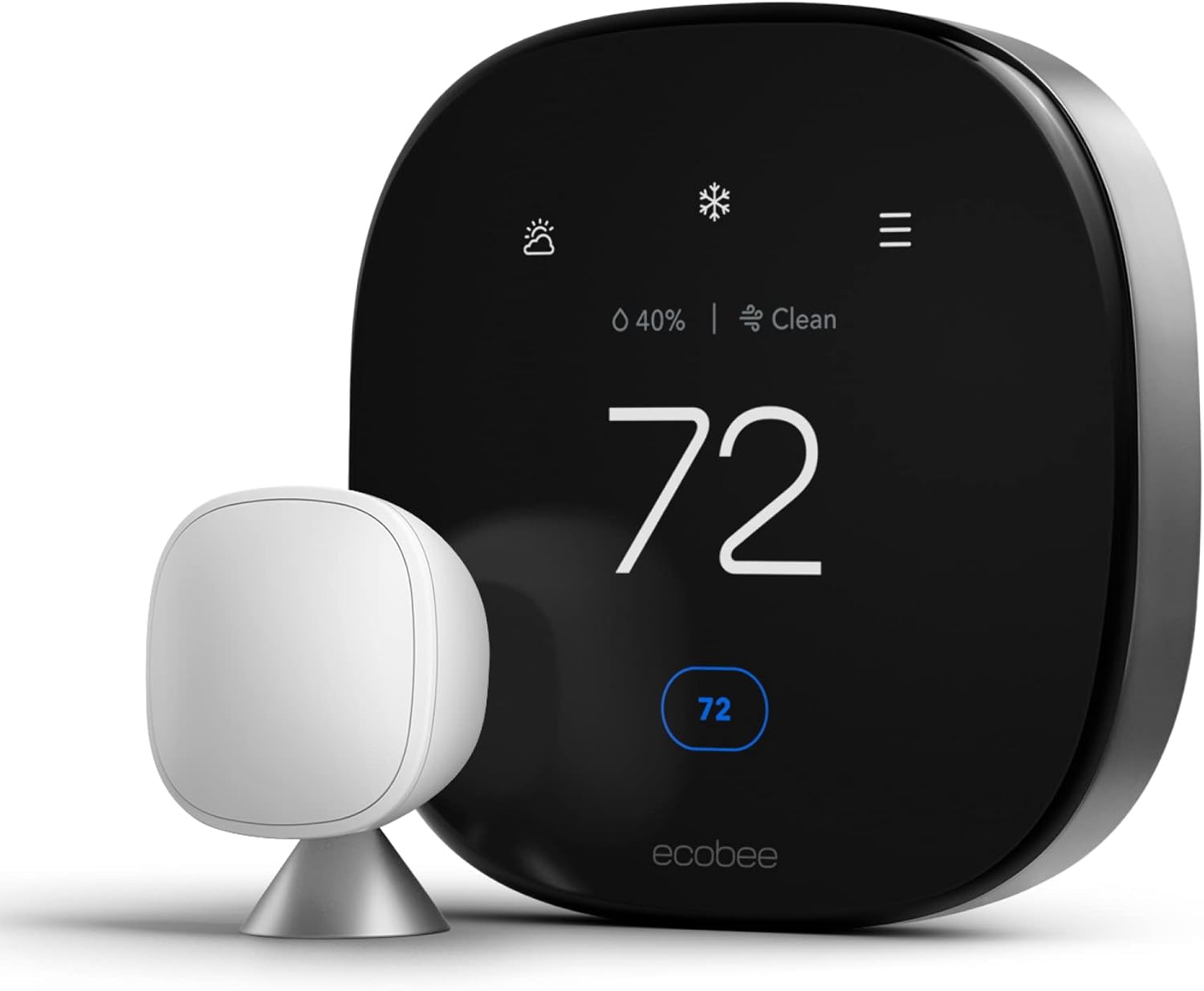
The Ecobee Smart Thermostat Premium tackles a problem the Nest doesn’t: temperature imbalances. It comes with a remote “SmartSensor” that measures both temperature and occupancy in a different room. You can tell the Ecobee to maintain the temperature based on the sensor in the living room during the day and the one in the bedroom at night. This “Follow Me” feature ensures comfort where you actually are, preventing the HVAC from overworking to heat or cool unused spaces. It also has Alexa built-in, acting as a smart speaker.
Pros
- Includes a remote sensor for zoned comfort
- Built-in Alexa and Siri compatibility
- Excellent app with granular controls
- Includes a Power Extender Kit for non-C-wire setups
Cons
- Doesn’t “learn” schedules in the same way Nest does
- Interface can be less intuitive than Nest’s
3. Honeywell Home T9 Smart Thermostat

Best for Multi-Room Control on a Budget
The Honeywell T9 brings the multi-room sensor technology of the Ecobee to a more accessible price point. The T9’s sensors are impressive, measuring temperature, humidity, and motion, and they have a much longer range than competitors. You can prioritize specific rooms or average the temperature across multiple active rooms. It’s a powerful and flexible system that excels at delivering customized comfort throughout your entire house without breaking the bank.
Pros
- Excellent multi-room sensor performance
- Reliable geofencing and scheduling
- Easy-to-use mobile app
- More affordable than top-tier competitors
Cons
- Requires a C-wire (no adapter included)
- The physical design is less premium than Nest or Ecobee
If you’re weighing your options, our Honeywell vs. Emerson Thermostats guide offers a comprehensive comparison of features and value.
Check Price on Amazon4. Emerson Sensi Touch Smart Thermostat

The Practical, No-Nonsense Choice
The Emerson Sensi Touch is a workhorse. It forgoes flashy features like learning algorithms for rock-solid fundamentals: flexible scheduling, geofencing, and extremely broad HVAC compatibility. It’s often lauded by HVAC professionals for its easy installation process and reliability. It’s an ENERGY STAR Partner of the Year award winner, proving its energy-saving credentials. If you want smart control without the complexity or high cost of a learning model, the Sensi is an outstanding choice.
Pros
- Very easy to install, often without a C-wire
- Straightforward and reliable app
- Energy Star certified for proven savings
- Great value for the price
Cons
- No learning capabilities
- Basic design and display
5. Amazon Smart Thermostat
Best Budget Option for Alexa Households
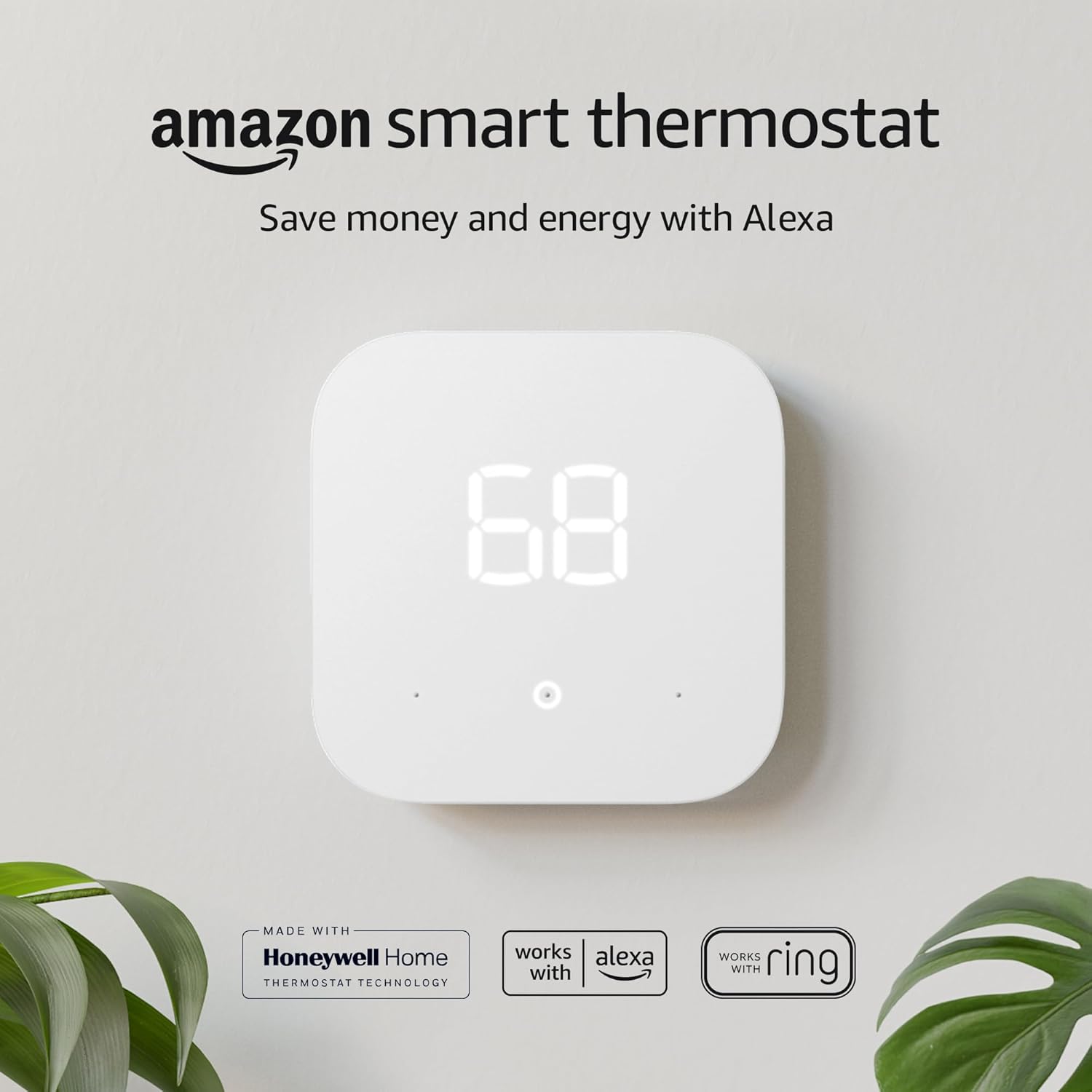
Developed with Honeywell Home technology, the Amazon Smart Thermostat is an incredible value for homes already invested in the Alexa ecosystem. It lacks a fancy screen or learning features on the device itself, but it leverages the power of Alexa for intelligent control. You can let Alexa manage the schedule for you through “Hunches,” which automatically adjust the temperature when it thinks you’re away or asleep. It’s an ENERGY STAR certified device at a price that’s almost impossible to beat.
Pros
- Extremely affordable price point
- Seamless integration with Amazon Alexa
- “Alexa Hunches” provide smart automation
- Clean, minimalist design
Cons
- Requires a C-wire
- Heavily reliant on the Alexa app and voice control
- No Google Assistant or Apple HomeKit support
Feature Comparison at a Glance
| Feature | Google Nest Learning | Ecobee Premium | Honeywell T9 | Emerson Sensi Touch | Amazon Smart Thermostat |
|---|---|---|---|---|---|
| Learning Schedule | ✔ | ✖ | ✖ | ✖ | (Via Alexa) |
| Geofencing | ✔ | ✔ | ✔ | ✔ | ✔ |
| Remote Sensors | ✖ (Sold Separately) | ✔ (1 Included) | ✔ (1 Included) | ✖ | ✖ |
| C-Wire Required | No (Recommended) | No (Adapter Included) | Yes | No (In most systems) | Yes |
| ENERGY STAR Certified | ✔ | ✔ | ✔ | ✔ | ✔ |
| Built-in Voice Assistant | ✖ | (Alexa & Siri) | ✖ | ✖ | ✖ |
Frequently Asked Questions (FAQs)
Which smart thermostat saves the most energy?
In my experience, the thermostats that save the most are the ones that best fit your lifestyle. For users with a consistent schedule, the Google Nest Learning Thermostat often yields the highest savings due to its self-optimizing schedule. For homes with multiple occupants and varied temperatures, the Ecobee Smart Thermostat excels by using its remote sensors to avoid heating or cooling empty rooms. Ultimately, any ENERGY STAR certified smart thermostat can save an average of 8-15% on your heating and cooling bills when used correctly.
How much money can you really save with a smart thermostat?
Savings vary based on climate, home insulation, and HVAC efficiency, but manufacturers and independent studies report average annual savings between $130 and $145. Google Nest, for example, states its thermostat saves an average of 10-12% on heating and 15% on cooling. The key is using the smart features—letting the schedule run, using eco modes, and taking advantage of geofencing.
Can I install a smart thermostat myself?
Yes, in most cases. If you have a modern HVAC system (and ideally a C-wire), installation is typically a 30-minute DIY project. It usually involves turning off power at the breaker, removing the old thermostat, labeling the wires, connecting them to the new base plate, and setting it up via the app. However, if you’re uncomfortable with wiring or have a complex system (like a dual-fuel heat pump), hiring a professional HVAC technician is always the safest bet.
Do smart thermostats work with heat pumps?
Absolutely. All the models recommended in this guide are fully compatible with most modern heat pump systems, including those with auxiliary or emergency heat strips. During setup, the app will guide you through configuring the thermostat specifically for your heat pump to ensure it operates efficiently, especially during the colder months when it needs to manage the switch to auxiliary heat correctly.
Smart Thermostat vs. Programmable Thermostat: What’s the Real Difference?
Before smart thermostats existed, the best you could do to automate your heating and cooling was a programmable thermostat. These devices let you set a fixed weekly schedule—wake, leave, return, sleep—and they’ve been sold since the 1980s. So why has nearly every homeowner upgrade guide, including this one, shifted almost entirely to smart thermostats? The answer comes down to flexibility, intelligence, and the way each device handles the unpredictability of real life.
A programmable thermostat is a “dumb” scheduler. It doesn’t know if you left for a two-week vacation, if your work shift changed, or if a surprise cold front rolled in. It just follows the schedule you punched in, whether or not that schedule still makes sense. Studies have repeatedly found that a large share of households with programmable thermostats never actually program them, or they override the schedule so often that any potential savings evaporate. The interface is usually the problem: tiny buttons, unintuitive menus, and a multi-step process just to nudge the temperature up two degrees.
Smart thermostats solve this by putting the “brain” of the operation in the cloud and in your pocket. Instead of a static schedule, you get:
- Real-time adjustments from your phone, whether you’re on the couch or on a plane.
- Weather-aware behavior, where the thermostat can react to an unexpected heat wave or cold snap instead of blindly following last month’s schedule.
- Usage-based learning that adapts automatically instead of requiring you to reprogram anything.
- Remote diagnostics, so if your HVAC system is behaving oddly, some smart thermostats will flag it before it becomes an expensive repair.
There is still a place for basic programmable thermostats—renters who can’t install Wi-Fi devices, homeowners with extremely simple routines, or anyone who wants to avoid any subscription or app dependency at all. But if your goal is to actually reduce your energy bill, a smart thermostat’s ability to respond to real conditions instead of a fixed script is what closes the gap between theoretical and actual savings.
Smart Thermostat Compatibility Beyond Standard Forced-Air Systems
Most smart thermostat marketing assumes you have a conventional forced-air furnace and central air conditioner. But a huge number of homes use other heating and cooling methods, and compatibility here is far more nuanced. I’ve fielded more questions about this topic than almost any other, so let’s break down exactly where things stand.
Baseboard Heaters and Line-Voltage Systems
Electric baseboard heaters typically run on 120V or 240V line voltage rather than the low-voltage (24V) wiring used by forced-air systems. This is a critical distinction because most mainstream smart thermostats, including the Nest and Ecobee models featured above, are designed exclusively for low-voltage systems and can be damaged—or simply won’t function—if connected directly to line-voltage baseboard heat. If your home relies on electric baseboard heating, you’ll need a thermostat specifically engineered for line-voltage control. These tend to have simpler interfaces and less third-party integration than their low-voltage counterparts, but dedicated line-voltage smart thermostats do exist and can still deliver geofencing and scheduling benefits.
Ductless Mini-Split Systems
Mini-split heat pumps have exploded in popularity for room additions, older homes without ductwork, and highly efficient zoned heating and cooling. Unfortunately, most mini-splits use proprietary infrared remote controls rather than standard thermostat wiring, which means conventional smart thermostats often can’t connect to them directly. The workaround is a smart AC controller—a small device that sits near the mini-split’s indoor unit and mimics the infrared remote while adding Wi-Fi scheduling, geofencing, and voice control. If your home is heated and cooled primarily by mini-splits, searching specifically for a compatible smart AC controller will get you much further than trying to force a traditional smart thermostat into that role.
Boilers and Hydronic (Radiant) Heat
Homes with boilers—whether feeding radiators, baseboard hydronic heat, or in-floor radiant systems—present a different challenge. Boiler systems often use a single-stage heat call with no cooling function at all, and many older boilers lack a C-wire entirely because they were never designed to power anything beyond a simple mercury switch thermostat. The good news is that most major smart thermostat manufacturers explicitly support heat-only boiler configurations, and models with a Power Extender Kit or a built-in battery buffer tend to handle these setups gracefully. In-floor radiant heat introduces an added wrinkle: because the thermal mass of a concrete or tile floor responds slowly, a smart thermostat’s aggressive pre-conditioning logic needs to be tuned with a longer lead time, or you’ll end up overshooting your target temperature.
Multi-Stage and Dual-Fuel Systems
If your HVAC system has multiple stages of heating or cooling—common in larger homes or colder climates—or if you have a dual-fuel setup that automatically switches between a heat pump and a gas furnace based on outdoor temperature, compatibility becomes more technical. Not every smart thermostat can properly sequence multi-stage equipment, and installing one on a system it doesn’t fully support can lead to short cycling, uneven temperatures, or premature equipment wear. This is one of the few scenarios where I recommend consulting a licensed HVAC technician before you buy, even if you plan to do the physical installation yourself.
Matter, Thread, and the Future of Smart Thermostat Standards
One keyword that’s increasingly showing up in smart home shopping searches is “Matter compatibility.” Matter is a unified smart home connectivity standard backed by Amazon, Google, Apple, and Samsung, designed to let devices from different brands work together without requiring separate hubs or fragmented apps. Thread is the low-power mesh networking protocol that often underpins Matter-certified devices, offering more reliable local communication than Wi-Fi alone.
For thermostats specifically, Matter support means a device isn’t locked into a single ecosystem forever. Historically, a Nest thermostat worked best with Google Assistant, an Ecobee leaned into Amazon Alexa and Apple HomeKit, and switching your smart home hub often meant your thermostat’s advanced automations broke or required workarounds. As more manufacturers roll out Matter-certified firmware, you gain the ability to control your thermostat through Apple Home, Google Home, Amazon Alexa, and SmartThings simultaneously, and to build cross-brand automations, like having a Matter-compatible door sensor trigger a thermostat setback the instant everyone leaves.
If future-proofing and ecosystem flexibility matter to you, it’s worth checking a model’s current and planned Matter support before buying, since this is an area where firmware updates are actively rolling out and coverage varies month to month across manufacturers.
Smart Thermostat Data Privacy: What Are You Actually Sharing?
A question I get constantly, and one that’s often overlooked in buying guides, is what happens to the data your smart thermostat collects. These devices know when you’re home, when you sleep, when you shower (via humidity spikes), and your day-to-day movement patterns through geofencing. That’s a meaningful amount of behavioral data flowing to a corporate server.
Here’s what’s generally true across the major brands featured in this guide:
- Usage data is used for product improvement and personalized reports. Manufacturers use aggregated data to refine their learning algorithms and generate the energy reports discussed earlier.
- Some data may be shared with utility companies if you’ve opted into a utility’s demand-response or rebate program through your thermostat account. This is usually opt-in and disclosed clearly during setup.
- Voice assistant integrations introduce another data layer. If your thermostat is linked to Alexa or Google Assistant, voice commands you use for temperature control are processed by that platform under its own privacy policy, separate from the thermostat manufacturer’s.
- Local control options exist but are limited. A handful of privacy-focused users opt for older non-Wi-Fi programmable thermostats or open-source smart thermostat firmware specifically to avoid cloud dependency, though this sacrifices remote access and app-based scheduling.
For most households, the privacy trade-off is manageable, particularly since none of the mainstream brands in this guide sell raw behavioral data to third-party advertisers. But if you’re especially privacy-conscious, it’s worth reading the specific privacy policy of whichever brand you choose and disabling any optional data-sharing features you’re not comfortable with during setup.
Federal Tax Credits, Rebates, and Utility Incentive Programs
One of the most underused ways to reduce the effective cost of a smart thermostat is to take advantage of rebate and incentive programs. These vary by location and change periodically, but the general categories are worth knowing about before you buy:
- Utility company rebates: Many electric and gas utilities offer instant or mail-in rebates, typically in the $25–$100 range, for purchasing an ENERGY STAR certified smart thermostat. Some utilities go further and offer ongoing bill credits in exchange for enrolling in a demand-response program, where the utility can make small, brief adjustments to your thermostat during periods of peak grid demand.
- State and local energy efficiency programs: Some states run their own efficiency initiatives layered on top of utility rebates, occasionally combinable for a larger total discount.
- Manufacturer trade-in and loyalty promotions: Thermostat brands periodically run trade-in credits when you recycle an old thermostat, or bundle deals when purchasing multiple sensors alongside the main unit.
Because these programs are regional and frequently updated, the most reliable approach is to search your utility provider’s name alongside “smart thermostat rebate” before finalizing a purchase, or check the ENERGY STAR rebate finder tool, which aggregates current offers by zip code. Stacking a utility rebate on top of an already competitively priced model can meaningfully shorten the payback period on your investment.
Thermostat Placement: Why Location Inside Your Home Matters
Even the smartest thermostat can’t compensate for poor placement. Because these devices make decisions based on the temperature they physically sense, positioning has a direct effect on comfort and efficiency throughout your home.
- Avoid direct sunlight. A thermostat mounted in a spot that gets afternoon sun will read artificially high temperatures and can trigger your AC to run longer than necessary.
- Stay away from heat-generating appliances and electronics. Placing a thermostat near a lamp, TV, or kitchen appliance skews its readings.
- Avoid drafty areas like entryways, near exterior doors, or beneath air vents, where localized drafts create inaccurate readings that don’t reflect the average temperature of the room.
- Central, interior walls at roughly chest height (about 52–60 inches from the floor) in a frequently used room, like a hallway or living room, tend to produce the most representative readings.
- Consider remote sensors for problem placements. If your only reasonable mounting spot is a poor one, this is exactly the scenario where the Ecobee’s or Honeywell T9’s remote sensors solve the problem: mount the physical thermostat wherever the wiring allows, then place a wireless sensor in the room where accurate temperature actually matters most.
Recommended Seasonal Thermostat Settings for Maximum Savings
Beyond hardware, how you configure your thermostat throughout the year has an enormous impact on your utility bill. The U.S. Department of Energy has long recommended specific setback strategies, and smart thermostats make hitting these targets far easier than manual adjustment ever could.
Winter Heating Settings
The general guidance is to set your thermostat to around 68°F while you’re awake and active, then use a setback of 7–10 degrees for the roughly eight hours you’re asleep or away from home. Doing this consistently can save as much as 10% a year on heating and cooling, according to DOE estimates. Smart thermostats automate this setback precisely through geofencing and scheduling, removing the willpower problem of manually turning the dial down every night.
Summer Cooling Settings
For cooling season, the DOE recommends 78°F when you’re home and active, with a similar upward setback while you’re away. Ceiling fans can make a room feel several degrees cooler than the thermostat reading, allowing you to raise the set point further without sacrificing comfort—just remember fans cool people, not rooms, so there’s no efficiency benefit to leaving them running in an empty house.
Shoulder Season (Spring and Fall) Settings
During mild weather, many smart thermostats will automatically shift into a “smart” or “eco” mode that avoids running your HVAC system at all when outdoor conditions are already comfortable, sometimes suggesting you open windows instead. This is also the ideal time to schedule your seasonal maintenance, since HVAC technicians are typically less busy compared to the depths of summer or winter.
Common Smart Thermostat Problems and How to Troubleshoot Them
No device is entirely trouble-free, and smart thermostats have their own set of common quirks. Here are the issues I get asked about most frequently, along with practical fixes.
Wi-Fi Connectivity Drops
If your thermostat keeps losing its Wi-Fi connection, the most common culprits are router distance, interference from other 2.4GHz devices, or a router that’s simply due for a reboot. Try relocating your router closer to central areas of the home, switching your thermostat to a dedicated 2.4GHz network if your router broadcasts separate bands, and updating your router’s firmware. Persistent drops after these steps often point to a thermostat firmware bug, which manufacturers typically resolve through an over-the-air update within a release cycle or two.
Inaccurate Temperature Readings
If the displayed temperature doesn’t match what a separate room thermometer shows, revisit the placement guidance above first. If placement isn’t the issue, check whether the thermostat has a manual calibration offset in its settings menu—most models allow you to nudge the displayed reading by a degree or two to correct for a documented sensor bias.
Short Cycling
Short cycling—where your HVAC system turns on and off in rapid succession—is uncomfortable, inefficient, and can shorten equipment lifespan. This is sometimes a thermostat configuration issue (an incorrect “cycle rate” setting for multi-stage systems) but is just as often a sign of an oversized HVAC unit or a failing component elsewhere in the system. If adjusting your thermostat’s cycle settings doesn’t resolve it, this is a signal to call an HVAC technician rather than keep troubleshooting the thermostat itself.
Battery and Power Issues
Battery-assisted smart thermostats will occasionally flag a low battery even when wired for constant power, usually because the C-wire connection is intermittent or the PEK isn’t installed correctly. Double-checking wire connections at both the thermostat and the furnace control board resolves this in most cases.
App and Account Sync Problems
If your phone app shows a different status than the physical thermostat display, this is almost always a temporary sync delay rather than a hardware fault. Force-closing and reopening the app, or logging out and back into your account, typically resolves the mismatch.
Best Smart Thermostats for Renters and Non-Invasive Installs
Renters face a unique challenge: most leases prohibit permanent modifications, and ripping out a landlord’s existing thermostat wiring is rarely allowed. Fortunately, there are strategies for enjoying smart thermostat benefits without violating your lease.
- Keep the original thermostat and box. Before installing anything, photograph the existing wiring and keep the original thermostat safely stored so you can revert to it before moving out.
- Choose a model with minimal wiring changes. Some thermostats support simple wire mapping that doesn’t require altering your HVAC system’s control board.
- Ask your landlord first. Many landlords are receptive to a smart thermostat upgrade, especially if you offer to leave it installed when you move out—it’s a low-cost value-add to the property, and some landlords will even cover the cost.
- Consider smart AC controllers or smart plugs for window units. If you rely on a window air conditioner or portable unit rather than central air, a smart plug or infrared smart controller adds scheduling and remote control without touching any wiring at all.
Smart Thermostats for Apple HomeKit Households
If your smart home is built around Apple’s ecosystem, HomeKit compatibility narrows your options somewhat compared to the broader Alexa and Google Assistant markets. The Ecobee Smart Thermostat Premium featured earlier in this guide includes native HomeKit support, allowing full control through the Apple Home app, Siri voice commands, and inclusion in HomeKit automations and Scenes. The Nest Learning Thermostat, by contrast, does not offer native HomeKit support without a third-party bridge, which is an important distinction for Apple-centric households to know before buying. If HomeKit integration is a priority, verifying “Works with Apple Home” certification on the product page before purchasing will save you a returned box and a refund request down the line.
Humidity Monitoring and Air Quality Features
Temperature isn’t the only variable affecting comfort—humidity plays a huge role in how a given temperature actually feels, and several smart thermostats now include humidity sensing as a standard feature. Indoor relative humidity between 30% and 50% is generally considered the comfort and health sweet spot; too low and you’ll notice dry skin, static electricity, and irritated sinuses, while too high invites mold growth and a muggy, uncomfortable feel even at a lower temperature setting.
Thermostats with humidity sensing can integrate with a connected humidifier or dehumidifier to automatically maintain this range, and some premium models add basic air quality or VOC (volatile organic compound) monitoring, alerting you when it might be time to run your HVAC fan to circulate and filter indoor air. If allergies, dry winter air, or muggy summers are a persistent issue in your home, prioritizing a model with robust humidity control features over one focused purely on temperature scheduling can make a bigger comfort difference than the marketing materials suggest.
HVAC Filter Change Reminders and Maintenance Tracking
A dirty air filter is one of the most common—and most avoidable—causes of HVAC inefficiency, restricted airflow, and premature equipment failure. Most smart thermostats include a filter change reminder feature that tracks runtime hours rather than relying on a generic monthly calendar reminder, which is a meaningfully smarter approach since actual filter lifespan depends on how much your system runs, not just the passage of time. Some models go further, allowing you to log the specific filter size and type so replacement is a one-tap reorder rather than a trip to remember the right dimensions. Pairing this feature with a subscription filter delivery service is a small but genuinely effective way to keep your HVAC system running efficiently between professional tune-ups.
A Brief History: How We Got to Smart Thermostats
Understanding where smart thermostats came from helps explain why they’re designed the way they are today. The first bimetallic strip thermostats appeared in the late 1800s, using the differential expansion of two metals to open and close a simple heating circuit. These evolved into the iconic round mercury-switch thermostats that dominated American homes for most of the 20th century—reliable, but entirely manual. Programmable digital thermostats arrived in the 1980s and 90s, introducing the concept of scheduled setbacks but requiring tedious manual programming that, as discussed earlier, most homeowners never fully utilized. The real inflection point came in 2011, when the first Nest Learning Thermostat combined machine learning, a genuinely appealing industrial design, and smartphone connectivity into a single product, effectively creating the smart thermostat category as we know it. Competitors quickly followed with their own take, emphasizing multi-room sensing, deeper voice assistant integration, and more affordable price points, which is exactly the diversity of options reflected in the product picks throughout this guide.
Smart Thermostats and Multi-Zone HVAC Systems
Larger homes often use zoned HVAC systems, where dampers inside the ductwork divide the house into separate climate zones, each controlled by its own thermostat. This setup solves the classic problem of a single thermostat trying to represent an entire two-story home, where upstairs bedrooms run hot while a downstairs office stays cold. Retrofitting a zoned system with smart thermostats means installing a compatible model at each zone panel, and confirming that your zone control board is compatible with the low-voltage signaling your chosen thermostats use. Some multi-zone smart thermostat setups can also be configured to talk to each other through a shared app account, giving you a single dashboard view of every zone in the house rather than juggling separate apps or logins for each floor.
Smart Thermostat Installation: A Detailed Step-by-Step Walkthrough
Earlier in this guide, we touched on installation briefly in the FAQ section, but given how many readers are deciding between a DIY install and hiring a professional, it’s worth walking through the actual process in more detail. Having personally installed dozens of these devices in homes with wildly different HVAC configurations, I can tell you the process is genuinely approachable for most forced-air systems, provided you take it step by step and don’t rush the wiring stage.
Step 1: Gather Your Tools and Confirm Compatibility
Before you touch a screwdriver, run your HVAC system’s model information through the manufacturer’s online compatibility checker. Most tools ask you to answer a short series of questions about your existing wiring rather than requiring you to identify obscure model numbers, and they’ll flag immediately if you’re missing a C-wire or dealing with an unusual configuration like the ones discussed earlier for baseboard heat or mini-splits. You’ll also want a small screwdriver, a phone camera, and painter’s tape for labeling wires.
Step 2: Turn Off Power and Remove the Old Thermostat
Always shut off power to your HVAC system at the breaker before touching any wiring, even though thermostat wiring itself is low-voltage and generally not dangerous to touch. This step protects your HVAC control board from a short circuit while wires are exposed. Once power is off, gently remove your existing thermostat’s cover, and before disconnecting anything, take a clear, well-lit photograph of the wiring exactly as it sits.
Step 3: Label Every Wire
This is the step most DIYers rush, and it’s the one that causes the most headaches later. Use the included labels (most smart thermostats ship with adhesive wire labels) or painter’s tape and a marker to note each wire’s terminal letter—R, C, W, Y, G, and so on—before disconnecting anything from the old baseplate. Even with a photo as backup, physically labeling each wire removes any ambiguity once wires are dangling loose from the wall.
Step 4: Mount the New Baseplate
Most smart thermostats include a small leveling tool or an in-app bubble level to help you mount the baseplate straight, which matters both for aesthetics and for some models’ motion-sensing hardware to calibrate correctly. Use the included anchors if you’re not mounting directly into a stud, and if you’re covering an old, larger thermostat’s mounting marks, most manufacturers include a trim plate or wall cover for a clean finish.
Step 5: Connect and Verify Each Wire
Insert each labeled wire into its corresponding terminal on the new baseplate, following your thermostat’s included wiring diagram, which typically maps standard letter codes to specific HVAC functions like heating call, cooling call, and fan control. Give each wire a gentle tug after inserting it to confirm it’s seated securely, since a loose connection is one of the most common causes of erratic operation after installation.
Step 6: Restore Power and Complete App Setup
With wiring complete, restore power at the breaker, attach the thermostat’s display unit to the baseplate, and follow the in-app setup wizard, which will typically walk you through Wi-Fi connection, HVAC system type confirmation, and an initial test cycle of your heating and cooling to confirm everything responds correctly. This test cycle step is important—don’t skip it, since it’s your first real confirmation that the wiring was done correctly before you close everything up and move on with your day.
When to Call a Professional Instead
If your compatibility check flags an unusual configuration, if you’re dealing with a heat pump with auxiliary heat strips and multiple stages, or if you’re simply not comfortable working near your HVAC control board, hiring a professional is a reasonable and often inexpensive choice. Many HVAC companies and even some big-box retailers offer smart thermostat installation services for a flat fee, and some manufacturers maintain a network of certified installers you can book directly through their website or app.
Smart Thermostat Warranty and Customer Support Comparison
Warranty coverage and support quality rarely make it into buying guides, but they matter more than people expect, especially since a thermostat failure in the middle of a heat wave or cold snap is not the moment you want to be navigating a confusing support process. In general, most mainstream smart thermostats carry a standard limited warranty covering manufacturing defects for a set period after purchase, with extended coverage sometimes available if you register your device and enroll in optional service plans offered by some brands. Support channels typically include in-app chat, phone support during business hours, and community forums where common troubleshooting questions—like the Wi-Fi and short-cycling issues covered earlier in this guide—are often already answered by other users or company representatives. Before buying, it’s worth a quick search for recent reviews specifically mentioning customer support experiences, since warranty terms and support responsiveness can shift between product generations even from the same manufacturer.
Smart Thermostats for Vacation Homes and Rental Properties
If you own a seasonal vacation home, a rental property, or a property you manage remotely, a smart thermostat solves problems that go well beyond everyday energy savings. Remote monitoring lets you check on a property’s indoor temperature from anywhere, which is invaluable for preventing frozen pipes in a vacant winter cabin or catching an HVAC malfunction before it turns into a costly repair or an uncomfortable guest experience. Many property owners set a wide-margin “vacation mode” temperature range—warm enough to prevent freezing in winter, cool enough to prevent excessive humidity and mold risk in summer—while the home sits unoccupied, then use geofencing or a simple remote schedule change to bring the property to a comfortable temperature just before arrival. For short-term rental hosts, some thermostat models integrate directly with property management and vacation rental platforms, allowing automated temperature resets between guest stays without a physical visit to the property.
How Smart Thermostats Handle Extreme Weather Events
Extended heat waves, polar vortex cold snaps, and other extreme weather events put unusual strain on both your HVAC system and your thermostat’s decision-making. Most smart thermostats include some form of weather-responsive logic that adjusts run times and pre-conditioning behavior based on local forecast data pulled from an integrated weather service, rather than treating every day as a typical one. During a heat wave, for example, a thermostat might begin pre-cooling your home earlier in the day when electricity demand and outdoor temperatures are lower, easing the load your system faces during peak afternoon heat. During an extreme cold snap, some models will proactively avoid switching a heat pump into a cheaper-but-less-effective backup heating mode too early, prioritizing comfort during the coldest stretch even at a modest cost increase. If you live somewhere prone to grid strain during extreme weather, it’s also worth checking whether your utility’s demand-response program (mentioned earlier in the rebates section) includes any override protections, since some programs allow you to opt out of automated adjustments during officially declared extreme weather events.
Keyword Quick Reference: Smart Thermostat Terms Worth Knowing
Shopping for a smart thermostat means wading through a fair amount of industry jargon. Here’s a quick-reference rundown of terms that show up throughout this guide and across most manufacturer product pages:
- C-wire (common wire): The continuous 24V power wire that keeps a smart thermostat’s Wi-Fi radio and display running at all times.
- PEK (Power Extender Kit): A small adapter installed at the furnace control board that provides continuous power to a smart thermostat when no C-wire is present.
- Geofencing: Location-based automation that changes thermostat behavior based on whether your phone is inside or outside a defined radius around your home.
- Setback: A temporary, intentional change in target temperature—usually to save energy while a home is unoccupied or residents are asleep.
- Demand response: A utility program where a thermostat allows minor, temporary adjustments during peak grid demand periods in exchange for bill credits or rebates.
- Auxiliary/emergency heat: A backup heating stage used by heat pump systems when outdoor temperatures drop below the point where the heat pump alone can efficiently heat the home.
- Matter and Thread: A cross-brand smart home connectivity standard (Matter) and its underlying low-power mesh networking protocol (Thread), aimed at reducing ecosystem lock-in.
- Short cycling: Rapid, repeated on-and-off cycling of an HVAC system, usually signaling a sizing, configuration, or mechanical issue.
- Zoning: Dividing a home into separate climate-controlled areas, each with its own thermostat and ductwork dampers.
Final Thoughts: Is a Smart Thermostat Worth the Investment?
Investing in a smart thermostat is one of the most intelligent upgrades you can make to your home. It’s a rare purchase that enhances your daily comfort while actively paying for itself over time through energy savings. The key is to choose the device that aligns with your home’s needs and your personal preferences.
Whether you prefer the automated intelligence of the Google Nest, the room-by-room precision of the Ecobee, or the unbeatable value of the Amazon Smart Thermostat, you’re taking a significant step towards a more efficient, convenient, and eco-friendly home. Many people wonder, “Are wifi thermostats worth it?” Based on the tangible savings and improved quality of life, my answer is a resounding yes.


 Home
Home
 Info
Info
 Compare
 Reviews
 Shop
Shop