
Are WiFi Thermostats Worth It? A 2026 Homeowner’s Guide
You’ve seen them everywhere. But does upgrading to a WiFi thermostat actually save you money, or is it just another expensive gadget?
We’ve all been there. You’re tucked into bed when you realize the house feels like a meat locker. Or you’re already halfway to the airport when that sinking feeling hits: you left the AC blasting. Today, a small, sleek device promises a solution: the WiFi thermostat.
For years, we relied on basic manual dials. To understand the leap forward, it helps to know how traditional systems work. The question now is whether the investment pays off.
Why Trust My Analysis?
I’m a home technology consultant with a decade of experience. I’ve installed hundreds of units and analyzed real-world energy reports to help homeowners extract maximum value.
The Short Answer: Are They Worth It?
Yes, for the vast majority of homeowners. The combination of energy savings, convenience, and insight allows these devices to pay for themselves in under two years.
Key Benefits
- Significant energy savings
- Remote control from anywhere
- Smart scheduling & geofencing
- HVAC health alerts
Potential Downsides
- Higher upfront cost
- Requires stable WiFi
- Installation can be tricky (C-wire)
The Real Value: A Deep Dive into the Benefits
To truly understand if it’s worth it *for you*, let’s look at the four pillars of value.
1. Real, Measurable Energy Savings
Heating and cooling account for nearly half of the average U.S. home’s energy bill. A smart thermostat tackles this by eliminating waste using algorithms and geofencing.
2. A Level of Convenience That Changes Habits
The “set it and forget it” promise is real. Whether you are in bed or on vacation, control is always at your fingertips via your phone or voice assistant.
3. Smart Home Integration
It acts as the central hub of your home’s climate, integrating with Alexa, Google Home, and Apple HomeKit to run routines like “Good Morning” or “Goodnight.”
4. Advanced Insights & Health Monitoring
Unlike “dumb” thermostats, smart models provide monthly energy reports and can even alert you if your furnace is taking too long to heat up, preventing costly emergency repairs.
The Potential Drawbacks
It’s important to be honest about the downsides.
- Upfront Cost: Expect to pay $100-$250, versus $30 for a basic unit.
- The C-Wire Requirement: Most smart thermostats require a “Common wire” for power. If you lack one, you may need an adapter kit.
Will a WiFi Thermostat Actually Work With Your HVAC System?
This is the single most common question we get from readers, and it’s also the gap most “worth it” articles skip entirely. The honest answer is that not every smart thermostat works with every heating and cooling setup, and buying the wrong one is the fastest way to turn a money-saving upgrade into a returned-item headache. Before you fall in love with a sleek display, you need to understand what’s actually behind your wall.
Most North American homes fall into one of a handful of system categories, and each one has its own quirks when it comes to smart thermostat compatibility. Conventional forced-air furnaces and single-stage central air conditioners are the easiest to convert, since they use a simple set of control wires (typically R, W, Y, G, and sometimes C) that nearly every smart thermostat on the market can read. Heat pump systems are more complicated because they rely on a reversing valve (O/B wire) and often use auxiliary or emergency heat strips that need to be configured correctly, or you risk your system running inefficiently, or not heating your home at all, on the coldest nights of the year. Multi-stage systems, which ramp cooling or heating output up and down in steps rather than simply switching on and off, need a thermostat that explicitly supports multi-stage control; feeding a two-stage furnace a single-stage signal can shorten equipment life and erase any efficiency gains. Boiler and radiant heat systems, common in older homes in the Northeast and Midwest, sometimes use a completely different wiring scheme (Y instead of W, for example) and require a thermostat manufacturer’s boiler-specific compatibility check.
Then there are the systems that trip people up entirely: millivolt systems (often found on wall furnaces and some older gas fireplaces), proprietary variable-refrigerant-flow (VRF) mini-split systems, and line-voltage baseboard heaters that run on 120V or 240V instead of the low-voltage 24V control wiring that almost all smart thermostats expect. If you have any of these, you’ll need a specialty thermostat, and in the case of line-voltage baseboard heat, your smart thermostat options are much more limited and typically pricier.
| System Type | Typical Wiring | Smart Thermostat Compatibility |
|---|---|---|
| Standard forced-air furnace + AC | R, W, Y, G, (C) | Excellent — nearly universal support |
| Heat pump (single-stage) | R, O/B, Y, G, (C), (Aux/E) | Good — confirm O/B and aux heat support |
| Multi-stage furnace or AC | W1/W2, Y1/Y2, (C) | Moderate — requires multi-stage-rated model |
| Boiler / radiant heat | Often Y instead of W | Moderate — check manufacturer boiler support |
| High-voltage baseboard (120V/240V) | Line voltage, no low-voltage bundle | Limited — special line-voltage models only |
| Ductless mini-split (VRF) | Proprietary controller, not standard wiring | Limited — usually needs brand-specific smart controller |
The takeaway: before you add anything to your cart, pull the cover off your existing thermostat, take a photo of the wiring terminals, and run it through the manufacturer’s online compatibility checker (Google Nest, ecobee, and Honeywell Home all offer free tools for this). It takes five minutes and prevents the single most common cause of smart thermostat returns.
Nest vs. Ecobee vs. Honeywell: How the Major Brands Actually Compare
“Are WiFi thermostats worth it” is really two questions stacked together — is the category worth it, and is a specific model worth it for your home. Because the big three brands dominate search results and store shelves, it’s worth breaking down how they differ in practice rather than on a spec sheet.
Google Nest Learning Thermostat
Nest built its reputation on machine learning: leave it alone for a week or two and it starts predicting your schedule based on when you actually adjust the temperature, rather than requiring you to build a schedule manually. It pairs that with Sunblock (dimming the display so direct sun doesn’t skew its temperature reading) and Farsight (a large, glanceable display visible from across the room). The trade-off is a premium price point and an ecosystem that, while broad, nudges you toward other Google/Nest hardware for the deepest integration.
ecobee Smart Thermostat
ecobee’s signature feature is included room sensors that measure temperature (and, on many models, occupancy) in specific rooms rather than just wherever the thermostat happens to be mounted, typically a hallway. That solves the classic “the living room is freezing but the hallway thermostat says it’s 72°F” complaint. ecobee also tends to be the most transparent about local processing and has historically positioned itself as a slightly more privacy-conscious option than pure cloud-first competitors, though every connected thermostat sends some usage data back to the manufacturer.
Honeywell Home (Resideo)
Honeywell’s smart lineup, including the T9 and T10 Pro, leans on decades of HVAC contractor relationships and tends to have the broadest raw compatibility with oddball or older systems, plus strong support from professional installers if you’d rather not DIY. Their app is generally considered less polished than Nest’s or ecobee’s, but the hardware is dependable and often available at a lower price point for comparable features.
| Feature | Google Nest Learning | ecobee Smart Thermostat | Honeywell Home T9 |
|---|---|---|---|
| Learns schedule automatically | Yes | Partial (SmartSensor-based) | No (manual scheduling) |
| Included room sensors | No (sold separately) | Yes, typically included | Yes, typically included |
| Geofencing | Yes | Yes | Yes |
| Voice assistant support | Google Assistant, Alexa | Alexa built-in, Google, Siri | Alexa, Google |
| Best for | Hands-off automation | Multi-room temperature accuracy | Budget-conscious, contractor installs |
Matter, Thread, and the 2026 Smart Home Standard
One thing that has genuinely changed the calculus on “is a smart thermostat worth it” in the last couple of years is the rise of Matter, the cross-platform smart home standard backed by Amazon, Google, Apple, and Samsung. Historically, buying a smart thermostat meant picking a camp: you were “a Nest household” or “an Alexa household,” and switching later meant re-doing your entire smart home setup. Matter is gradually breaking down those walls by letting a growing number of devices speak a shared language regardless of which voice assistant or app you use to control them.
As of this writing, thermostat support for Matter is still uneven across brands — some manufacturers have added Matter compatibility via firmware update, while others have kept their flagship models on proprietary protocols and reserved Matter support for newer or lower-tier hardware. If future-proofing and ecosystem flexibility matter to you, it’s worth checking a specific model’s current Matter certification status before buying rather than assuming every 2026-era smart thermostat supports it out of the box. The practical benefit, once you have it, is real: a Matter-certified thermostat can be added to Apple Home, Google Home, Amazon Alexa, and Samsung SmartThings simultaneously, and automations you build in one app generally continue to work if you switch ecosystems down the road.
The C-Wire, Explained Properly
We mentioned the C-wire requirement as a drawback earlier, but because it’s the number one reason DIY installs stall out, it deserves a full explanation rather than a single bullet point.
The “C” stands for “common,” and it completes an electrical circuit that provides continuous, low-voltage power to your thermostat. Older mechanical and even many basic digital thermostats don’t need this because they draw a tiny trickle of power directly from the system whenever it calls for heat or cooling, which is enough to flip a simple switch but not enough to run a WiFi radio, a color touchscreen, and a processor around the clock. Smart thermostats need that steady trickle of power, which is what the C-wire supplies.
- Check for an existing C-wire first. Turn off power to your HVAC system at the breaker, remove your old thermostat’s cover, and look at the wiring. If you see a wire connected to a terminal labeled “C” (it’s often, but not always, blue), you already have one and installation will be straightforward.
- If there’s no C-wire, check for a spare conductor. Many homes were wired with a 5-wire bundle even though only 4 were used, meaning there’s a spare wire sitting unused at both ends that your HVAC technician (or a confident DIYer) can activate as a C-wire.
- Consider a “power extender kit” (PEK) or “fast wire” adapter. These small accessories, sold by Nest, ecobee, and Honeywell, create a “virtual” C-wire by cleverly using the existing wires in short bursts, without needing to run any new cable. They install at the furnace/air handler control board and typically take a competent DIYer 15-20 extra minutes.
- As a last resort, run a new wire. If your furnace and thermostat are far apart or behind finished walls, this is genuinely a job for an HVAC technician or electrician, and it’s the point at which many homeowners decide professional installation is worth the extra $75-$150.
Room Sensors and Zoning: Solving the “Uneven House” Problem
A frequent complaint from readers who already own a smart thermostat is that it didn’t fix the room that’s always too hot or too cold, because a single thermostat, wherever it’s mounted, can only measure the temperature at that one spot. This is where remote room sensors and true HVAC zoning come in, and it’s a topic most surface-level “worth it” roundups skip.
Remote sensors, like ecobee’s SmartSensor or Honeywell’s add-on sensors, are small battery-powered pucks you place in a bedroom, home office, or living room. Your thermostat can then average the readings from multiple sensors, or prioritize whichever rooms are occupied at a given time, so the system heats or cools based on how the space is actually used rather than the temperature in a single hallway. This is arguably the single highest-impact upgrade for anyone with a two-story home, a converted attic or basement, or large west-facing windows that turn one room into a greenhouse every afternoon.
True zoning is a bigger step: motorized dampers are installed inside your ductwork, splitting your home into two or more zones, each with its own thermostat and its own target temperature, all controlled by a central zone panel. It solves the uneven-house problem more thoroughly than sensors alone, but it’s a professional HVAC project costing anywhere from $2,000 to $5,000+ depending on the number of zones and duct accessibility, so it only tends to make financial sense as part of a larger renovation or a persistent comfort complaint that sensors alone haven’t solved.
Data Privacy: What a Smart Thermostat Actually Knows About You
Because a WiFi thermostat is, by definition, an always-connected device sitting on your home network, it’s fair to ask what it’s collecting and where that data goes, and this is a question that’s become more prominent in 2026 as smart home devices proliferate. In practice, most manufacturers collect three broad categories of data: usage patterns (when you adjust the temperature and by how much), presence signals (geofencing location data from your phone, or occupancy detection from built-in or add-on sensors), and basic diagnostic data about your HVAC system’s run times and cycles.
Manufacturers use this data primarily to power the features you bought the thermostat for — scheduling algorithms, energy reports, and maintenance alerts — and, in most cases, to generate the aggregated efficiency reports some utility companies use for rebate programs (more on that below). It’s reasonable to want more control over this, and most major brands now let you review and limit data sharing inside their privacy settings, disable geofencing if you’re not comfortable with location tracking, and, in some cases, opt out of data being used for advertising or shared with third parties. If privacy is a priority, look for manufacturers that publish clear data retention policies and support local (on-device) processing for at least core scheduling functions, so basic operation doesn’t grind to a halt if the cloud service has an outage.
Utility Rebates and Incentive Programs: Free Money Most People Miss
Here’s a keyword nearly every homeowner searches for but that most “worth it” articles never mention: rebates. A huge number of U.S. electric and gas utilities offer cash-back programs specifically for ENERGY STAR-certified smart thermostats, and stacking a rebate on top of the energy savings dramatically shortens the payback period we discuss below.
Typical utility rebates range from $25 to $100 per thermostat, and some utilities go further with “demand response” programs: in exchange for allowing the utility to make small, temporary adjustments to your thermostat during periods of peak grid demand (a hot summer afternoon, for example), they’ll pay you an additional annual bill credit, often in the $20-$50 range, on top of the initial rebate. Enrollment is opt-in and adjustments are typically limited to a degree or two for a couple of hours, but if avoiding any third-party control of your thermostat matters to you, it’s worth reading the specific program terms before enrolling.
To find out what’s available in your area, check your utility’s website for an “energy efficiency” or “rebates” page, search the ENERGY STAR Rebate Finder tool, or simply call your provider directly — many rebates require you to apply within 60-90 days of purchase, so it’s worth checking before you buy rather than after.
How to Calculate Your Own Payback Period
Rather than relying on the industry-wide “10-23% savings” statistic, you can get a much more accurate answer for your specific home with a bit of simple math.
- Find your current annual heating and cooling spend. Pull your last 12 months of utility bills, or use your provider’s online usage dashboard, and separate out the portion attributable to heating and cooling (roughly 40-50% of a typical whole-home energy bill is a reasonable estimate if your bills don’t break it out).
- Apply a realistic savings percentage. Independent studies and manufacturer data generally support a 10-15% reduction for households that were not already diligent about manual scheduling, and a more modest 5-8% for households that were already conscientious about adjusting a programmable thermostat.
- Subtract the net cost. Take the thermostat’s purchase price, add any professional installation cost, then subtract any utility rebate you qualify for.
- Divide net cost by annual savings. The result is your payback period in years. For most households, this lands somewhere between 8 months and 2.5 years, depending on climate, current habits, and local energy prices.
Households in climates with long heating or cooling seasons (the Deep South, the Mountain West, or the Upper Midwest) tend to see faster payback simply because the HVAC system runs more hours per year, giving the smart thermostat’s scheduling and geofencing more opportunities to shave off wasted runtime.
Are WiFi Thermostats Worth It for Renters and Apartments?
This is a large and growing search intent that most articles ignore entirely, but it’s a genuinely different calculation than the one homeowners face. If you rent, the first and most important step is checking your lease and, ideally, getting written permission from your landlord before swapping out the existing thermostat, since technically you’d be modifying fixed equipment that belongs to the property.
The good news is that most smart thermostat installations are fully reversible: keep the original thermostat in a labeled bag, and when you move out, a 15-minute reinstall restores everything to its original state, letting you take your smart thermostat with you to your next home. Many landlords are receptive to this once they understand it’s non-destructive, and some even appreciate that a smart thermostat can help protect the HVAC system through maintenance alerts. If your landlord isn’t open to a permanent swap, portable smart plug-based approaches or smart vent systems that don’t touch the actual thermostat wiring are a lower-commitment alternative, though they generally deliver a smaller share of the energy savings.
Common Installation Mistakes and WiFi Troubleshooting
Even with a compatible system, a handful of avoidable mistakes account for the vast majority of frustrated one-star reviews.
- Mislabeling wires during removal. The single most common error. Always label each wire with the terminal letter it came from before disconnecting anything, using the small stickers most thermostats include in the box.
- Ignoring the “R” jumper wire. Some older systems use a jumper between the R and Rc/Rh terminals to power both heating and cooling from a single transformer; removing it without understanding its purpose can leave one side of your system dead.
- Placing the thermostat in a bad location. Direct sunlight, drafts near doors, or proximity to a kitchen or a heat-generating appliance all skew the temperature reading and cause the system to run more than necessary — the opposite of the energy savings you’re trying to achieve.
- Connecting to a 5GHz-only WiFi band. Most smart thermostats only support the 2.4GHz WiFi band for its better range and lower power draw; if your router broadcasts a combined SSID, you may need to temporarily create a separate 2.4GHz network name during setup.
- Weak signal at the thermostat’s location. Because thermostats are often mounted centrally in hallways, far from the router, a WiFi extender or mesh node can resolve persistent disconnection issues that otherwise look like a defective unit.
Lifespan, Warranty, and Subscription Costs
A question that’s easy to overlook when comparing sticker prices: how long does a smart thermostat actually last, and are there ongoing costs? Most smart thermostats carry a manufacturer warranty of 1-3 years and have an expected working lifespan of 7-10 years, comparable to a traditional programmable thermostat, though the pace of smart home software updates means some owners choose to upgrade sooner to access new features or continued app support.
Core functionality — scheduling, remote control, geofencing — is included with the hardware purchase on every major brand, with no mandatory subscription. However, some ecosystems offer optional paid tiers (Nest Aware being the best-known example) that unlock extras like extended historical energy reports or enhanced HVAC monitoring alerts. These are genuinely optional for the “is it worth it” calculation in this guide; none of the core energy-saving or convenience features discussed above require a subscription on any of the three brands we’ve compared.
Quick Glossary of Smart Thermostat Terms
Programmable vs. WiFi vs. Learning: Untangling the Terminology
Part of what makes this topic confusing is that “smart thermostat” gets used loosely to describe several genuinely different tiers of product, and shoppers often compare prices across categories without realizing they’re not comparing like for like.
A basic programmable thermostat lets you set a repeating weekly schedule (weekday mornings warmer, nights cooler, and so on) but has no WiFi connection, no remote app, and no learning capability. These start around $25-$40 and are a genuine improvement over a manual dial, but they don’t deliver the remote-control or away-detection savings this guide focuses on.
A WiFi (or “smart”) thermostat adds an internet connection and a companion app, so you can view and adjust the temperature from anywhere, receive alerts, and typically use geofencing to detect when you’ve left home. This is the category most of this guide is discussing, and where the bulk of the 10-23% savings statistic comes from, since remote control and geofencing catch the “oops, we forgot to adjust it” scenarios a schedule alone can’t.
A learning thermostat, a term Nest popularized, goes a step further by building its own schedule from your manual adjustments rather than requiring you to program one, and by incorporating additional signals (weather forecasts, humidity, even how long your home actually takes to reach a target temperature) into its decisions. Every learning thermostat is a WiFi thermostat, but not every WiFi thermostat has true learning capability — some rely entirely on a schedule you build yourself in the app, which is worth checking if “hands-off automation” is your main motivation for upgrading.
Which Type of Smart Thermostat Makes Sense for Your Climate?
The value proposition of a WiFi thermostat isn’t uniform across the country, and it’s worth calibrating your expectations, and your feature priorities, to where you actually live.
Hot, Humid Climates (Southeast, Gulf Coast)
In these regions, air conditioning runs for the majority of the year, so geofencing and aggressive away-scheduling have the most opportunity to generate savings — a system that runs 10+ hours a day benefits far more from a few shaved-off hours than one that only runs occasionally. Humidity monitoring and dehumidification control, offered on several ecobee and ecobee-partnered systems, are also worth prioritizing, since comfort in this climate is as much about humidity as raw temperature.
Cold Climates (Upper Midwest, Northeast, Mountain West)
Here, heat pump auxiliary/emergency heat management becomes the single most important feature to get right, since a misconfigured system can silently switch to expensive electric-resistance backup heat far more often than necessary, quietly erasing any savings the smart features would otherwise deliver. Look specifically for thermostats with clear documentation and support for your exact heat pump configuration, and consider professional installation if you’re not fully confident in configuring aux heat lockout settings yourself.
Mixed / Moderate Climates
Homes that use both heating and cooling seasonally get the broadest benefit from smart scheduling and seasonal changeover automation, since the thermostat can adjust its logic as the seasons shift without you needing to manually reprogram it twice a year. This is also where multi-stage system support matters most, as moderate climates are where two-stage furnaces and air conditioners (which run at a lower, more efficient output most of the time) are most common.
Voice Assistants and App Ecosystems: A Practical Look
Nearly every smart thermostat advertises Alexa and Google Assistant compatibility on the box, but the practical experience differs more than the marketing suggests. Nest thermostats naturally offer the deepest integration with Google Assistant and the broader Google Home app, letting you fold thermostat control into routines alongside Nest cameras, doorbells, and Google-compatible lighting. ecobee, notably, builds an Alexa microphone directly into many of its thermostat models, meaning the thermostat itself doubles as an Alexa speaker/smart display without needing a separate Echo device in that room. Honeywell’s app integrates capably with both major voice assistants but doesn’t have its own first-party smart speaker hardware play, so it tends to suit households that already have their voice assistant ecosystem decided and just want reliable thermostat control folded in.
Apple HomeKit support is worth double-checking model by model rather than assuming brand-wide compatibility, since some manufacturers reserve HomeKit support for specific SKUs or firmware versions rather than their entire lineup. If you’re deep in the Apple ecosystem and HomeKit automation is a priority, verify the specific model’s HomeKit or Matter certification before purchasing rather than relying on the brand’s general reputation.
Network Security Best Practices for Smart Thermostats
Because a smart thermostat is a permanently connected device with access to your home WiFi network, it’s worth applying the same basic security hygiene you’d use for any other connected device. Keep the thermostat’s firmware updated (most brands push these automatically, but it’s worth confirming auto-update is enabled), use a strong, unique password for your router and for the manufacturer’s companion app account, and enable two-factor authentication on the app account if it’s offered, since that account is also what controls geofencing location data.
For households with a lot of connected devices, creating a separate “IoT” or guest WiFi network specifically for smart home hardware, including your thermostat, smart plugs, and cameras, is a reasonable extra step; it keeps a compromised smart-home device from having direct network access to computers or phones carrying more sensitive information. Most modern mesh WiFi routers make setting up a segmented IoT network straightforward through their app, typically taking less than ten minutes.
DIY vs. Professional Installation: A Real Cost Breakdown
We touched on this above, but it’s worth laying out the actual numbers so you can make an informed call rather than guessing.
| Scenario | Typical Cost | Time Required |
|---|---|---|
| DIY install, existing C-wire | $0 (just the thermostat) | 15-30 minutes |
| DIY install, using a power extender kit | $15-$25 for the kit (often included) | 30-45 minutes |
| Professional install, standard system | $75-$150 labor | 30-60 minutes on-site |
| Professional install, new wire run required | $150-$300+ labor | 1-3 hours on-site |
| Professional install, heat pump aux heat configuration | $100-$200 labor | 45-90 minutes on-site |
As a rule of thumb, DIY installation makes sense whenever you can visually confirm a C-wire (or an easy power-extender-kit workaround) and you’re comfortable following labeled wiring instructions carefully. Professional installation is the safer call whenever you’re dealing with a heat pump’s auxiliary heat settings, a multi-stage system, a boiler, or any wiring configuration that doesn’t clearly match the manufacturer’s standard diagrams, since a misconfigured heat pump lockout setting can cost you far more in wasted electric-resistance backup heat than the installation fee itself.
Seasonal Scheduling Tips to Maximize Savings
Owning a smart thermostat doesn’t automatically guarantee savings — the algorithm still needs sensible inputs and, in some cases, a nudge from you at the change of seasons.
- Widen your “away” setback. Most default schedules use a conservative setback (a few degrees) while you’re out. Once you trust the system’s recovery time, widening this gap during long workdays captures noticeably more savings.
- Recalibrate at the change of seasons. Confirm your heating and cooling setpoints still make sense as outdoor temperatures shift, especially if your thermostat doesn’t fully automate seasonal changeover.
- Use “sleep” setbacks generously. A few degrees cooler overnight in winter (or warmer in summer, if you sleep comfortably that way) is one of the most reliable and universally recommended savings levers, and most people barely notice it once acclimated.
- Review your monthly energy report. The reports most smart thermostats generate flag unusual run-time spikes, which can be an early warning sign of a failing HVAC component well before it becomes a costly breakdown.
- Don’t fight geofencing with manual overrides. Frequently overriding the automated schedule teaches some learning thermostats the “wrong” pattern; if the default settings aren’t working for your routine, adjust the schedule itself rather than repeatedly overriding it.
A Quick Pre-Purchase Checklist
- Confirm your HVAC system type and wiring using the manufacturer’s online compatibility tool before buying.
- Check for an existing C-wire or confirm a power-extender-kit is included or purchasable for your chosen model.
- Look up local utility rebates for your specific model or for ENERGY STAR-certified thermostats generally.
- Decide how important room sensors are to you, and whether your chosen model includes them or sells them as an add-on.
- Verify voice assistant and smart home ecosystem compatibility against what you already use, and check current Matter certification status if ecosystem flexibility matters to you.
- If renting, get landlord sign-off and keep your original thermostat for a clean reinstall later.
The Environmental Case, Beyond Your Utility Bill
Most “worth it” discussions focus entirely on personal savings, but there’s a broader angle worth mentioning: heating and cooling is one of the largest sources of residential energy consumption, and small per-household reductions add up meaningfully at scale. Utility-run demand response programs, discussed earlier, exist specifically because shaving peak demand across thousands of participating homes reduces the need for utilities to fire up their least efficient, most carbon-intensive “peaker” power plants during high-demand periods. If reducing your household’s environmental footprint is part of your motivation, a smart thermostat is one of the lower-effort ways to make a measurable dent, particularly when combined with a demand response enrollment and a reasonably aggressive away-schedule.
Smart Thermostats vs. Smart Vents and Smart Plugs
Because not every home is a good candidate for a full smart thermostat swap — renters without landlord approval, homes with line-voltage baseboard heat, or apartments on shared HVAC systems — it’s worth knowing what the next-best alternatives look like.
Smart vents replace individual register covers with motorized versions that can open and close on a schedule or in response to a room sensor, effectively creating budget zoning without touching your main thermostat or ductwork. They’re a reasonable middle ground for uneven-temperature complaints in specific rooms, though they work within the constraints of your existing central thermostat rather than replacing it, and closing too many vents at once can strain some HVAC systems if not managed carefully.
Smart plugs paired with window AC units or portable electric heaters offer a lower-commitment way to get remote control and basic scheduling in a single room, particularly useful for renters who can’t modify a central thermostat at all. The energy savings ceiling is much lower than a whole-home smart thermostat, since you’re only automating one appliance rather than your entire HVAC system, but it requires zero wiring changes and no landlord approval in most cases.
Where Smart Thermostats Are Headed
A few trends are worth watching if you’re trying to decide whether to buy now or wait. Matter adoption, discussed earlier, is likely to keep expanding, gradually reducing the ecosystem lock-in that has historically made brand choice such a high-stakes decision. Predictive, weather-aware pre-conditioning — where a thermostat starts cooling or heating earlier than scheduled based on an incoming weather system, rather than reacting after the fact — is moving from a Nest-exclusive feature toward broader adoption across brands. And integration with home solar and battery storage systems is becoming more common, letting a thermostat time pre-cooling or pre-heating to coincide with periods of excess solar generation rather than drawing from the grid at peak rates.
None of these trends should necessarily delay a purchase if your current system is inefficient and you’re paying for unnecessary heating or cooling today; the core scheduling, geofencing, and remote-control features that deliver the bulk of the savings in this guide are mature and unlikely to be meaningfully disrupted by next year’s software update. If you’re on the fence purely because “something better might come along,” the ongoing cost of waiting, in wasted energy, is usually higher than the risk of buying a slightly less future-proof model today.
HVAC Health Alerts: The Underrated Benefit
We mentioned maintenance alerts briefly under “Advanced Insights,” but this benefit deserves more attention because it can prevent costs that dwarf the price of the thermostat itself. Modern smart thermostats track how long your system takes to reach a target temperature and flag it when that “time to temperature” creeps upward over weeks or months, which is often an early symptom of a clogged filter, a refrigerant leak, or a failing component, long before the system fails outright on the hottest or coldest day of the year (which, not coincidentally, is also when emergency HVAC service calls are most expensive and least available).
Filter-change reminders, calculated based on actual system runtime rather than a generic 90-day calendar reminder, are a smaller but genuinely useful version of the same idea: a system that’s run heavily during a brutal summer needs its filter changed more often than the manufacturer’s default assumption, and a clogged filter both wastes energy and accelerates wear on the blower motor. Over the 7-10 year lifespan of a typical HVAC system, catching even one issue early, before it turns into an emergency repair or full replacement, can save several hundred to several thousand dollars, which is worth factoring into the “worth it” calculation alongside the more commonly cited utility bill savings.
Indoor Air Quality: An Increasingly Common Add-On
A growing number of smart thermostat ecosystems now offer paired indoor air quality monitoring, either built into the thermostat itself or available as a compatible add-on sensor, tracking humidity, VOCs, and in some cases particulate matter alongside temperature. This isn’t a core part of the energy-savings case for upgrading, but it’s become enough of a common search question that it’s worth addressing directly: if a smart thermostat you’re considering advertises air quality tracking, treat it as a genuine bonus for households with allergy or asthma concerns rather than a primary reason to choose one model over another, since the underlying sensor accuracy and the resulting automation (adjusting fan or humidification settings in response) still varies meaningfully between manufacturers.
Humidity control specifically is worth a closer look regardless of whether you care about broader air quality metrics, because keeping indoor humidity in a comfortable 30-50% range affects perceived temperature enough that some households can raise their summer cooling setpoint by a degree or two without any loss of comfort once humidity is properly managed, layering an additional, often-overlooked source of energy savings on top of scheduling and geofencing.
Managing Multiple Thermostats in One Home
Larger homes with more than one HVAC system, common in houses with a separate unit for an upper floor or an addition, raise a slightly different question: should every thermostat be smart, or just the primary one? In practice, mixing a smart thermostat on the most-used system with a basic programmable unit on a rarely used zone (a guest suite or a finished basement that sees occasional use) is a reasonable, budget-conscious approach, since the savings potential scales with how much a given zone is actually heated or cooled. For homes where every zone sees regular use, standardizing on smart thermostats from the same manufacturer across all systems tends to produce a cleaner single-app experience and makes household-wide geofencing and away-detection more consistent, rather than needing separate apps or automations for each zone.
Top Recommended WiFi Thermostats for 2026
Here are three excellent choices catering to different budgets.
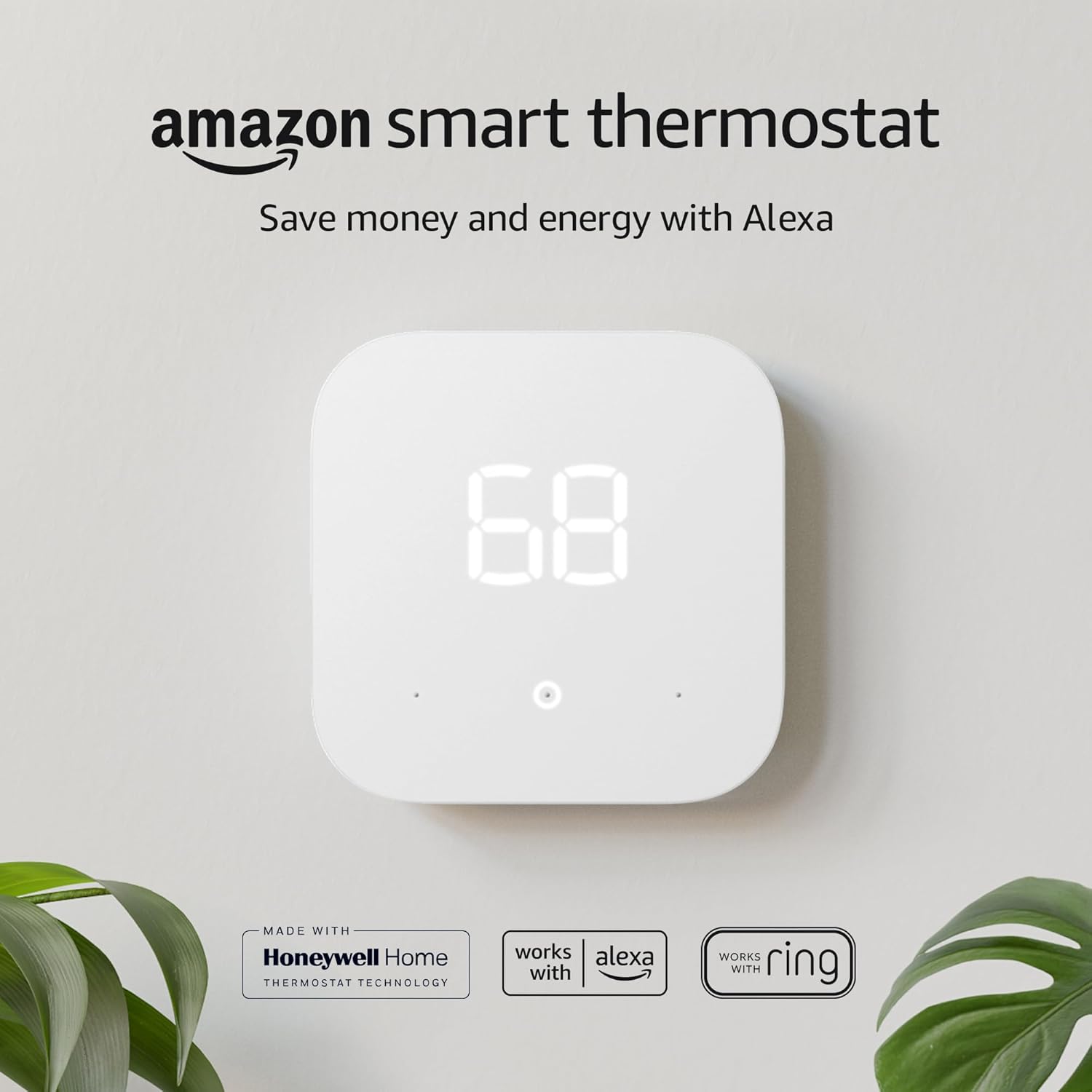
Best Budget Pick: Amazon Smart Thermostat
Perfect for the Alexa ecosystem. Developed with Honeywell technology, providing core smart features at an unbeatable price.
Check Price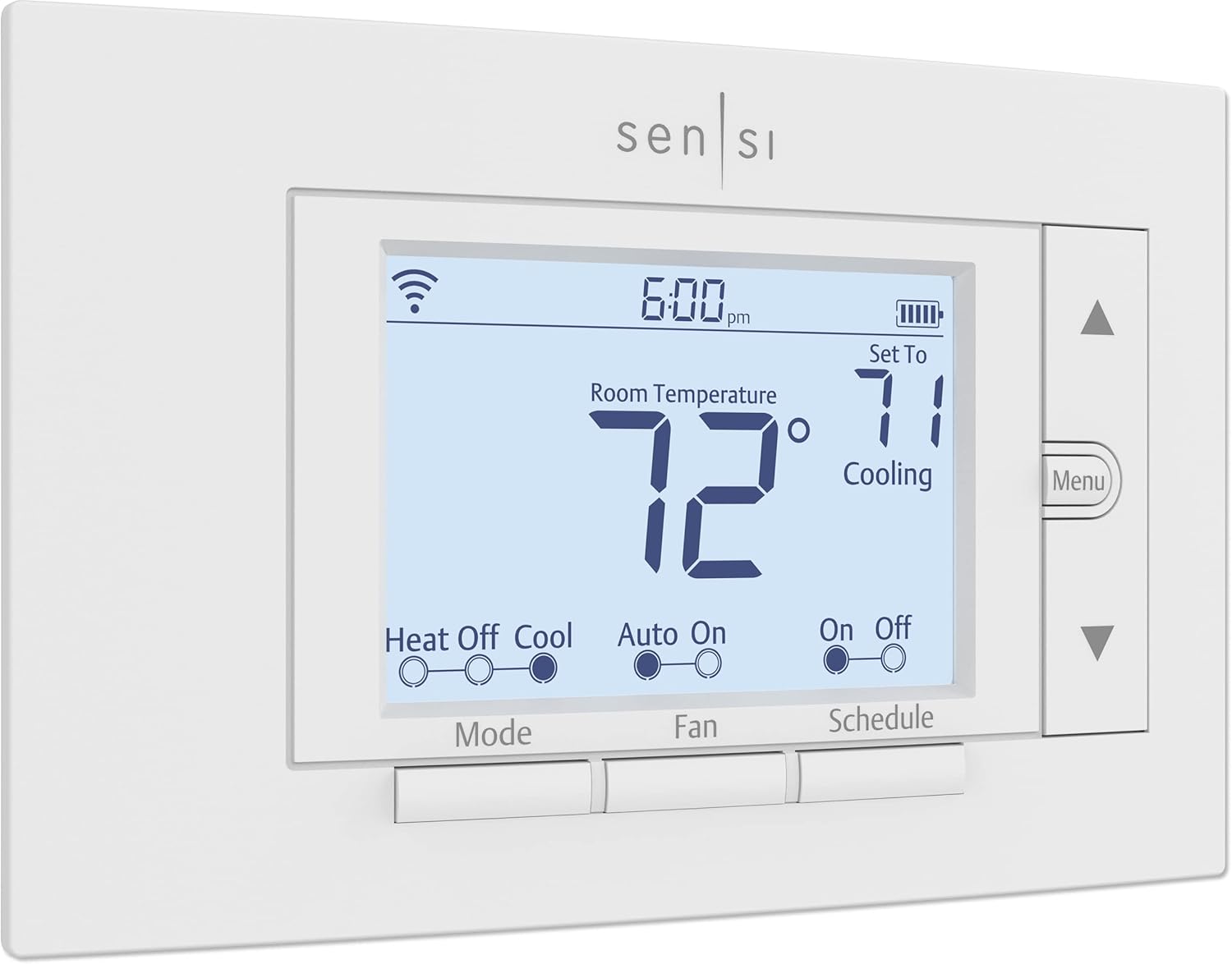
Best All-Around Value: Emerson Sensi
The practical choice. Works with all platforms and often doesn’t require a C-wire, making it perfect for older homes.
Check Price
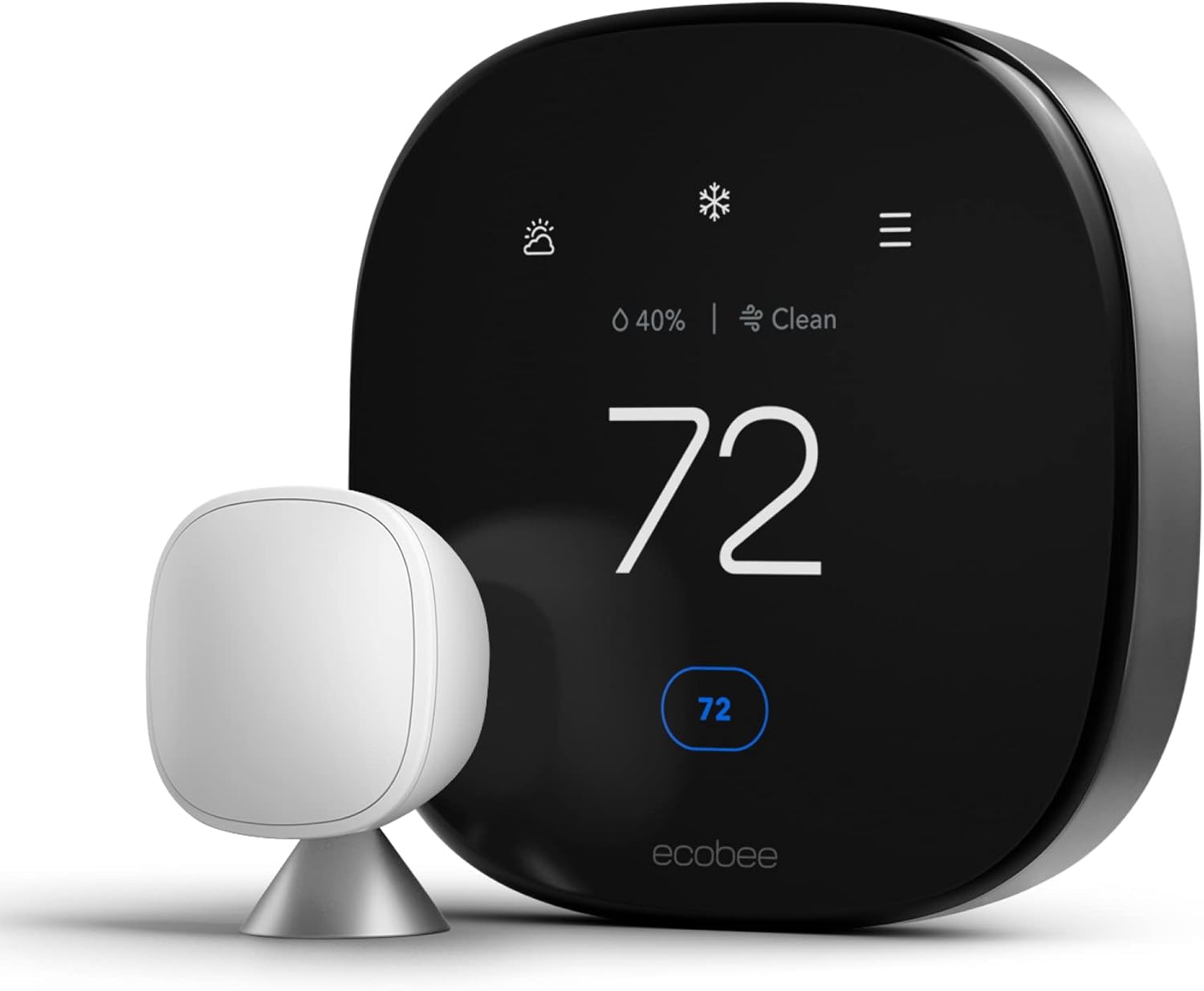
The Premium Choice: Google Nest Learning
The gold standard. It learns your schedule automatically and features the beautiful Farsight display.
Check PriceFrequently Asked Questions
Yes, most people can do it in 30 minutes. Just ensure you turn off the breaker first!
Yes, they function as a standard manual thermostat if the internet goes down.
Most smart thermostats need continuous power to run their display and WiFi radio, so they either need a C-wire or a power-extender-kit workaround. A small number of models are designed to work without one by drawing power more conservatively, but they’re the exception rather than the rule, and compatibility should be confirmed for your specific system before purchase.
Yes, but heat pump compatibility deserves extra attention, particularly around auxiliary/emergency heat configuration. Confirm the specific model explicitly supports your heat pump type, and consider professional installation if you’re not confident configuring aux heat settings correctly.
Any internet-connected device carries some theoretical risk, but major manufacturers push regular security updates and the practical risk is low if you use a strong router password, keep firmware updated, and consider segmenting smart home devices onto a separate network.
Generally not with standard smart thermostats, since ductless mini-splits typically use proprietary controllers rather than the low-voltage wiring standard thermostats expect. Some mini-split manufacturers offer their own WiFi control accessories, and a small number of universal smart controllers claim broader mini-split support, so check compatibility carefully for this system type specifically.
Industry figures generally cite 10-23% off heating and cooling costs, but your actual savings depend heavily on your current habits, climate, and how much of your bill goes to heating and cooling in the first place. Households that weren’t already using a programmable schedule tend to see the largest gains; households that were already diligent may see more modest savings.
Often yes, provided your lease allows it or your landlord approves, since most installations are fully reversible and you can take the thermostat with you when you move. Keep your original thermostat to reinstall before move-out.
No — core scheduling, remote control, and geofencing features are included with the hardware on every major brand. Optional paid tiers exist for extras like extended historical reports, but they aren’t required to get the energy-saving benefits discussed in this guide.
The Final Verdict: A Resounding Yes
It’s one of the few home upgrades that actively pays you back. For the average U.S. homeowner, this isn’t just a gadget; it’s a financial no-brainer.



 Home
Home
 Info
Info
 Compare
 Reviews
 Shop
Shop