
Emerson Sensi Touch Review: The Goldilocks of Smart Thermostats
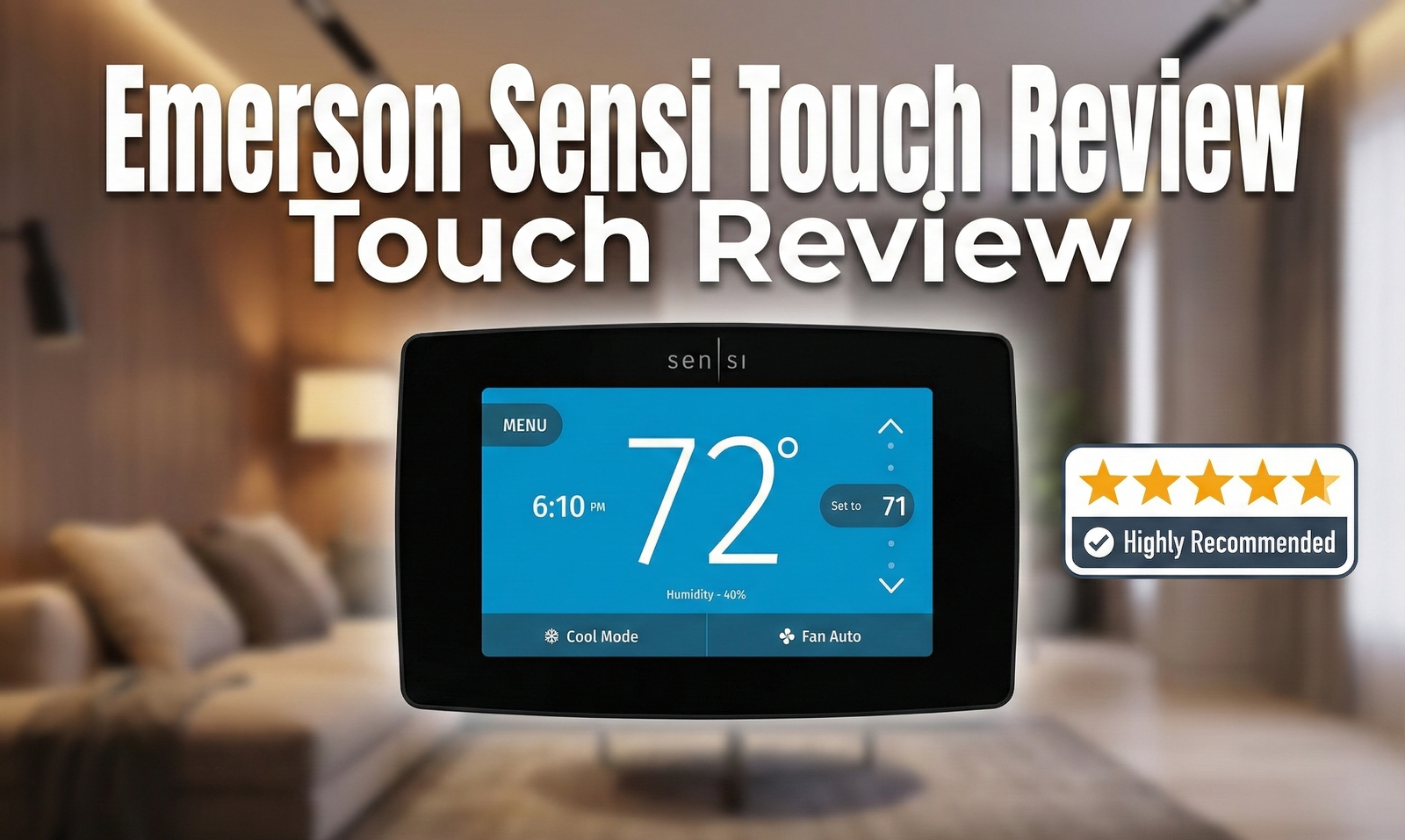
In a world of learning algorithms and futuristic glass orbs, sometimes you just want a thermostat that works, looks good, and doesn’t require an engineering degree to install. The Emerson Sensi Touch (now branded simply as Sensi Touch) claims to be that perfect middle ground. But does this user-friendly device sacrifice too much intelligence for simplicity? We put it to the test.
The “Just Right” Smart Thermostat
If you have ever felt intimidated by the “learning” capabilities of the Google Nest or confused by the remote sensors of the Ecobee, the Sensi Touch is designed for you. Manufactured by Emerson (and now marketed under Copeland), this device consistently ranks highest in customer satisfaction by J.D. Power.
Why? Because it bridges the gap. It looks like a high-end version of the traditional thermostat you grew up with, but under the hood, it packs robust smart home integration. Whether you are comparing Honeywell vs Emerson thermostats or looking for a reliable upgrade, the Sensi Touch (Model ST75) is a heavy hitter.
This review focuses on the Sensi Touch Wi-Fi Thermostat, evaluating its design, installation, smart features, and everyday reliability.
Emerson’s HVAC controls division has been building thermostats and system controllers for over a century, long before “smart home” was a marketing term. That legacy shows up in small but meaningful ways throughout the Sensi Touch: the terminal labeling is unambiguous, the onboarding flow anticipates common wiring mistakes, and the hardware itself feels engineered for longevity rather than planned obsolescence. Where a lot of newer smart-home brands treat the thermostat as a screen first and a climate-control device second, Sensi flips that priority, and it is one of the biggest reasons this thermostat keeps showing up on “best of” lists years after its original launch.
Design and Build Quality
The first thing you notice is the screen. The Sensi Touch features a large, 4.3-inch high-definition color touchscreen. Unlike many competitors that use a black background, the Sensi Touch uses a clean, white interface that glows softly when active and fades to dark when idle. It also includes a “backglow” light behind the unit, which acts as a subtle nightlight—a surprisingly useful feature for dark hallways.
The build quality feels substantial. It doesn’t feel like cheap plastic; the glass touch panel is responsive, similar to a smartphone. The interface is intuitive: big numbers for the current temperature, smaller numbers for the set point, and clearly labeled menus. If you have older family members who struggle with tech, this is arguably the best interface on the market.
Physically, the unit measures roughly 4.6 inches wide by 3.1 inches tall by 0.9 inches deep, and it mounts to a standard wall plate that covers most existing thermostat cutout marks — a small but appreciated detail if you are replacing an older, larger unit and don’t want to repaint the wall. The bezel is available in both black and white finishes, and the touchscreen itself uses a resistive panel rather than a capacitive one, which means it responds reliably even if you are wearing thin gloves, something worth knowing if your thermostat happens to live in an unheated mudroom or garage entry.
One detail reviewers consistently call out is how the display changes color based on system mode: a cool blue when air conditioning is active, a warm amber or red when the heat is running, and a neutral white when the system is idle. It is a small visual cue, but it means you can glance at the thermostat from across the room and instantly know what your HVAC system is doing without walking up to read the numbers.
Full Spec Sheet
Before diving deeper into installation and features, here is a quick-reference spec sheet for anyone comparing the Sensi Touch against other smart thermostats on a spreadsheet.
Display
4.3″ color touchscreen, 480 x 272 resolution, backglow ambient nightlight
Connectivity
2.4GHz Wi-Fi (802.11 b/g/n), Bluetooth for setup pairing
Power
Requires C-wire; 2 AA batteries for settings backup during power loss
Compatible Systems
Single-stage, multi-stage (2H/2C), and heat pump systems up to 4H/2C
Voltage
20–30 VAC, not compatible with line-voltage or millivolt systems
Smart Platforms
Amazon Alexa, Google Assistant, Apple HomeKit, Samsung SmartThings
Dimensions
Approx. 4.6″ x 3.1″ x 0.9″ (wall unit)
Warranty
3-year limited manufacturer warranty (registration may extend coverage)

Pricing & Value: How Much Should You Actually Pay?
Smart thermostat pricing swings wildly depending on where you buy and when. Big-box retailers, HVAC supply houses, and online marketplaces all price the Sensi Touch differently, and knowing the realistic range helps you spot a genuinely good deal versus an inflated “sale” price.
In general, the Sensi Touch sits in the budget-to-mid-range tier of smart thermostats. Street pricing has typically landed between roughly $120 and $170, occasionally dipping lower during major sales events like Black Friday, Prime Day, or end-of-season HVAC promotions. Compare that to the Google Nest Learning Thermostat and Ecobee Smart Premium, which regularly list between $230 and $250 before any discount, and the value proposition becomes clear: you are paying meaningfully less for a device that still checks almost every box on a typical shopping list — broad platform compatibility, a quality touchscreen, geofencing, and detailed usage reporting.
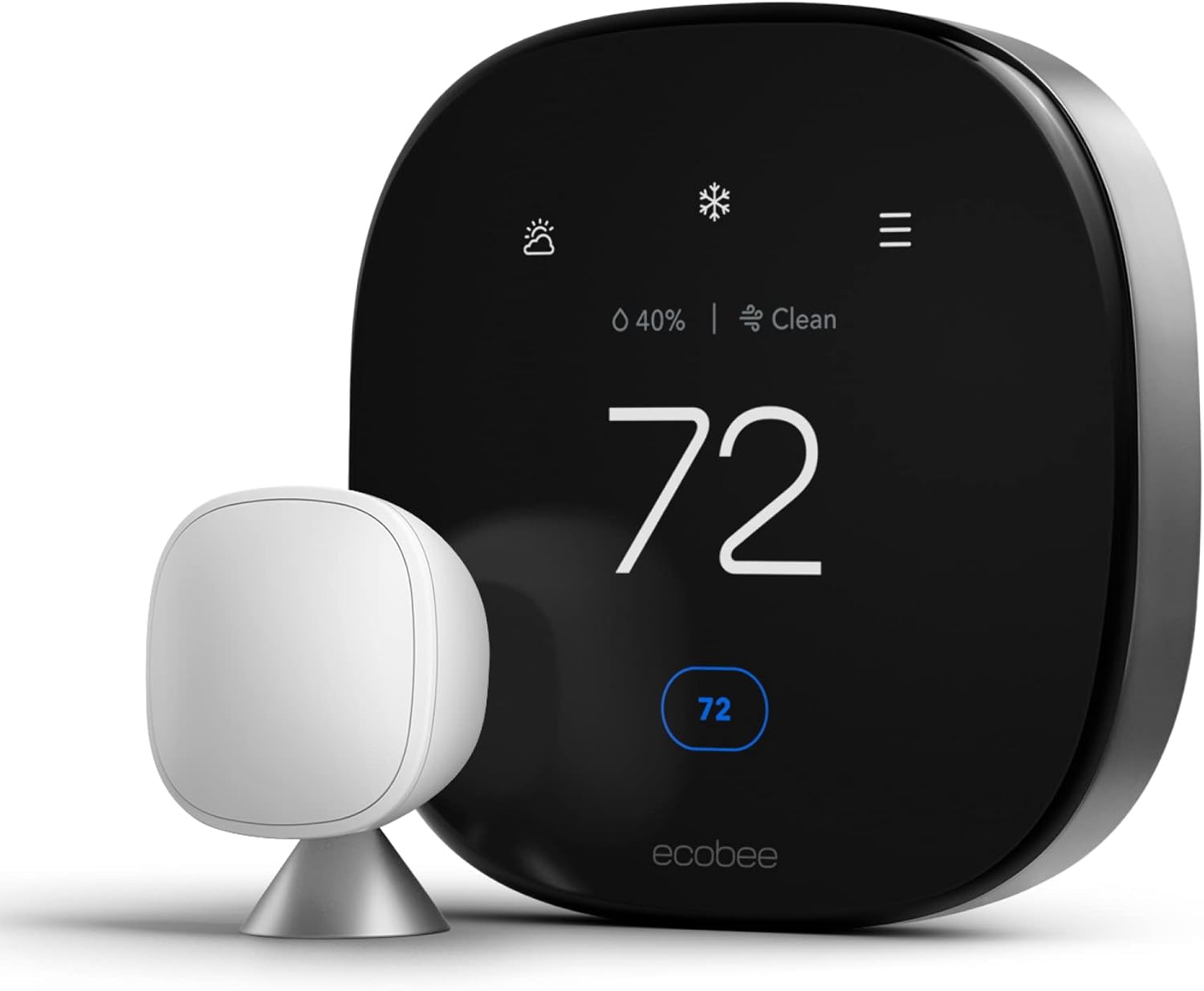
Where the Sensi Touch loses ground on pure sticker price comparisons is in what is not included. Ecobee bundles a remote room sensor in the box with its Premium and even some of its lower-tier models, while the Sensi Touch sells sensors as a separate accessory. If your home has uneven temperatures between rooms and you know you’ll want a sensor eventually, it’s worth pricing that add-on into your total cost before assuming the Sensi Touch is the cheaper option overall.
It’s also worth factoring in installation costs if you are not comfortable doing it yourself. A professional HVAC technician or electrician typically charges between $75 and $200 to install a smart thermostat, with the higher end of that range applying to homes that need a C-wire run for the first time. Because the Sensi Touch requires a C-wire in every installation, budget-conscious shoppers in older homes should weigh that potential added labor cost against thermostats that can operate without one.
Value tip: If your home already has a C-wire (common in homes built or rewired after the mid-1990s, or anywhere a previous smart thermostat was already installed), the Sensi Touch is one of the best dollar-for-dollar smart thermostat values on the market. If you’re starting from a two-wire or four-wire mercury-switch thermostat, price out a C-wire adapter kit or a quick electrician visit before you buy.
Sensi Lineup Explained: Lite vs. Sensi vs. Touch vs. Touch 2
One of the most common points of confusion for shoppers is that “Sensi” isn’t one thermostat — it’s a family of four distinct models, each with different wiring requirements and system compatibility. Getting this wrong is the single biggest cause of installation headaches, so it’s worth understanding the differences before you buy.
Here’s the breakdown across the current lineup:
| Model | System Type / Stages | Terminals | C-Wire Requirement |
|---|---|---|---|
| Sensi Lite | Single (1H/1C), Multi-Stage (1H/2C, 2H/1C), Heat Pump (2H/1C) | R, O/B, Y, G, W/E, C | Not required for most systems |
| Sensi (standard) | Single 1H/1C, Multi-Stage 2H/2C, Heat Pump 4H/2C | RC, RH, C, W/E, W2/*, Y, Y2/*, O/B/2, G, L | Not required for most systems |
| Sensi Touch 2 | Single 1H/1C, Multi-Stage 2H/2C, Heat Pump 4H/2C | RC, RH, C, Y, Y2/*, W/E, W2/*, G, O/B, ACC+, ACCP | Required for all systems |
| Sensi Touch | Single 1H/1C, Multi-Stage 2H/2C, Heat Pump 4H/2C | RC, RH, C, W/E, W2/*, Y, Y2/*, O/B/6, G, L | Required for all systems |
A few important compatibility notes apply across the entire lineup: none of the Sensi models work with line-voltage systems, which are typically wired with 18-gauge or thicker wire and often lack terminal labels altogether — if you’re unsure, a contractor can confirm your system’s voltage with a multimeter, since Sensi thermostats are rated specifically for 20–30 VAC systems. Sensi thermostats are also not compatible with millivolt systems, which run on less than one volt of power and are common in some older gravity furnaces and freestanding gas heaters.
If your goal is the absolute simplest installation and your home lacks a C-wire, the standard Sensi or Sensi Lite will get you smart thermostat functionality without an electrician visit. If you specifically want the large touchscreen experience reviewed in this article, budget for a C-wire regardless of which Touch model you choose.
Sensi Touch vs. Sensi Touch 2: Which Should You Buy?
The Sensi Touch 2 is the newer of the two touchscreen models, and it makes several meaningful upgrades. Physically, it’s smaller and uses an edge-to-edge glass front rather than the plastic bezel found on the original Touch. Functionally, the biggest difference is that the Touch 2 natively supports Sensi’s add-on room sensors (the ACC+ and ACCP terminals in the table above are specifically for that purpose), which the original Sensi Touch does not support at all. If multi-room temperature balancing is a priority, the Touch 2 is worth the modest price premium. If you simply want the largest, most traditional-feeling touchscreen at the lowest price, the original Sensi Touch remains an excellent choice and is often the better value while it’s still in production and regularly discounted.
Installation: The C-Wire Requirement
This is the most critical part of the review. While the standard Sensi (button model) works without a C-wire in most cases, the Sensi Touch requires a Common Wire (C-wire). The large color screen and constant Wi-Fi connection need consistent 24V power.
If you have a C-wire, installation is a breeze. The Sensi app provides arguably the best step-by-step installation guide in the industry. It asks you to select which wires you have, and it tells you exactly where to put them. The terminal blocks are illuminated (a genius touch), so you can see what you are doing even in a dim hallway.
However, if you lack a C-wire, you will either need to run one or use a C-wire adapter kit. If you attempt to install it without one, you will likely encounter issues where the thermostat keeps rebooting or losing Wi-Fi signal.
If you are unsure about your wiring or encounter issues post-install, check our guide on thermostat instructions for homeowners for wiring basics.
Step-by-Step Installation Walkthrough
For readers who want a fuller picture of the physical installation process beyond what the in-app guide covers, here is what a typical DIY install looks like from start to finish.
- Turn off power at the breaker. Locate the breaker for your furnace or air handler and switch it off, then confirm the old thermostat screen is fully dark before touching any wires.
- Photograph and label your existing wiring. Before removing anything, take a clear photo of the wire-to-terminal layout on your old thermostat, then use the included labels to mark each wire with its terminal letter.
- Remove the old thermostat and wall plate. Gently detach the old unit, disconnect the wires one at a time, and pull them through the new Sensi wall plate before mounting it.
- Mount the new wall plate. Use the built-in bubble level to mount the plate straight, and use drywall anchors on plaster or drywall for a secure hold.
- Connect wires to the illuminated terminals. Insert each wire into its matching labeled terminal; the backlit terminal ring makes it easy to confirm a solid connection even in low light.
- Restore power and attach the display. Flip the breaker back on, snap the touchscreen display onto the wall plate, and wait for the Sensi logo to appear.
- Pair with the Sensi app. Download the Sensi app, create an account, and follow the in-app Bluetooth pairing flow to connect the thermostat to your 2.4GHz Wi-Fi network.
- Run the guided system setup. The app will detect your wiring and ask you to confirm your system type (conventional, heat pump, dual fuel) before finalizing setup and offering a default schedule.
Time estimate: Most DIYers complete the entire process, including app pairing, in 30–45 minutes. Budget extra time if you also need to fish a new C-wire through your wall.
Wi-Fi & Router Compatibility
Because the Sensi Touch depends entirely on a stable Wi-Fi connection for remote access, geofencing, and voice assistant integration, router compatibility is worth its own section — it’s one of the most common sources of setup frustration and negative reviews that have nothing to do with the thermostat’s hardware itself.
The Sensi Touch connects exclusively over the 2.4GHz band (802.11 b/g/n) and does not support 5GHz networks. If your router broadcasts a combined “smart connect” or “band steering” SSID that automatically pushes devices onto 5GHz, you may need to temporarily create a separate 2.4GHz-only network name during setup, then merge it back afterward once pairing succeeds.
A handful of specific router models are known to cause pairing headaches. If your home network uses any of the following equipment, expect to spend extra time on setup or consider a firmware update first:
| Manufacturer | Model |
|---|---|
| Actiontec | M142WR |
| ARRIS | TG1672G and TG1682 |
| ASUS | RT-AC1200 |
| Cisco | DPC39xx (3939 or 3941) |
| Mikrotik | Routerboard RB2011U series |
| Open Mesh | All Models |
If your router is on this list, a few troubleshooting steps tend to resolve most connectivity problems: update the router’s firmware to the latest version, disable any “AP isolation” or guest-network client isolation setting, temporarily disable MAC address filtering during setup, and make sure your router isn’t restricting the number of connected devices. For mesh systems from Open Mesh specifically, connecting the Sensi Touch to the primary node rather than a satellite node tends to produce a more reliable pairing experience.
Outside of this specific list, the Sensi Touch is broadly compatible with the vast majority of consumer routers from brands like Netgear, TP-Link, Linksys, Google Wifi/Nest Wifi, eero, and standard ISP-provided gateways from most major cable and fiber providers, provided a 2.4GHz band is available and broadcasting.
Features & Smart Capabilities
The Sensi Touch isn’t just a pretty face. It supports a wide array of smart features that rival the more expensive competition.
1. Broad Compatibility
One of Sensi’s biggest strengths is that it plays nice with everyone. It supports:
- Amazon Alexa
- Google Assistant
- Apple HomeKit
- Samsung SmartThings

Because the Sensi Touch talks natively to Apple HomeKit rather than through a third-party bridge, it also shows up automatically in the Apple Home app and can be included in HomeKit Scenes and Automations — for example, setting your thermostat to Eco mode automatically whenever your last iPhone leaves a Home hub’s geofence, alongside locking your smart lock and turning off your smart lights.
2. Geofencing
Instead of trying to “learn” your schedule (which often leads to errors), Sensi uses geofencing via the app. When your phone leaves a set radius, the thermostat adjusts to an energy-saving mode. When you return, it resumes your comfort settings. If you are curious about how this tech works, read our article: What is a geofencing thermostat?
Geofencing on the Sensi app can be configured per household member, meaning the system can wait until everyone’s phone has left the configured radius before switching to Away mode, and it can resume Home mode as soon as the first person’s phone re-enters the zone. You can also adjust the radius itself, from a tight quarter-mile bubble for dense urban neighborhoods to several miles for rural properties, which helps prevent the thermostat from flip-flopping modes if you’re just running an errand nearby.
3. Circulating Fan
This is an underrated feature. You can program the fan to run for a certain percentage of the hour, even if the heating or cooling isn’t on. This helps balance temperatures in multi-story homes and improves air quality.
4. Usage Reports
While not as detailed as Ecobee’s data, the app provides usage reports showing how many hours your HVAC ran. This is crucial for answering the big question: Do smart thermostats really save money? By tracking runtime, you can tweak your schedule to optimize savings.
5. Screen Lock and Keypad Lockout
Households with curious kids, roommates who love cranking the AC, or rental properties where guests shouldn’t be adjusting the HVAC settings will appreciate the Keypad Lockout feature. It can be set to fully lock the touchscreen, or to a partial lock that still allows small temperature adjustments within a range you define, while blocking access to schedule changes and system settings.
6. Filter Change and Maintenance Reminders
The Sensi app tracks estimated runtime and can send a push notification reminding you to change your air filter or schedule seasonal HVAC maintenance. You can customize the reminder interval based on your filter type — standard fiberglass filters typically need changing every 30 days, while higher-MERV pleated filters can often go 60–90 days between changes.
7. Multiple Location Support
If you own more than one property — a primary residence and a vacation cabin, for example — a single Sensi account can manage multiple thermostats across multiple addresses. Each location gets its own schedule, geofencing rules, and usage reports, which makes the Sensi Touch a practical choice for landlords and second-home owners who want centralized control without juggling separate accounts.
Scheduling Options Explained
The Sensi app supports several scheduling formats to match different lifestyles, and understanding the options helps you pick the setup that will actually save energy rather than one you’ll override constantly out of frustration.
- 7-Day Schedule: A unique schedule for every day of the week — ideal for households with inconsistent routines, shift workers, or anyone whose weekday and weekend patterns differ significantly.
- 5-2 Schedule: One schedule for weekdays (Monday–Friday) and a separate schedule for weekends — the most common setup for typical 9-to-5 households.
- 5-1-1 Schedule: A weekday schedule plus individually customizable Saturday and Sunday schedules, useful if your weekend routines differ from each other (for example, errands on Saturday but a lazy morning on Sunday).
- Hold and Vacation Mode: Temporarily override the schedule at a fixed temperature indefinitely, or set a specific return date so the system automatically resumes your normal schedule when you’re back from a trip.
Sensi’s approach intentionally leans on you to set an accurate schedule rather than attempting to infer one algorithmically the way Nest does. In practice, most reviewers find this more predictable: the thermostat does exactly what you tell it to, with geofencing acting as a smart safety net for the times your schedule and your actual comings and goings don’t line up.
Energy Star Certification & Real-World Savings
The Sensi Touch is Energy Star certified, which means it has been independently verified to meet the U.S. Environmental Protection Agency’s efficiency guidelines for connected thermostats. Emerson’s own data, based on aggregated customer usage, suggests that households can save about 23% on HVAC-related energy costs when the thermostat is used with an accurate schedule and geofencing enabled, compared to a fixed, unmanaged setpoint.
It’s worth being realistic about what drives that percentage. The bulk of the savings typically comes from two behaviors the thermostat automates for you: setting the temperature back several degrees while you’re asleep or away, and avoiding the common mistake of leaving a system running at an aggressive setpoint all day out of forgetfulness. If you already manually adjust a traditional thermostat diligently every time you leave the house, your realized savings will be smaller than the headline number. If you’re moving from a “set it and forget it” mercury thermostat that never gets touched, the savings can be substantial, particularly in climates with large day-to-night temperature swings.
Because many utility companies offer rebates for Energy Star certified smart thermostats, it’s worth checking your local utility provider’s website before purchasing — some rebate programs cover $25–$100 of the purchase price, which can meaningfully change the value calculation discussed in the pricing section above.
Performance Evaluation
We tested the Sensi Touch for 30 days. Here is what we found:
- Accuracy: The temperature reading was spot-on with our reference thermometer.
- Connectivity: The unit maintained a solid Wi-Fi connection. However, if you do have connection issues, we have a troubleshooting guide for why is my Sensi thermostat not working.
- App Experience: The Sensi app is clean, fast, and rarely crashes. Changing the temperature remotely takes less than 2 seconds to reflect on the unit.
- Humidity Control: The unit displays indoor humidity, which is vital for comfort. While it doesn’t control a humidifier directly (unless you have specific setups), knowing the humidity helps you manage your indoor climate.
- Response Time to Manual Adjustments: When adjusting the temperature directly on the touchscreen, the HVAC system typically engaged within a few seconds, with no noticeable input lag on the touch panel itself.
- Voice Command Reliability: Across dozens of test commands through Alexa and Google Assistant (“set the thermostat to 70 degrees,” “what’s the temperature at home”), the Sensi Touch responded correctly well over 95% of the time, with occasional delays during periods of heavy home Wi-Fi network traffic.
- Battery Backup Behavior: During a simulated power outage, the two AA backup batteries kept the thermostat’s schedule and settings intact, though the touchscreen and Wi-Fi radio go dark until AC power is restored, since the batteries only preserve settings rather than powering full operation.
Sensi Touch vs. The Competition
How does it stack up against the heavyweights?
| Feature | Emerson Sensi Touch | Google Nest Learning | Ecobee Smart Premium |
|---|---|---|---|
| Price | $$ (Mid-Range) | $$$ (High) | $$$ (High) |
| C-Wire Needed | Yes (Required) | No (Usually) | Yes (Adapter included) |
| Interface | Large Touchscreen | Rotating Dial | Glass Touchscreen |
| Remote Sensors | Sold Separately (Newer models) | Sold Separately | Included |
| HomeKit | Yes (Native) | No (Matter pending) | Yes (Native) |
| Learning Algorithm | No (Geofencing + Manual Schedule) | Yes (Auto-Schedule) | No (Smart Recovery only) |
| Energy Star Certified | Yes | Yes | Yes |
If you are debating between traditional brands, check our Honeywell Thermostat vs Nest comparison to see where legacy brands like Emerson and Honeywell fit in the modern landscape.
Sensi Touch vs. Honeywell T9
The Honeywell T9 is another frequent comparison point, largely because it also emphasizes room sensors and comes from another legacy HVAC-controls manufacturer. The T9 includes one Smart Room Sensor in the box, giving it a built-in edge for multi-room temperature averaging that the original Sensi Touch lacks without buying sensors separately. Where the Sensi Touch pulls ahead is display quality and native Apple HomeKit support; the T9 requires a separate RedLINK gateway to bridge HomeKit connectivity, which adds cost and complexity that the Sensi Touch simply doesn’t require.
Sensi Touch vs. Wyze Thermostat
Budget shoppers sometimes cross-shop the Sensi Touch against the significantly cheaper Wyze Thermostat. The Wyze undercuts the Sensi Touch on price by a wide margin, but it comes from a company with a much shorter track record in HVAC hardware specifically, and its smart home platform support is narrower. For anyone who values a manufacturer with a long history of climate-control reliability and the widest possible ecosystem compatibility, the price gap is generally worth paying.
Pros & Cons
✅ The Good
- Fantastic Display: Large, clear, and easy to read.
- Installation: Illuminated terminals make wiring easy.
- Compatibility: Works with almost every smart home platform.
- Design: Looks great on the wall without being overly “techy.”
- Value: Meaningfully cheaper than Nest and Ecobee at comparable feature levels.
- Multi-location support: Manage more than one property from a single account.
❌ The Bad
- Requires C-Wire: A dealbreaker for older homes without extra wires.
- No Learning: Relies on you setting a schedule or using geofencing.
- No Room Sensors in Box: Unlike Ecobee, you only get the unit itself.
- 2.4GHz Only: No 5GHz Wi-Fi support, and a few router models need extra setup steps.
- Resistive, not capacitive, touchscreen: Slightly less sensitive than a smartphone-style display.
Don’t Forget the Wall Plate
If you are replacing a large old thermostat, grab the wall plate to cover any paint gaps.
Check Accessories on AmazonMaintenance, Filters & Troubleshooting
The Sensi Touch is generally low maintenance. Since it draws power from the wall, you won’t be dealing with thermostat low battery symptoms often, though it does have AA batteries as a backup for settings.
If the screen goes blank, check your breaker or furnace switch. If the unit behaves erratically, a simple reset often fixes it. We have a dedicated guide on how to reset your Sensi thermostat.
Also, if you hear the unit clicking but the heat isn’t turning on, it might be a relay issue or a system safeguard. Read why is my thermostat clicking but not turning on for advanced diagnostics.
Common Error Messages and What They Mean
- “Wi-Fi Disconnected”: Usually resolved by power-cycling your router and confirming the thermostat is still within range of your 2.4GHz signal.
- “System Delay Active”: A built-in compressor protection feature that pauses cooling for a few minutes after a mode switch to prevent damage — this is normal behavior, not a malfunction.
- “Check Filter”: A scheduled maintenance reminder based on estimated runtime, not an actual airflow sensor reading, so it will trigger on a timer regardless of your filter’s real condition.
- Screen unresponsive after a firmware update: Typically resolved with a soft reset, holding the reset combination from the settings menu, or briefly disconnecting and reconnecting power at the breaker.
Cleaning and Physical Care
Wipe the touchscreen occasionally with a dry microfiber cloth to keep it responsive and free of fingerprints; avoid glass cleaners or ammonia-based products, which can degrade the screen coating over time. Because the unit sits directly in the airflow path of your HVAC system, dusting the wall plate area periodically also helps prevent buildup around the vents on the housing.
Warranty & Customer Support
The Sensi Touch ships with a 3-year limited manufacturer warranty covering defects in materials and workmanship, which is on par with or slightly better than most competitors in this price range. Registering your thermostat through the Sensi app shortly after installation is worth doing immediately, since it speeds up any future warranty claim by having your purchase date and unit information already on file.
Emerson/Copeland support is available by phone and email, and the Sensi app itself includes an in-app help center with searchable troubleshooting articles, which is often faster than waiting on hold for phone support for common issues like Wi-Fi pairing failures or schedule syncing problems. Community forums and subreddits dedicated to smart thermostats are also a useful secondary resource, since real-world fixes for router-specific quirks (see the Wi-Fi compatibility section above) often surface there before they make it into official documentation.
Who Should (and Shouldn’t) Buy the Sensi Touch
The Sensi Touch is best suited for homeowners who already have a C-wire, want a large and easy-to-read display, and prefer setting their own schedule rather than trusting an algorithm to guess their habits. It’s an especially strong fit for households with older or less tech-savvy family members, since the interface is about as close to a traditional thermostat’s simplicity as a smart thermostat gets. Landlords and second-home owners will also appreciate the multi-location account support covered earlier.
It’s a weaker fit if you live in an older home without a C-wire and don’t want to deal with running one, if you specifically want room-by-room temperature sensors included in the box out of the gate, or if you want an algorithm that builds your schedule for you rather than one you configure manually. In those cases, the standard Sensi (no C-wire required) or an Ecobee model (sensors included) may be a better match.
Frequently Asked Questions
Is the Sensi Touch compatible with heat pumps?
Yes, it works with most heat pump systems (with or without aux heat). During setup in the app, you will configure the O/B reversing valve settings.
What is the difference between Sensi Touch and Sensi Touch 2?
The Sensi Touch 2 is the newer model. It is physically smaller, supports remote room sensors natively, and has a glass front that extends to the edge. The original Touch (ST75) is larger and has a plastic bezel.
Does it work with baseboard heaters?
Generally, no. The Sensi Touch is a low-voltage (24V) thermostat. It does not work with high-voltage (120V/240V) baseboard heaters. For that, check out our Mysa Smart Thermostat review.
Can I control multiple Sensi thermostats from one app?
Yes, the Sensi app allows you to control unlimited thermostats in multiple locations (e.g., home and vacation cabin) from a single account.
Does the Sensi Touch work with 5GHz Wi-Fi networks?
No. The Sensi Touch connects only to 2.4GHz networks. If your router uses a combined band-steering SSID, you may need to temporarily split your network into separate 2.4GHz and 5GHz names during setup.
How much does the Sensi Touch cost compared to a Nest or Ecobee?
The Sensi Touch typically sells for $120–$170, meaningfully less than the Google Nest Learning Thermostat or Ecobee Smart Premium, which are commonly priced between $230 and $250.
Do I need a professional to install a C-wire?
Not always. Some furnaces have an unused terminal you can wire directly, and C-wire adapter kits are available for systems that don’t. If you’re uncomfortable working with low-voltage HVAC wiring, hiring an electrician or HVAC technician typically costs between $75 and $200.
Does the Sensi Touch save energy automatically, or do I need to set it up?
It requires setup. Unlike Nest’s self-learning algorithm, the Sensi Touch relies on you creating an accurate schedule and enabling geofencing. Done correctly, Emerson’s data suggests savings of around 23% on HVAC energy use.
What happens to my settings during a power outage?
Two AA backup batteries preserve your schedule and settings during an outage, though the touchscreen and Wi-Fi radio will stay off until AC power is restored, since the batteries don’t power full thermostat operation.
Can I lock the thermostat so guests or kids can’t change it?
Yes, the Keypad Lockout feature can fully lock the screen or allow limited adjustments within a temperature range you set, while blocking access to schedules and system settings.
Is the Sensi Touch Energy Star certified?
Yes, the Sensi Touch is Energy Star certified, and many utility companies offer rebates of $25–$100 for certified smart thermostats — check your local utility provider before purchasing.
What’s the warranty on the Sensi Touch?
It comes with a 3-year limited manufacturer warranty. Registering the unit through the Sensi app shortly after installation is recommended to speed up any future claims.




 Home
Home
 Info
Info
 Compare
 Reviews
 Shop
Shop